# Maple Documentation > Every Maple doc, concatenated. Source: https://maple.dev/docs # Introduction > Getting Started · https://maple.dev/docs/getting-started/introduction What Maple is, what it includes, and how to send your first telemetry. Maple is an observability platform built on OpenTelemetry. Your applications send traces, logs and metrics over OTLP, the protocol every OpenTelemetry SDK already speaks, and Maple stores them and lets you query, chart and alert on them. There is no proprietary agent to install.
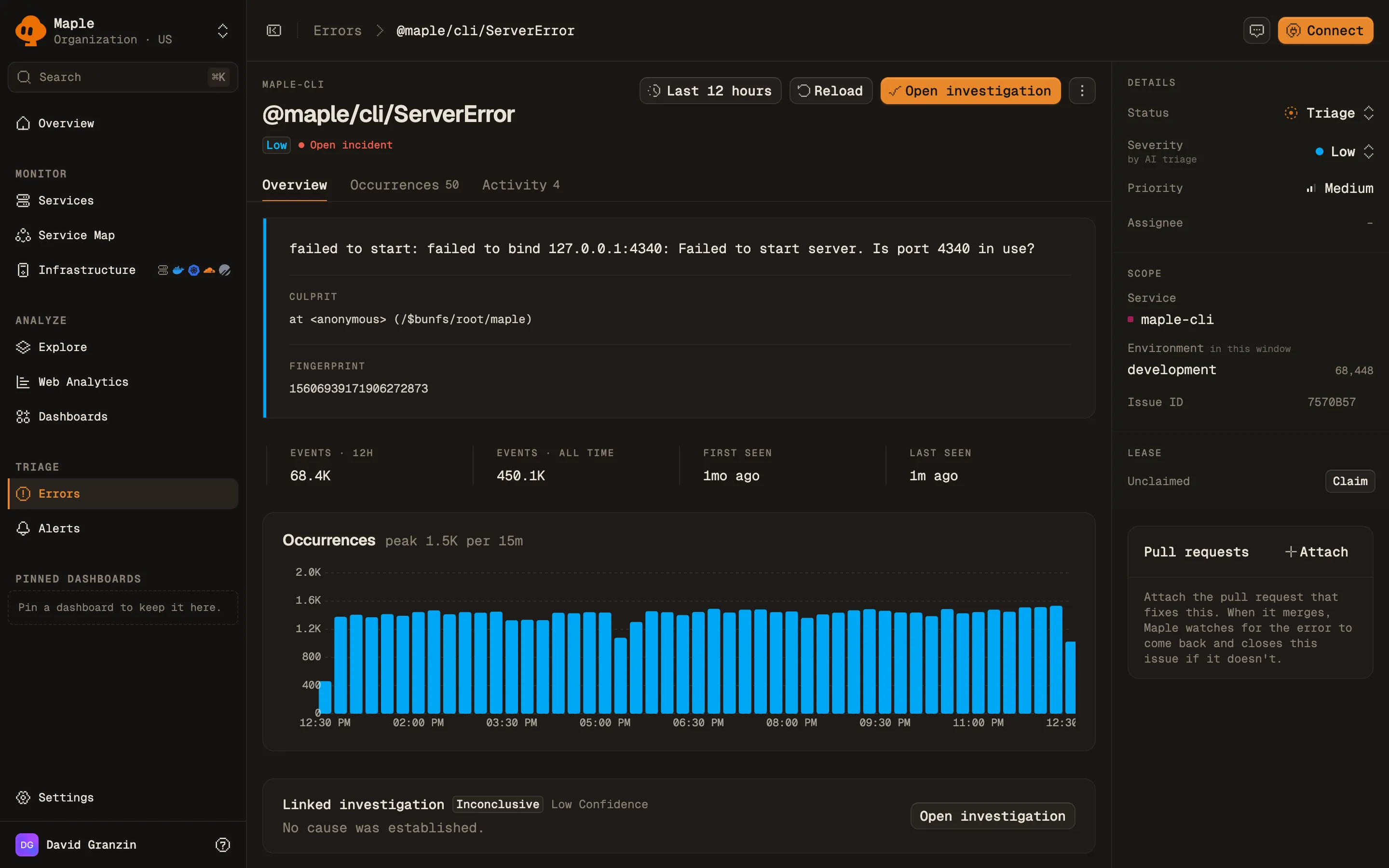
Maple's Overview page for a production environment over the last 24 hours: an All clear alert strip, service health counts, totals for logs, traces, metrics and data size, and request volume and error rate charts.
The Overview page: service health, signal totals, and request volume at a glance.
## What's in Maple - [Traces](/docs/explore/traces): search spans and open a trace to see every span in it. - [Logs](/docs/explore/logs): search logs and jump from a log line to the trace that produced it. - [Metrics](/docs/explore/metrics): browse and chart the metrics your services export. - [Services](/docs/explore/services): throughput, error rate and latency per service. - [Service map](/docs/explore/service-map): the calls between your services, built from trace data. - [Errors](/docs/errors/overview): exceptions grouped into issues that you can assign and track to done. - [Alerts](/docs/alerting/alert-rules): rules on any signal, with notifications to your destinations. - [Dashboards](/docs/dashboards/build-dashboards): charts and tables built from queries. - [Replays](/docs/session-replay/replays): recordings of browser sessions, linked to their traces. - [Web analytics](/docs/product-events/web-analytics): page views and visitors from the browser SDK. - [Agent Sessions](/docs/agent-sessions/overview): AI agent conversations, with every model call and tool call. - Infrastructure: [Hosts](/docs/infrastructure/hosts), [Kubernetes](/docs/infrastructure/kubernetes), [Containers](/docs/infrastructure/docker), [Cloudflare](/docs/integrations/cloudflare), [Google Cloud](/docs/integrations/gcp) and [PlanetScale](/docs/integrations/planetscale). ## Getting started For a copy-paste walkthrough, including a curl command that sends a test span without an SDK, follow the [Quickstart](/docs/getting-started/quickstart). The short version: 1. Sign up at [app.maple.dev](https://app.maple.dev). During onboarding you pick the region your organization lives in (US or EU). 2. Open **Settings → Ingestion** and copy an ingest key. Use the private key (`maple_sk_…`) for server applications and the public key (`maple_pk_…`) for browser code. 3. Point an OpenTelemetry SDK at the ingest endpoint for your region: | Region | Ingest endpoint | | -------------- | ----------------------------- | | United States | `https://ingest.maple.dev` | | European Union | `https://ingest.eu.maple.dev` | A key only works in the region it was created in. See [Regions](/docs/reference/regions). 4. Send a request to your application, then open **Explore → Traces** in Maple and check that a trace for it appears. With the standard OpenTelemetry environment variables, step 3 looks like this: ```bash export OTEL_EXPORTER_OTLP_ENDPOINT="https://ingest.maple.dev" # EU: https://ingest.eu.maple.dev export OTEL_EXPORTER_OTLP_PROTOCOL="http/protobuf" export OTEL_EXPORTER_OTLP_HEADERS="Authorization=Bearer YOUR_INGEST_KEY" export OTEL_SERVICE_NAME="my-service" ``` If you use a coding agent, the [maple-onboard](https://github.com/MapleTechLabs/maple/tree/main/skills/maple-onboard) skill instruments a repository for you, and [maple-audit](https://github.com/MapleTechLabs/maple/tree/main/skills/maple-audit) checks an existing OpenTelemetry setup against Maple's conventions. ## Language guides - [Effect SDK](/docs/sdks/effect): Maple's SDK for Effect applications - [Node.js](/docs/guides/instrumentation-nodejs): Express, Fastify, Hono - [Next.js](/docs/guides/instrumentation-nextjs): App Router, Pages Router, middleware - [Python](/docs/guides/instrumentation-python): FastAPI, Django, Flask - [Go](/docs/guides/instrumentation-go) - [Rust](/docs/guides/instrumentation-rust): through the `tracing` crate - [Java](/docs/guides/instrumentation-java): the OpenTelemetry Java agent - [C# / .NET](/docs/guides/instrumentation-csharp) - [Kotlin](/docs/guides/instrumentation-kotlin): Ktor and Spring Boot - [Laravel](/docs/guides/instrumentation-laravel): Eloquent, queues, HTTP client The attributes Maple reads for the service map, error grouping and throughput are listed in [OpenTelemetry conventions](/docs/concepts/otel-conventions). ## Next steps - [Quickstart](/docs/getting-started/quickstart): your first trace in about five minutes. - [Instrument your application](/docs/instrumentation): every language and framework guide. - [OpenTelemetry conventions](/docs/concepts/otel-conventions): the attributes Maple reads. --- # Quickstart > Getting Started · https://maple.dev/docs/getting-started/quickstart Send your first trace to Maple in about five minutes, from your own stack or with a single curl request. import LanguageTabs from "../../../components/docs/LanguageTabs.astro" import LanguageTab from "../../../components/docs/LanguageTab.astro" You need a Maple account and either an app to instrument or a terminal with `curl`. ## 1. Sign up and pick a region Sign up at [app.maple.dev](https://app.maple.dev). During onboarding you pick the region your organization lives in, US or EU. The region cannot be changed later, and each region has its own ingest endpoint: | Region | Ingest endpoint | | -------------- | ----------------------------- | | United States | `https://ingest.maple.dev` | | European Union | `https://ingest.eu.maple.dev` | ## 2. Copy your ingest key Open **Settings → Ingestion** and copy the private key (`maple_sk_…`). It is for servers and scripts. The public key (`maple_pk_…`) is for browser code. Both can only send telemetry. See [Authentication](/docs/reference/authentication#ingest-keys). ## 3. Set the exporter variables Every OpenTelemetry SDK reads these standard variables: ```bash export OTEL_EXPORTER_OTLP_ENDPOINT="https://ingest.maple.dev" # EU: https://ingest.eu.maple.dev export OTEL_EXPORTER_OTLP_HEADERS="Authorization=Bearer YOUR_INGEST_KEY" export OTEL_EXPORTER_OTLP_PROTOCOL="http/protobuf" export OTEL_SERVICE_NAME="quickstart" ``` The endpoint is the base URL. Exporters append `/v1/traces`, `/v1/logs` and `/v1/metrics` themselves. ## 4. Send a trace Pick your stack. Each setup reads the variables from step 3, so run it in the same shell. Install the auto-instrumentations package and start your app through its `register` entry point. No code changes: ```bash npm install @opentelemetry/api @opentelemetry/auto-instrumentations-node node --require @opentelemetry/auto-instrumentations-node/register app.js ``` Send a request to your app. Each incoming HTTP request becomes a trace, with child spans for outgoing calls and database queries. For ES module apps and the full setup with logs and metrics, see the [Node.js guide](/docs/guides/instrumentation-nodejs). Install `@vercel/otel`: ```bash npm install @vercel/otel @opentelemetry/api ``` Create `instrumentation.ts` in the project root (or `src/instrumentation.ts` if your code lives in `src/`). With no exporter passed, `@vercel/otel` reads the endpoint and headers from the variables: ```typescript // instrumentation.ts import { registerOTel } from "@vercel/otel" export function register() { registerOTel({ serviceName: "quickstart" }) } ``` Start the dev server with `npm run dev` and open a page. Each request becomes a trace with spans for rendering, route handlers and server `fetch()` calls. On Next.js 13.4 and 14, enable the instrumentation hook first; see the [Next.js guide](/docs/guides/instrumentation-nextjs), which also covers logs and metrics. Install the distro and the HTTP exporter, then let `opentelemetry-bootstrap` add the instrumentation packages for the libraries you already use: ```bash pip install opentelemetry-distro opentelemetry-exporter-otlp-proto-http opentelemetry-bootstrap -a install ``` Start your app through the `opentelemetry-instrument` wrapper. No code changes: ```bash opentelemetry-instrument python app.py # or: opentelemetry-instrument uvicorn main:app ``` Send a request to your app. FastAPI, Django, Flask and the common HTTP and database clients are traced automatically. Keep `OTEL_EXPORTER_OTLP_PROTOCOL` from step 3: the distro defaults to gRPC, which Maple does not accept. The wrapper does not work with `uvicorn --reload`. For logs, metrics and a setup in code, see the [Python guide](/docs/guides/instrumentation-python). Go has no zero-code agent, so add the SDK and wrap your HTTP handler: ```bash go get go.opentelemetry.io/otel \ go.opentelemetry.io/otel/sdk \ go.opentelemetry.io/otel/exporters/otlp/otlptrace/otlptracehttp \ go.opentelemetry.io/contrib/instrumentation/net/http/otelhttp ``` ```go package main import ( "context" "log" "net/http" "go.opentelemetry.io/contrib/instrumentation/net/http/otelhttp" "go.opentelemetry.io/otel" "go.opentelemetry.io/otel/exporters/otlp/otlptrace/otlptracehttp" sdktrace "go.opentelemetry.io/otel/sdk/trace" ) func main() { ctx := context.Background() // Reads OTEL_EXPORTER_OTLP_ENDPOINT and OTEL_EXPORTER_OTLP_HEADERS. // A setup error only disables tracing; it never stops the app. if exporter, err := otlptracehttp.New(ctx); err != nil { log.Printf("telemetry disabled: %v", err) } else { tp := sdktrace.NewTracerProvider(sdktrace.WithBatcher(exporter)) defer tp.Shutdown(ctx) otel.SetTracerProvider(tp) } mux := http.NewServeMux() mux.HandleFunc("GET /hello", func(w http.ResponseWriter, r *http.Request) { w.Write([]byte("hello")) }) log.Fatal(http.ListenAndServe(":8080", otelhttp.NewHandler(mux, "server"))) } ``` Run it with `go run .` and call `curl localhost:8080/hello`. Each request becomes a server span, named after `OTEL_SERVICE_NAME`. For logs, metrics, gRPC and `database/sql`, see the [Go guide](/docs/guides/instrumentation-go). Download the OpenTelemetry Java agent and attach it when you start your app. No code changes: ```bash curl -L -o opentelemetry-javaagent.jar \ https://github.com/open-telemetry/opentelemetry-java-instrumentation/releases/latest/download/opentelemetry-javaagent.jar java -javaagent:opentelemetry-javaagent.jar -jar app.jar ``` Send a request to your app. The agent instruments Spring, servlet containers, JDBC, HTTP clients and most other popular libraries, and exports traces, metrics and logs. It works the same for Kotlin and any other JVM app. See the [Java guide](/docs/guides/instrumentation-java) or the [Kotlin guide](/docs/guides/instrumentation-kotlin). Add the hosting extension, the OTLP exporter and ASP.NET Core instrumentation: ```bash dotnet add package OpenTelemetry.Extensions.Hosting dotnet add package OpenTelemetry.Exporter.OpenTelemetryProtocol dotnet add package OpenTelemetry.Instrumentation.AspNetCore ``` Register OpenTelemetry in `Program.cs`. `UseOtlpExporter()` reads the endpoint, protocol and headers from the variables: ```csharp using OpenTelemetry; using OpenTelemetry.Trace; var builder = WebApplication.CreateBuilder(args); builder.Services.AddOpenTelemetry() .WithTracing(tracing => tracing.AddAspNetCoreInstrumentation()) .UseOtlpExporter(); var app = builder.Build(); app.MapGet("/", () => "Hello!"); app.Run(); ``` Start it with `dotnet run` and send a request. Each request becomes a server span. For `HttpClient`, Entity Framework, logs and metrics, see the [.NET guide](/docs/guides/instrumentation-csharp). Install the Laravel OpenTelemetry package: ```bash composer require keepsuit/laravel-opentelemetry ``` Laravel reads its configuration from `.env`, so put the values from step 3 there instead of exporting them: ```env # .env OTEL_SERVICE_NAME=quickstart OTEL_EXPORTER_OTLP_ENDPOINT=https://ingest.maple.dev OTEL_EXPORTER_OTLP_PROTOCOL=http/protobuf OTEL_EXPORTER_OTLP_HEADERS="Authorization=Bearer YOUR_INGEST_KEY" ``` Send a request to your app. Each request becomes a trace with spans for database queries, Redis commands and `Http` facade calls. If protobuf export fails in your environment, set `OTEL_EXPORTER_OTLP_PROTOCOL=http/json`. For queues, logs and metrics, see the [Laravel guide](/docs/guides/instrumentation-laravel). Install Maple's Effect SDK: ```bash npm install @maple-dev/effect-sdk effect ``` The SDK takes the key from `MAPLE_INGEST_KEY` rather than the OTLP headers variable, and uses `OTEL_EXPORTER_OTLP_ENDPOINT` from step 3 for the region: ```bash export MAPLE_INGEST_KEY="YOUR_INGEST_KEY" ``` Provide the layer to your program: ```typescript import { Maple } from "@maple-dev/effect-sdk" import { Effect } from "effect" const program = Effect.gen(function* () { yield* Effect.log("Hello from Effect!") }).pipe(Effect.withSpan("hello-maple")) Effect.runPromise(program.pipe(Effect.provide(Maple.layer({ serviceName: "quickstart" })))) ``` Run it once. The `hello-maple` span and its log line reach Maple together. For Effect 3, browsers and Cloudflare Workers, see the [Effect SDK](/docs/sdks/effect). To check the key and endpoint before touching your app, post one span as OTLP JSON. No SDK needed: ```bash NOW=$(date +%s) curl -i "${OTEL_EXPORTER_OTLP_ENDPOINT}/v1/traces" \ -H "Authorization: Bearer YOUR_INGEST_KEY" \ -H "Content-Type: application/json" \ -d '{ "resourceSpans": [{ "resource": { "attributes": [{ "key": "service.name", "value": { "stringValue": "quickstart" } }] }, "scopeSpans": [{ "spans": [{ "traceId": "5b8efff798038103d269b633813fc60c", "spanId": "eee19b7ec3c1b174", "name": "GET /hello", "kind": 2, "startTimeUnixNano": "'"${NOW}"'000000000", "endTimeUnixNano": "'"${NOW}"'250000000", "status": { "code": 1 } }] }] }] }' ``` A `200` response means Maple accepted the span. Change the `traceId` to send another trace with the same command. Rust, Kotlin and other stacks have their own guides under [Instrument your application](/docs/instrumentation). The variables from step 3 stay the same. ## 5. Verify Open **Explore → Traces** and filter **Service** to `quickstart` (or your `OTEL_SERVICE_NAME`). The trace appears within about a minute. Click it to see its spans. ## Troubleshooting - **`401` from the ingest endpoint.** The key is wrong, or it belongs to the other region. A US key is rejected by `ingest.eu.maple.dev` and the other way around. See [Regions](/docs/reference/regions). - **Nothing shows up.** Maple accepts OTLP over HTTP only. An exporter set to `grpc` or pointed at port `4317` cannot reach it; use `http/protobuf` and the endpoint without a port. Set `OTEL_LOG_LEVEL=debug` to print export errors. - **The trace is there, but under a name like `unknown_service`.** `OTEL_SERVICE_NAME` was not set in the shell (or `.env`) that started the app, so the SDK fell back to a default `service.name`. - **Still nothing.** Check the time range on the Traces page. For the curl span, your machine's clock sets the timestamp. More status codes and their meaning are in the [Ingest API reference](/docs/reference/ingest#status-codes). ## Next steps - [Instrument your application](/docs/instrumentation): full guides per language, with logs and metrics. - [Traces](/docs/explore/traces): search, filter and open traces. - [Service map](/docs/explore/service-map): see calls between services once two of them are instrumented. - [Alert rules](/docs/alerting/alert-rules): get notified when error rate or latency crosses a threshold. --- # Use Maple with AI agents > Getting Started · https://maple.dev/docs/getting-started/ai-agents Connect Claude Code, Cursor, Windsurf or any MCP client to Maple, then let the agent debug production errors, chase latency, build dashboards, set up alerts and instrument your code. Your coding agent can work with Maple directly. Connected to the [Maple MCP server](/docs/reference/mcp), it reads the same traces, logs, metrics and error issues you see in the dashboard, and it can act on them: triage an issue, build a dashboard, create an alert rule. Paired with the [GitHub integration](/docs/integrations/github), it can go from an exception to the line of code that raised it. There are three ways agents fit in: - **Query and operate Maple** through the MCP server. This page covers it. - **Instrument your code** with the `maple-onboard` and `maple-audit` skills. See [Instrument with a coding agent](#instrument-with-a-coding-agent). - **Monitor your own AI agents** in [Agent Sessions](/docs/agent-sessions/overview). ## Connect your agent Open **Settings → MCP** in Maple. It shows the endpoint for your organization's region and a ready-made configuration for Claude Code, Cursor, Windsurf and other clients. | Region | Endpoint | | ------ | ------------------------------ | | US | `https://api.maple.dev/mcp` | | EU | `https://api.eu.maple.dev/mcp` | **With OAuth (recommended).** Add the endpoint URL to your client. On first use it opens Maple in your browser, you pick a workspace and approve access. No key to copy or rotate. For Claude Code: ```bash claude mcp add --transport http maple https://api.maple.dev/mcp ``` For Cursor, add this to `.cursor/mcp.json`: ```json { "mcpServers": { "maple": { "type": "http", "url": "https://api.maple.dev/mcp" } } } ``` **With an API key.** If your client does not support OAuth, create a key under **Settings → MCP** and send it as a Bearer token: ```json { "mcpServers": { "maple": { "type": "http", "url": "https://api.maple.dev/mcp", "headers": { "Authorization": "Bearer maple_ak_…" } } } } ``` Treat the key like a password. Keep it out of files you commit. To check the connection, ask your agent: _"List my services in Maple."_ It should answer with your services and their error rates. ## What to ask Plain questions work. The agent picks the tools. Some starting points: - "What broke in the last hour?" - "Why is `checkout` slower since yesterday's deploy?" - "Show me the slowest traces for `POST /orders` today and explain where the time goes." - "Which errors started after commit `a1b2c3d`?" - "Build a dashboard for the payments service: throughput, error rate, p95 latency." - "Alert me in Slack when the API error rate goes over 2% for 5 minutes." - "Is my instrumentation missing anything?" You get better answers when you name the **service**, the **time window** and the **environment**. Ask the agent to include trace IDs and the numbers it used, so you can open the evidence in Maple yourself. ## Common workflows ### Debug a production error 1. The agent finds the error with `find_errors` or `list_error_issues`. 2. `error_detail` gives sample occurrences, stack traces and related logs. 3. `inspect_trace` shows the full request: which service called which, and where it failed. 4. With the GitHub integration, `read_source_file` opens the code at the commit that was running. 5. The agent proposes a fix in your repository. From the **Errors** page you can skip step 1: right-click an issue and choose **Copy agent prompt** to hand your agent the issue with its context. ### Work an error issue end to end Agents can own issues the same way people do, using the lease described in [Errors](/docs/errors/overview): 1. `claim_error_issue` takes the lease, so two agents (or an agent and a teammate) do not work the same bug. 2. `comment_on_error_issue` records what the agent found. 3. `propose_fix` moves the issue to **In review**. 4. `link_pull_request` attaches the PR. When it merges, Maple watches for new occurrences and verifies the fix. ### Investigate a slowdown `compare_periods` compares error rate, throughput and p95 between two windows and flags regressions per service. `find_slow_traces` and `get_service_top_operations` narrow it to the endpoint, and `inspect_trace` shows which span grew. ### Build dashboards and alerts The agent can create dashboards (`create_dashboard`, `add_dashboard_widget`) and alert rules (`create_alert_rule`). A widget that saves is not always a widget that shows the right thing, so ask the agent to check its work with `inspect_chart_data`, which runs the query and reports whether the chart has data. For heavier dashboard work, give your agent the [maple-dashboard-widgets](https://github.com/MapleTechLabs/maple/tree/main/skills/maple-dashboard-widgets) skill. It documents every panel type, data source and unit. ### Answer anything else with SQL When no tool fits, `describe_warehouse_tables` lists the tables and columns, and `run_sql` runs a read-only query scoped to your organization. See [SQL](/docs/reference/sql). ## Instrument with a coding agent Open-source skills teach a coding agent how to set up OpenTelemetry for Maple: - [maple-onboard](https://github.com/MapleTechLabs/maple/tree/main/skills/maple-onboard) instruments every app and service in a repository: traces, logs and metrics, using the native OpenTelemetry SDK for each language. - [maple-audit](https://github.com/MapleTechLabs/maple/tree/main/skills/maple-audit) reviews an existing setup, reports gaps per service (missing service map edges, missing `service.version`, errors without exceptions) and fixes them. - [maple-agent-tracing](https://github.com/MapleTechLabs/maple/tree/main/skills/maple-agent-tracing) traces an AI agent so each conversation shows up as one [Agent Session](/docs/agent-sessions/overview). It detects the framework and installs a skill for that framework only. See [Trace your AI agent](/docs/agent-tracing). Install them together with the per-language guides they read: ```bash bunx skills add MapleTechLabs/maple/skills --skill '*' ``` Then ask: _"Set up Maple in this repo. My ingest endpoint is https://ingest.maple.dev and my ingest key is maple_pk\_…"_ or _"Audit my Maple instrumentation."_ EU organizations give `https://ingest.eu.maple.dev`. With the MCP server connected, the agent can confirm the first traces arrived and run `audit_setup` and `get_instrumentation_recommendations` against your live data. ## Stay in control - **Read and write tools are separate.** Most tools only read. Tools that change data (triage, dashboards, alert rules) are marked in the [tool list](/docs/reference/mcp#tools). Most clients ask before each tool call; keep approval on for write tools. - **Deletes need confirmation.** `delete_alert_rule` refuses to run without `confirm=true`. - **Access is scoped to one organization**, the one the key belongs to or the one you picked at sign-in. - **Rate limit:** 120 requests per 10 seconds per key or user. Over it, the server answers `429` and the agent should wait 10 seconds. ## Prefer a terminal? The [`maple` CLI](/docs/reference/cli) outputs JSON by default, so an agent without MCP support can run it and pipe the result into `jq` or its own context. ## Troubleshooting - **`401 Unauthorized`.** The key was revoked, or the endpoint is in the wrong region. EU organizations use `api.eu.maple.dev`. - **Empty results.** Check the time window and the service name. Ask the agent to run `list_services` first to see what Maple has. - **Source code tools return nothing.** They need the [GitHub App](/docs/integrations/github) installed with access to that repository. - **The agent guesses instead of querying.** Tell it to use Maple: _"Use the maple MCP tools to check."_ ## Related - [MCP server reference](/docs/reference/mcp): endpoints, authentication and every tool - [Errors](/docs/errors/overview): issue states, leases and fix verification - [Agent Sessions](/docs/agent-sessions/overview): observe the AI agents you build - [Authentication](/docs/reference/authentication): API keys and OAuth --- # OpenTelemetry conventions > Concepts · https://maple.dev/docs/concepts/otel-conventions Maple's expected OpenTelemetry attributes, status codes, span kinds, and data model conventions. Maple accepts telemetry over the OpenTelemetry Protocol (OTLP). This page describes the attributes and conventions Maple reads to build its dashboards, service map and analytics. Maple stores every OTel attribute you send verbatim. A curated set gets special treatment: pre-extracted into indexed columns at ingest, exposed as short filter aliases, rendered as colored badges, used to draw the service map, or ranked higher in the log attribute chips. Most of these follow the [OpenTelemetry semantic conventions](https://opentelemetry.io/docs/specs/semconv/). If your SDK emits standard attributes, you usually don't need to do anything extra. > **Audit with Claude Code:** `maple-audit` reviews an existing setup against these conventions per service, with severities, and fixes the gaps. See the [maple-audit skill](https://github.com/MapleTechLabs/maple/tree/main/skills/maple-audit). ## Sending data This page covers what to put on your telemetry. Endpoints, authentication headers, content types and the standard `OTEL_*` environment variables are in the [Ingest API reference](/docs/reference/ingest). To set up an SDK, start at [Instrument your application](/docs/instrumentation). ## Service identity The bare minimum every span needs. `service.name` is the primary axis Maple groups by. Without it, spans go to a synthetic `unknown_service` bucket. | Attribute | Example | What Maple does with it | | --------------------- | ---------------------- | ----------------------------------------------------------------------------------------------------------- | | `service.name` | `api`, `ingest`, `web` | **Required.** Primary grouping for services list, service map, dashboards, alerts. Filter alias: `service`. | | `service.version` | `1.4.2`, `c0b92f68` | Per-version slices on service overview. Hidden from log chips but always queryable. | | `service.namespace` | `payments` | Logical grouping above `service.name`. Hidden from log chips. | | `service.instance.id` | UUID per process | Distinguishes replicas of the same service. Hidden from log chips. | ## Deployment and version tracking Tag every span with these and you get per-environment and per-version slices across the services table, service map, and per-service overview. | Attribute | Example | What Maple does with it | | ----------------------------- | ----------------------------- | --------------------------------------------------------------------------------------------------- | | `deployment.environment.name` | `production` | Filterable everywhere; per-env throughput / latency / error rate; environment chips in span detail. | | `deployment.environment` | `production` | Legacy alias, treated as the same value. Either spelling is accepted. | | `vcs.ref.head.revision` | `c0b92f68` | Git commit SHA. Enables release markers on charts and per-version metrics. | | `vcs.repository.url.full` | `https://github.com/acme/api` | Canonical repo URL. Links telemetry to source. | `vcs.repository.url.full` and `vcs.ref.head.revision` are the OpenTelemetry semantic-convention keys. Use them exactly as named. Legacy spellings like `deployment.commit_sha`, `git.repo`, or `app.repo_url` are not read. Set resource attributes via environment variable: ```bash export OTEL_RESOURCE_ATTRIBUTES="deployment.environment.name=production,vcs.repository.url.full=https://github.com/acme/api,vcs.ref.head.revision=abc123" ``` In the search bar, `env`, `environment`, and `commit_sha` are short aliases. See [Filter aliases](#filter-aliases) below. ## Span status codes Maple stores span status codes as title-case strings. Maple's ingest converts the OTLP status enum on the way in: | OTLP value | Stored as | Meaning | | ---------- | --------- | ------------------------------- | | `0` | `"Unset"` | Default. No explicit status set | | `1` | `"Ok"` | Explicitly marked successful | | `2` | `"Error"` | Span encountered an error | Set status through your SDK's status API. You don't need to convert anything yourself. Title case matters when you filter or write queries. `StatusCode = 'Error'` matches. Uppercase (`ERROR`) or lowercase (`error`) variants match zero rows. Only spans with status `Error` appear in error analytics. ## Span kinds | Kind | Description | How Maple Uses It | | ------------ | ------------------------------------ | --------------------------------------------------------------------------------------------------------- | | `"Server"` | Incoming request handler | Throughput and error rate calculations. Callee side of a service map edge. Renders path-only HTTP routes. | | `"Client"` | Outgoing request to another service | Caller side of a service map edge; database nodes; external dependencies. Renders host+path HTTP routes. | | `"Producer"` | Async message producer | Caller side of a service map edge; messaging dependencies. | | `"Consumer"` | Async message consumer | Throughput calculations. Callee side of a `Producer` edge. | | `"Internal"` | Default, synchronous in-process work | Trace detail view. | `Client` spans get a small outgoing-arrow icon in HTTP labels and render their route as `host+path` so the destination is visible. `Server` spans render path-only. The [service map](#service-map) and a service's dependencies are built only from `Client` and `Producer` spans. A network call left on `Internal` does not appear on either. ## HTTP attributes The most heavily instrumented namespace. Maple extracts three fields into indexed columns at write time, then renders method, route, and status code in trace rows. ### Fast columns Filtering on these scans a small column instead of doing a per-row map lookup. The legacy and current OTel semconv names map to the same column. The first non-empty source wins, so you don't need to migrate just for fast filtering. | Attribute(s) | Indexed column | | ----------------------------------------------- | ---------------- | | `http.method`, `http.request.method` | `HttpMethod` | | `http.route`, `url.path`, `http.target` | `HttpRoute` | | `http.status_code`, `http.response.status_code` | `HttpStatusCode` | ### Method color pills `http.method` / `http.request.method` drives a colored pill on the span row: | Method | Color | | ------- | --------- | | GET | Blue | | POST | Orange | | PUT | Green | | PATCH | Gray | | DELETE | Red | | HEAD | Gray | | OPTIONS | Dark gray | ### Status badge tiers `http.status_code` / `http.response.status_code` is rendered as a colored badge in the trace list: | Status range | Tone | | ------------ | ------------ | | 5xx | Error (red) | | 4xx | Warn (amber) | | 3xx | Blue | | 1xx–2xx | Info (green) | In log chips, the same key scores 95, just below `exception.*`. See [Attribute prominence scoring](#appendix-attribute-prominence-scoring). ### Route extraction and fallback chain For full HTTP info, Maple tries each source in order until one matches: - **Method:** `http.method` → `http.request.method` → span name (e.g. `http.server GET /path`, or bare `GET /path`). - **Route on server spans:** `http.route` → `http.target` → `url.path`. - **Route on client spans:** `http.route` → parsed `url.full` / `http.url` (host+path) → `server.address` / `net.peer.name` combined with `url.path` / `http.target`. - **Status:** `http.status_code` → `http.response.status_code`. If none of the route attributes are set, Maple falls back to the route in the span name. So `url.full` (e.g. `https://api.stripe.com/v1/charges`) on a `Client` span is enough for route rendering. Emitting `http.route` is still preferred, because it's a semantic path (`/api/users/:id`) instead of a high-cardinality URL. ## Service map The [service map](/docs/explore/service-map) draws a node for each service and each database, and an edge for the calls between them. Calls to external HTTP hosts, message queues and RPC services are not drawn on the map. They are listed on the service's **Dependencies** tab. Four rules make sure your spans show up correctly. ### 1. Service-to-service edges Maple draws an edge when a `Client` or `Producer` span in one service has a child `Server` or `Consumer` span in another service, in the same trace. Two things make that work: - The callee is instrumented, so it records its own `Server` or `Consumer` span. - The caller propagates trace context (the `traceparent` header), so the callee's span becomes a child of the client span. Instrumented HTTP and RPC clients do both for you. ```text api: GET /v1/users (span.kind=Client, span_id=a1) users: GET /v1/users (span.kind=Server, parent_span_id=a1) └──> draws an edge api → users ``` `peer.service` does not draw edges. If the callee is not instrumented, or the caller drops `traceparent`, no edge is drawn. The call shows up at most as an external dependency on the caller's **Dependencies** tab (see rule 3). ### 2. Database nodes Set `db.system.name` and `db.namespace` on database `Client` spans. The legacy `db.system` spelling is also accepted. Maple keys each database node on the pair, so services that call the same database share one node. ```text SELECT * FROM users (span.kind=Client, db.system.name=postgresql, db.namespace=users_db) └──> draws an edge api → postgresql users_db ``` Without `db.system.name`, the call is treated as an external HTTP or other dependency, not a database. Without `db.namespace`, Maple falls back to the legacy `db.name`, then to the host (`server.address`). With none of these set, every database behind that driver collapses into one node. ### 3. External dependencies Other outbound `Client` and `Producer` spans become external dependencies. They are listed on the calling service's **Dependencies** tab, not drawn on the map. Maple names each one from these attributes: | Call type | Attributes | Dependency name | | ----------- | ------------------------------------------------ | ------------------------------------------ | | Messaging | `messaging.system`, `messaging.destination.name` | Destination name, or the system if missing | | RPC | `rpc.system`, `rpc.service` | `rpc.service`, or the system if missing | | HTTP, other | `server.address` | Host | HTTP client instrumentation sets `server.address` automatically. ### 4. Pick canonical names Keep `db.system.name`, `messaging.system`, and `rpc.system` values spelled the same across services. If one service emits `db.system.name=postgresql` and another emits `PostgreSQL`, they become separate database nodes. Use the OpenTelemetry well-known values where one exists. ## Database queries Besides the service map, these drive the log chips and the AI error-debug prompt context. | Attribute | What Maple does with it | | ------------------------------------------- | ----------------------------------------------------------------------------------------------------------- | | `db.system.name` (legacy `db.system`) | Scored 70 in log chips; with `db.namespace`, keys the service map database node; toned `info` in log chips. | | `db.namespace` | Names the database node on the service map. | | `db.query.text` (legacy `db.statement`) | Scored 70; rendered in span detail; included as context in the error-debug prompt. | | `db.operation.name` (legacy `db.operation`) | Scored 70 (e.g. `"SELECT"`, `"INSERT"`). | ## Caching Maple detects a cache span when `cache.system` or `cache.result` is present. When detected, the trace UI renders a hit/miss badge and an operation pill (GET / SET / DELETE) on the span row. | Attribute | Example | What Maple does with it | | ------------------------ | ---------------------- | ----------------------------------------------------------------------------- | | `cache.system` | `redis`, `memcached` | Identifies the cache backend; presence triggers cache-span detection. | | `cache.result` | `hit` \| `miss` | Drives the hit/miss badge color; presence also triggers cache-span detection. | | `cache.name` | `user-sessions` | Logical cache name shown in span detail. | | `cache.operation` | `GET`, `SET`, `DELETE` | Drives the operation pill color. | | `cache.lookup_performed` | `true` \| `false` | Whether a lookup was actually executed (string, not bool). | ## Errors and exceptions Drives the error banner in the log detail panel and the highest-priority chip on every log row. | Attribute | What Maple does with it | | ------------------- | -------------------------------------------------------------------- | | `exception.message` | Banner body. Falls back to `error.message`, then to the log body. | | `exception.type` | Monospace badge beside the banner title. Falls back to `error.type`. | | `error.message` | Same as `exception.message` (legacy fallback). | | `error.type` | Same as `exception.type` (legacy fallback). | Any attribute matching `exception.*` scores 100 (top of the log chips) and is toned `error` (red). If the message runs past 3 lines or 160 characters, the banner collapses by default and shows a "Show more" toggle. ## RPC For gRPC and other RPC frameworks. | Attribute | What Maple does with it | | ---------------------- | ---------------------------------------------------------------------------- | | `rpc.system` | Names RPC dependencies when `rpc.service` is missing. | | `rpc.service` | Scored 68 in log chips; toned `info`. Names RPC dependencies. | | `rpc.method` | Scored 68; toned `info`. | | `rpc.grpc.status_code` | Scored 90 (just below HTTP status). Non-zero values are toned `error` (red). | ## User identity Promotes user/customer context to the log chips so it's visible at a glance on every log row. | Attribute | What Maple does with it | | ----------------------------------------------------- | -------------------------------------------- | | `user.id`, `enduser.id`, `customer.id`, `customer_id` | All scored 66 in log chips (equal priority). | ## Logs ### Severity levels `SeverityText` drives the per-row text color in the log list and the trace detail timeline. | SeverityText | SeverityNumber | Color theme | | ------------ | -------------- | -------------- | | `TRACE` | 1-4 | severity-trace | | `DEBUG` | 5-8 | severity-debug | | `INFO` | 9-12 | severity-info | | `WARN` | 13-16 | severity-warn | | `ERROR` | 17-20 | severity-error | | `FATAL` | 21-24 | severity-fatal | `ERROR` and `FATAL` severities also show the error banner at the top of the log detail panel. ### Trace correlation Logs are automatically correlated with traces when `TraceId` and `SpanId` fields are present. Most OTel SDKs inject these fields when a span is active. ## Kubernetes and infrastructure Kubernetes resource attributes power the service map's pod-count badges and the Infrastructure pages. The `maple-k8s-infra` Helm chart sets most of these for you via the OTel operator and the `k8sattributes` processor. ### Workload identity (joins to `service.name`) | Attribute | What Maple does with it | | ---------------------- | ------------------------------------------------------------------------------------------------------ | | `k8s.deployment.name` | Primary workload identity. With `k8s.namespace.name`, joins to `service.name` for infrastructure data. | | `k8s.statefulset.name` | Same join, for stateful workloads. | | `k8s.daemonset.name` | Same join, for DaemonSets. | | `k8s.job.name` | Job filter and pod detail on the Infrastructure pages. Not part of the service join. | | `k8s.cluster.name` | Cluster shown on the Infrastructure pages. Not part of the service join. | ### Promoted to log chips Resource attributes normally stay out of log chips. These are the exceptions, along with `deployment.environment`. | Attribute | What Maple does with it | | -------------------- | -------------------------------- | | `k8s.pod.name` | Promoted to log attribute chips. | | `k8s.namespace.name` | Promoted to log attribute chips. | | `cloud.region` | Promoted to log attribute chips. | ### Node detail metadata | Attribute | What Maple does with it | | --------------------- | ----------------------------------------------------------------------------- | | `k8s.node.name` | Required to match node metrics from kubelet; node-list and node-detail views. | | `k8s.node.uid` | Display in node metadata panel. | | `k8s.pod.uid` | Used to count distinct pods per workload. | | `k8s.kubelet.version` | Display in node metadata panel. | | `container.runtime` | Display in K8s node metadata (containerd, cri-o, etc.). | ## Cloud and platform badges These set the platform badge and runtime icon next to a service on the service map. SDKs running on common platforms detect most of them automatically. The keys are listed here so self-instrumenters can match. | Attribute | Example values | What Maple does with it | | ---------------------- | ------------------------------------------------- | ------------------------------------------------------------------------------------------------------------------------ | | `cloud.provider` | `cloudflare` | `cloudflare` sets the Cloudflare badge. | | `cloud.platform` | `cloudflare.workers`, `aws_lambda` | `cloudflare.workers` sets the Cloudflare badge; `aws_lambda` sets the Lambda badge. | | `cloud.region` | `us-west-2`, `iad1` | Promoted to log chips (see Kubernetes section above). | | `process.runtime.name` | `nodejs`, `bun`, `deno`, `workerd`, `rust`, `jvm` | Runtime mark on the service map. | | `faas.name` | Lambda function name, Worker script name | Any value sets the Lambda badge unless the service is on Cloudflare. Matches Cloudflare Worker scripts to their service. | | `faas.version` | Function version / revision | Shown as the script version on Cloudflare Workers. | A service with `k8s.pod.name` or `k8s.deployment.name` gets the Kubernetes badge. Cloudflare takes precedence over Lambda, and Lambda over Kubernetes. `nodejs`, `bun`, `deno`, `workerd`, `rust`, `python` (or `cpython`), `ruby`, and the JVM (`jvm`, `java`, or the OTel-canonical `OpenJDK Runtime Environment`) render as their logo next to the service name. `go`, `dotnet`, `php`, and anything unrecognized render as a short text chip, because their logos are wordmarks that are unreadable at icon size. A runtime the platform badge already implies (`workerd` on a Cloudflare service) is not shown a second time. Common aliases are folded together (`node`/`nodejs`, `go`/`golang`). Keep the value consistent across services on the same runtime anyway. An unlisted variant falls through to the text chip, and one fleet ends up wearing two different marks. ## Filter aliases In Maple's WHERE-clause search bar (trace list, log search, dashboard widgets), you can type a short alias and it resolves to the canonical attribute: | Alias | Resolves to | | -------------------- | ------------------------------------------------- | | `service` | `service.name` | | `span` | `span.name` | | `environment`, `env` | `deployment.environment` | | `commit_sha` | `vcs.ref.head.revision` | | `root.only` | `root_only` (synthetic boolean, root spans only) | | `errors_only` | `has_error` (synthetic boolean, error spans only) | So `env = "production"` and `deployment.environment = "production"` mean the same thing. Pick whichever is shorter. ## Reserved namespace `maple_*` is reserved for Maple platform internals (org routing, ingest auth keys). Do not use this prefix for your own attributes. The UI hides anything starting with `maple_` from log attribute chips. ## Attributes Maple hides from log chips These are stored on the row but skipped from the log attribute chips because they're noisy or already shown elsewhere (service column, etc.): - `service.name`, `service.namespace`, `service.instance.id`, `service.version` - `telemetry.sdk.*` - `process.runtime.*`, `process.executable.*` - `os.*` - `host.arch`, `host.name` - `maple_*` The data is still queryable. You can filter or group by these in the search bar. They just don't appear in the row's attribute chips. ## Appendix: attribute prominence scoring Each log row shows every attribute that isn't hidden as a chip, ordered by score. Higher score comes first. | Score | Attributes | | ----- | --------------------------------------------------------------------------------------------------- | | 100 | `error`, `exception`, `exception.*` (anything) | | 95 | `http.status_code`, `http.response.status_code` | | 90 | `rpc.grpc.status_code` | | 80 | `http.method`, `http.request.method` | | 70 | `db.system.name`, `db.system`, `db.query.text`, `db.statement`, `db.operation.name`, `db.operation` | | 68 | `rpc.service`, `rpc.method` | | 66 | `user.id`, `enduser.id`, `customer.id`, `customer_id` | | 60 | `duration_ms`, `latency_ms`, `http.duration` | | 55 | `http.url`, `http.route`, `url.path` | | 40 | Other `http.*`, `url.*` | | 38 | Other `db.*` | | 36 | Other `rpc.*` | | 34 | `messaging.*` | | 32 | Other `user.*`, `enduser.*` | | 25 | Anything with a dot (`namespace.key`) | | 20 | Bare keys (no namespace) | Resource attributes appear in chips only if they're in the promoted set (`deployment.environment`, `deployment.environment.name`, `k8s.pod.name`, `k8s.namespace.name`, `cloud.region`). A promoted resource attribute scores 10 lower than the same key on the log itself. ## Metrics Maple accepts OTLP metrics at `/v1/metrics`: sums (counters), gauges, histograms, and exponential histograms. Summary data points are not supported and are dropped at ingest. For exact RED (rate, error, duration) metrics alongside sampled traces, derive metrics from every span with the Collector's SpanMetrics connector before sampling. See [Exact counts with SpanMetrics](/docs/concepts/sampling-throughput#exact-counts-with-spanmetrics). ## Data retention How long each signal is kept depends on your plan. See [Retention](/docs/reference/retention). --- # Sampling and throughput estimation > Concepts · https://maple.dev/docs/concepts/sampling-throughput How Maple weights sampled spans at ingest so throughput, error rate and service map call counts reflect the traffic you actually served. When you sample traces, the spans Maple receives are a fraction of the requests your services handled. Maple gives every span a weight at ingest and sums those weights, so request rates, error rates and service map call counts estimate the traffic before sampling. ## What is trace sampling? Sampling reduces span volume by exporting only a subset of traces. - **Head sampling** decides at the start of a trace, for example "keep 10% of traces". The OpenTelemetry SDK or Collector makes the choice before any spans are exported. - **Tail sampling** decides after the trace completes, usually based on latency, errors or other attributes. Both cut storage and processing cost. Both also mean the raw span count no longer equals the number of requests. ## How each span gets its weight At ingest, Maple stores a `SampleRate` on every span: the number of requests that span stands for. It resolves the value from three sources, in this order: 1. **`SampleRate` span attribute.** If the span carries a `SampleRate` attribute of 1 or more (for example, set by your Collector), Maple uses it as is. 2. **W3C threshold in `tracestate`.** When OpenTelemetry probability sampling is active, the span's `tracestate` carries an `ot` entry with a `th` (rejection threshold) key, such as `ot=th:e668`. Maple converts the threshold to a weight of `1 / acceptance probability`. The weight is capped at 10000 (an acceptance probability of 0.01%). 3. **Default of 1.** A span with neither is treated as unsampled. No configuration is needed. If your SDK or Collector sets `th` in `tracestate`, or sets a `SampleRate` attribute, Maple picks it up. For example, `th:e668` means about 90% of traces were rejected, so about 10% were kept and each kept span has a `SampleRate` of about 10. ## How throughput is calculated Throughput is the sum of the weights, divided by the length of the window: ``` estimated requests = sum(SampleRate) throughput = estimated requests / window seconds ``` With 10% sampling (`SampleRate = 10`) and 500 sampled entry-point spans over 60 seconds, the estimate is 5,000 requests, or about 83 requests per second. Because the weight is stored on each span, **mixed sampling rates add up correctly**. Take 100 spans in one bucket: 99 kept at 50% (weight 2) and 1 kept at 1/8192 (weight 8192). The estimate is `99 × 2 + 1 × 8192 = 8390` requests. The same holds when different services, or different deployments of one service, sample at different rates. ## How error rate is calculated Error rate uses the same weights. Each error span counts for its `SampleRate`, and so does each span in the denominator: ``` error rate = sumIf(SampleRate, StatusCode = 'Error') / sum(SampleRate) ``` A tail sampler that keeps every error but only 1% of successful requests would make a raw error count look far too high. Weighting each span by its own `SampleRate` corrects for that, as long as the sampler reports the weight it used. Service map edges use the same weighting for call counts between services. ## UI indicators When a service has sampled spans in the selected window: - **Tilde prefix (`~`).** Throughput is prefixed with `~` to mark it as an estimate. This appears in the services table and on service map nodes and edges. - **Traced rate.** The services table shows the rate of spans actually received under the estimate, for example `~8.3 traced`. - **Tooltip.** Hovering the throughput cell shows the sampling rate and the extrapolation factor, for example "Estimated from 10% sampled traces (x10 extrapolation)". ## Limitations **The estimate is only as good as the weight.** If a sampler drops spans without recording `th` in `tracestate` or a `SampleRate` attribute, Maple counts the surviving spans at weight 1 and underestimates throughput. ## Exact counts with SpanMetrics For exact RED metrics (rate, errors, duration) next to sampled traces, use the OpenTelemetry Collector [SpanMetrics Connector](https://github.com/open-telemetry/opentelemetry-collector-contrib/tree/main/connector/spanmetricsconnector). It derives metrics from every span before sampling, so the counts do not depend on the sampling configuration. A typical Collector pipeline: ```yaml connectors: spanmetrics: namespace: span.metrics service: pipelines: traces: receivers: [otlp] processors: [batch] exporters: [otlp, spanmetrics] # fork to both export + metrics metrics: receivers: [spanmetrics] exporters: [otlp] ``` The metrics pipeline sees every request while the traces pipeline samples as aggressively as you like. --- # Traces without a root span > Concepts · https://maple.dev/docs/concepts/missing-root-spans Why traces reach Maple without their root span, how Setup health measures it, and how to fix each cause. The root span is the one span in a trace with no parent. When it never reaches Maple, the rest of the trace still arrives, but: - the trace is missing from the trace list, its filters and trace search, which list traces by their root span; - alert rules on error rate, latency and throughput don't count it, because they are computed over root spans; - its duration and its waterfall start at the first span that did arrive. ## How Setup health measures it **Settings → Setup health** runs the check **Traces have a root span** (`TRC-02`). It takes every trace whose first span started between 75 and 15 minutes ago and counts the ones whose root span never arrived. A span is exported when it ends, and the root usually ends last, so the 15 minutes give it time to arrive. | Traces without a root span | Result | | -------------------------- | -------- | | None or one | Passes | | Two or more, up to 0.1% | Info | | More than 0.1% | Warning | | More than 1% | Critical | Warning and critical need at least 50 traces in the window. Traces whose root was dropped by sampling don't count: those with a `th:` value in `tracestate`, and, when Maple's ingest sampling is on, traces made only of the error and slow spans it keeps from traces it drops. The finding lists the services where these traces start, each with its own share. The `audit_setup` [MCP tool](/docs/reference/mcp) returns the same result. ## Find the cause The earliest span that did arrive points at the cause. The [agent prompt](#investigate-with-an-agent) below finds example traces and reads them for you. | Earliest span that arrived | Cause | Fix | | -------------------------------------------------------------------- | ------------------------------------------------------------------------------------- | ----------------------------------------------------------------- | | An Internal or Client span in a short-lived process | The root span was never exported | [Flush before the process stops](#flush-before-the-process-stops) | | A Server span with a parent ID | A proxy, gateway, load balancer or platform in front sends `traceparent` but no spans | [Context from upstream](#context-from-upstream) | | Any span, in a trace that runs for many minutes | The root span is still open | [Long-running root spans](#long-running-root-spans) | | A span whose parent belongs to a service that exports somewhere else | The caller sends its spans to another Maple organization or another backend | Send every service to the same organization | ## Flush before the process stops The OpenTelemetry SDK exports spans in batches. Whatever is still in the batch when the process exits or the runtime freezes it is lost, and the root span, which ends last, is usually among them. - In serverless functions, flush the tracer provider at the end of every invocation with `await provider.forceFlush()`. - In CLI commands, scripts and jobs, call `await sdk.shutdown()` before the process exits, on the error path too. - In servers, call `sdk.shutdown()` on `SIGTERM`, so a deploy or scale-down doesn't drop the roots of requests in flight. The [instrumentation guides](/docs/instrumentation) show the setup for each language. ## Context from upstream When a proxy, gateway or load balancer adds or forwards `traceparent` without exporting a span of its own, your first service continues a trace whose root lives in that proxy. Then nearly every trace that passes through it has no root. - If the proxy can export OpenTelemetry, send its spans to Maple, and it becomes the root. - Otherwise, remove the incoming `traceparent` and `tracestate` headers at the proxy, so the first service starts the trace itself. Cloud Run rewrites `traceparent` on every request it forwards: the parent becomes a span inside Google's infrastructure that Maple never receives, so traces that enter a Cloud Run service have no root. [Instrument a Cloud Run service](/docs/integrations/gcp-opentelemetry#instrument-a-cloud-run-service) covers the setup and this limit. ## Long-running root spans A root span that stays open for more than about 15 minutes, such as a WebSocket session or a batch job, counts as missing until it ends. Start a new trace for each message or step, and connect it to the session with a span link. ## Investigate with an agent Connect the [Maple MCP server](/docs/getting-started/ai-agents) to a coding agent such as Claude Code, Codex or Cursor, and paste this prompt: ```text Investigate why traces in my Maple organization arrive without a root span, using the Maple MCP tools. Guide: https://maple.dev/docs/concepts/missing-root-spans 1. Call audit_setup and read the TRC-02 finding: the share of traces without a root span and the services where they start. 2. Find example traces with run_sql, over a 30-minute window that ends 15 minutes ago: SELECT ServiceName AS firstService, SpanKind AS firstSpanKind, SpanName AS firstSpan, count() AS traces, any(TraceId) AS exampleTrace FROM ( SELECT TraceId, argMin(ServiceName, Timestamp) AS ServiceName, argMin(SpanKind, Timestamp) AS SpanKind, argMin(SpanName, Timestamp) AS SpanName FROM traces WHERE $__orgFilter AND $__timeFilter(Timestamp) GROUP BY TraceId HAVING countIf(ParentSpanId = '') = 0 AND min(Timestamp) >= $__startTime + INTERVAL 10 MINUTE ) GROUP BY firstService, firstSpanKind, firstSpan ORDER BY traces DESC LIMIT 20 3. For the top rows, call inspect_trace on exampleTrace and inspect_span on its earliest span. Note the span kind, the parent span ID, the resource attributes (cloud.platform, faas.*, telemetry.sdk.*) and how long the trace runs. 4. Classify each row: - Internal or Client earliest span in a short-lived process: the root span is never exported, because the process exits or is frozen before the SDK flushes. - Server earliest span with a parent ID: a proxy, gateway, load balancer or platform such as Cloud Run sends traceparent without exporting spans. - The trace runs for many minutes: the root span is still open. - The parent belongs to a service that exports to another Maple organization or another backend. 5. If the source code is available, locally or through search_source_code and read_source_file, find where each affected service sets up OpenTelemetry. Check that it flushes at the end of each request, invocation or command, and shuts the SDK down on SIGTERM. 6. Report per service: the cause, the trace IDs that show it, and the code or configuration change that fixes it. Don't change any code until I confirm. ``` --- # Traces > Explore · https://maple.dev/docs/explore/traces Search traces by service, route, status, duration, and any span or resource attribute, then open a trace to inspect its spans, logs, and session replay. The **Traces** page lists the traces Maple received in the selected time range. Filter the list with sidebar facets or a query, then open a trace to see every span on a waterfall, timeline, or flow view. From a trace you can jump to its logs and to the session replay that produced it. ## What data it needs Traces come from any OpenTelemetry SDK exporting spans over OTLP. The list and facets read these fields: - `service.name` resource attribute for **Service**, and `deployment.environment` and `service.namespace` for **Environment** and **Namespace**. - Span name for **Root Span**. - Span status (`Ok`, `Error`, `Unset`) for **Has Error** and the **Status** column. - `http.request.method` and `http.response.status_code` (or their older `http.method` and `http.status_code` spellings) for **HTTP Method** and **Status Code**. See [OpenTelemetry conventions](/docs/concepts/otel-conventions) for the full list of attributes Maple reads. ## The trace list The table has these columns: **Trace ID**, **Root Span** (with start time), **Services**, **Spans**, **Duration**, and **Status**. **Status** shows the HTTP status code when the root span has one, otherwise the span status. Sort by clicking **Duration**. The default order is newest first. More rows load as you scroll.
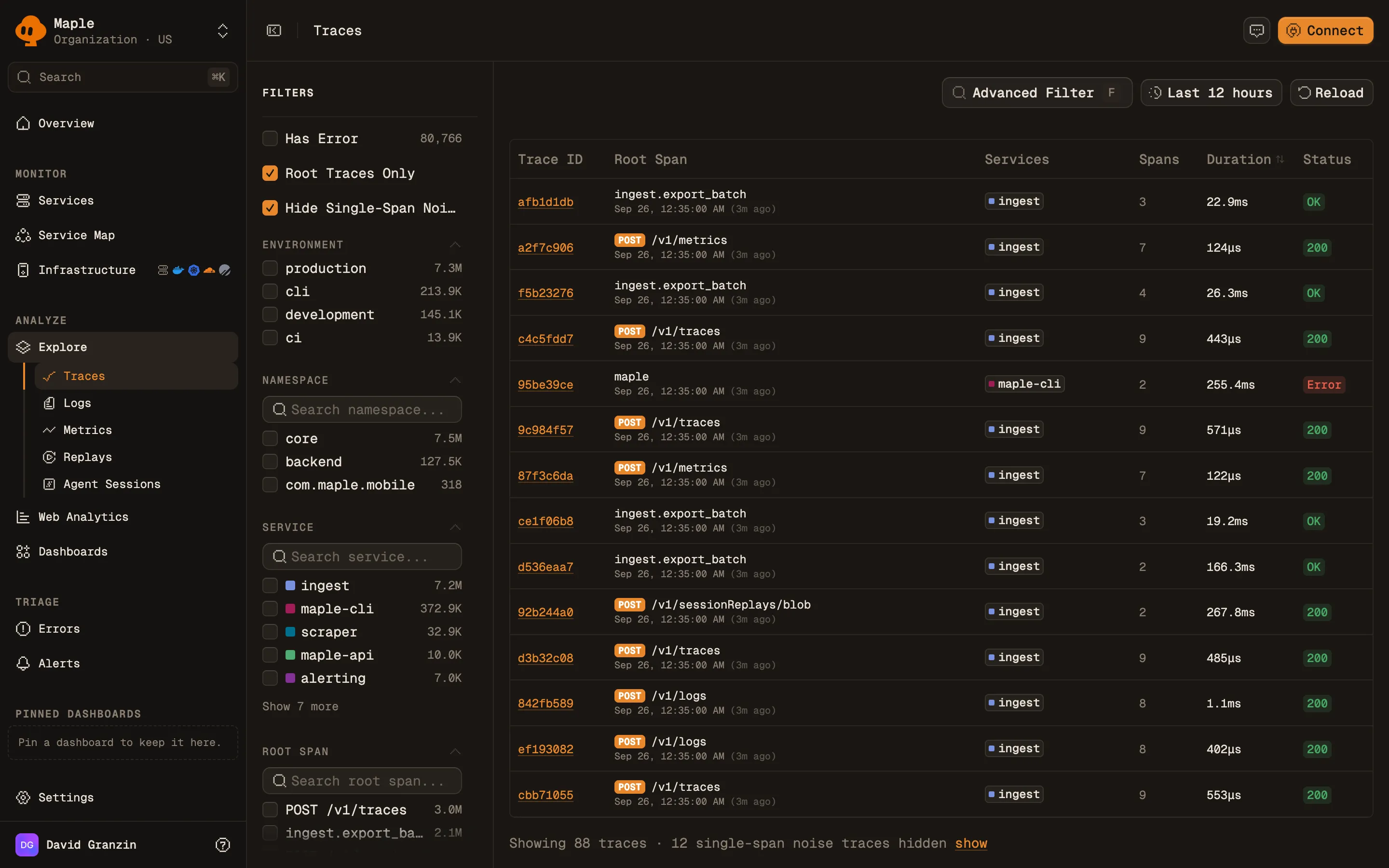
The Traces list with Trace ID, Root Span, Services, Spans, Duration and Status columns, and a filter sidebar with Has Error, Root Traces Only, environment, namespace, service and root span facets.
The trace list with its facet sidebar. Counts next to each facet value cover the selected time range.
The default time range is the last 12 hours. Pick a preset from **Last 5 minutes** to **Last 1 month**, or set a custom range. Click a row to open the trace in a side sheet. Use **Previous trace** and **Next trace** (or the `K` and `J` keys) to step through the list, and **Open trace** to go to the full page. Cmd-click or Ctrl-click opens the full page directly. ## Filter traces ### Sidebar facets | Facet | What it does | | -------------------------- | -------------------------------------------------------------------------------------------------------------------------------------------------- | | **Has Error** | Only traces with an error span. | | **Root Traces Only** | Lists one row per trace, keyed on its entry span (a root span, or a Server or Consumer span). On by default. Turn it off to list individual spans. | | **Hide Single-Span Noise** | Hides single-span traces that are not entry points, such as orphaned client spans. On by default, shown while **Root Traces Only** is on. | | **Environment** | Filter by `deployment.environment`. | | **Namespace** | Filter by `service.namespace`. | | **Service** | Filter by `service.name`. | | **Root Span** | Filter by root span name. | | **Duration** | A minimum and maximum duration range. | | **HTTP Method** | Filter by request method. | | **Status Code** | Filter by HTTP response status code. | Every value facet can include or exclude a value. ### Query syntax Click **Advanced Filter** (or press `F`) to write a query. Press Ctrl+Space for autocomplete and Cmd+Enter to apply. ``` service.name = "checkout" AND attr.http.route != "/health" ``` Join clauses with `AND`. Supported keys and operators: | Key | Operators | | -------------------------------------------------------------------------- | ----------------------------------------------------------------------------- | | `service.name`, `span.name`, `deployment.environment`, `service.namespace` | `=`, `!=`, `contains` | | `http.method`, `http.status_code` | `=`, `!=` | | `has_error`, `root_only`, `min_duration_ms`, `max_duration_ms` | `=` | | `attr.` (span attribute), `resource.` (resource attribute) | `=`, `!=`, `contains`, `!contains`, `exists`, `!exists`, `>`, `>=`, `<`, `<=` | You can use up to 5 filters per attribute map (span or resource). The dialog shows a warning for any clause the list cannot apply. ## Inspect a trace The trace page header shows the environment, the commit SHA (from `vcs.ref.head.revision`), the error state, and the HTTP status. If the trace produced [product events](/docs/product-events/overview), they appear in a **Product events** panel. Three views show the spans: - **Timeline** (default): spans on a time axis, with **Search spans…** and a color-by picker. - **Waterfall**: the span tree with a duration bar per span. - **Flow**: spans as a graph of nodes and edges, with repeated child spans combined into one card with a count.
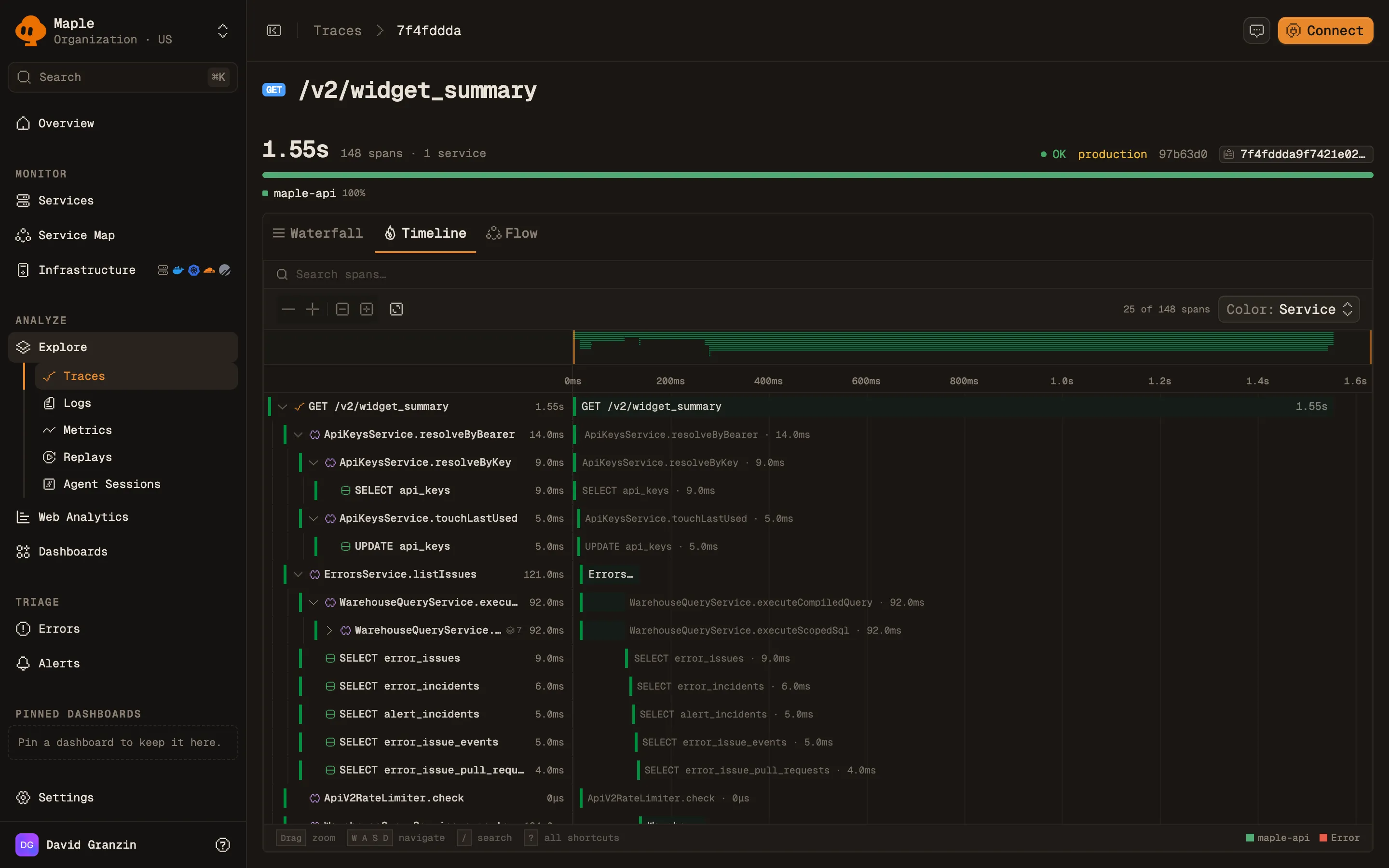
A 148-span trace for GET /v2/widget_summary on the Timeline view: a duration header, a service breakdown bar, and nested spans for API key lookups, warehouse queries and SQL statements drawn on a time axis.
A trace on the Timeline view, with nested database and warehouse spans.
Click a span to open the span panel. Press Esc to close it. The selected span is kept in the URL, so you can share a link to it. The span panel shows the duration and status, and an error section when the status is `Error`. It has these tabs: - **Details**: **Start Time**, **Span ID**, **Parent Span ID**, then **Span Attributes** and **Resource Attributes**. Each attribute row has **Filter by** and **Exclude** actions that open the trace list with that attribute filter applied. - **Logs**: logs emitted inside this span. Click one to open its detail. - **Infrastructure**: host, container, or Kubernetes details, shown when the span carries those resource attributes. ## Jump to logs and replays - **View Logs** in the trace header opens the [Logs](/docs/explore/logs) page scoped to the trace ID. The button shows a count and appears only when the trace has logs. The time window covers the trace duration plus 5 minutes on either side. - **View Session Replay** opens the [replay](/docs/session-replay/replays) of the browser session that made the request. It appears when a recorded session is linked to this trace ID by the [browser SDK](/docs/session-replay/browser-sdk). ## Query traces from an assistant The [MCP server](/docs/reference/mcp) exposes the same data: - `search_traces`: filter by service, error, duration, HTTP method, span name, or one attribute key and value. - `inspect_trace`: the span tree and logs for one trace ID. - `inspect_span`: every attribute of one span. - `find_slow_traces`: the slowest traces with p50 and p95 context. ## Troubleshooting - **"No traces yet".** Maple has never received a span for this organization. Configure an OpenTelemetry SDK with your ingest key and the [ingest endpoint](/docs/reference/ingest). See [Instrumentation](/docs/instrumentation). - **"No traces in this time range".** Maple has data, just not in this window. Click **Widen time range**. - **"No traces match these filters".** Your exclusions removed everything. Click **Clear filters**. - **A trace you expect is missing.** **Root Traces Only** and **Hide Single-Span Noise** are on by default. Turn off **Hide Single-Span Noise** to see single-span traces, or **Root Traces Only** to search individual spans. - **"Trace not found".** The trace has expired past your [retention](/docs/reference/retention) or has not been ingested yet. ## Next steps - [Logs](/docs/explore/logs): search log lines and jump back to their traces. - [Services](/docs/explore/services): latency, throughput, and errors per service. - [OpenTelemetry conventions](/docs/concepts/otel-conventions): attributes that power filters and badges. --- # Logs > Explore · https://maple.dev/docs/explore/logs Search log messages by text or trace ID, filter by severity, service, and environment, and move between a log line and the trace it belongs to. The **Logs** page shows the log records Maple received in the selected time range. A volume chart stacks log counts by severity. Below it, a table lists each record. Search by message text or trace ID, filter with the sidebar, and open any record to see its attributes and the trace it came from. ## What data it needs Logs arrive over OTLP, usually from an OpenTelemetry log bridge attached to your existing logger. Writing to stdout alone does not send anything to Maple. The page reads: - `service.name`, `deployment.environment`, and `service.namespace` resource attributes for the **Service**, **Environment**, and **Namespace** filters. - Severity text (for example `INFO`, `WARN`, `ERROR`) for **Severity** and the chart colors. - Trace ID and span ID on the log record for trace correlation. OpenTelemetry log bridges set these automatically when a log is written inside an active span. See [OpenTelemetry conventions](/docs/concepts/otel-conventions#logs) for severity levels and trace correlation. ## The log list The default time range is the last 12 hours. The chart at the top shows log volume by severity. Drag across it to zoom the time range to that window.
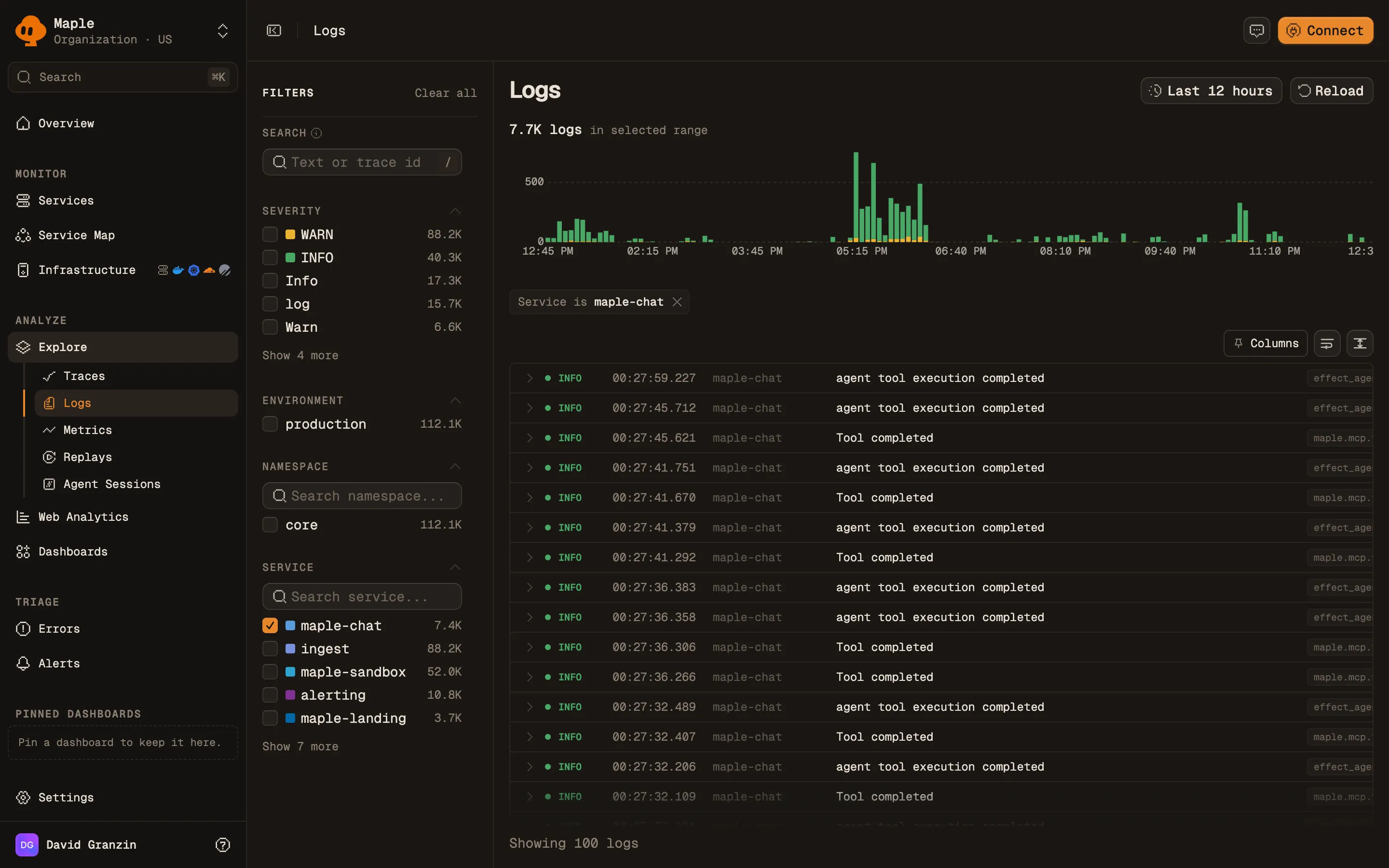
The Logs page filtered to the maple-chat service: a log volume chart by severity, a Service is maple-chat filter chip, and rows with time, service and message, next to a sidebar of severity, environment, namespace and service filters.
Logs filtered to one service. Drag across the volume chart to zoom into a window.
The table has **Time**, **Service**, and **Message** columns. The toolbar above it has three controls: - **Columns**: pin attributes as extra columns. The picker lists attribute keys seen in the selected time range. Pinned columns are saved in the URL. - **Wrap long log lines**. - **Toggle comfortable row density**. Click a row to expand it inline. Click **Open detail** to open the full record. ## Search and filter ### Search box The **Search** box accepts three kinds of input: | Input | What it does | | -------------------------------- | -------------------------------------------------------- | | Any text | Matches log messages containing the text, ignoring case. | | A 32-character hex trace ID | Shows only logs from that trace. | | A W3C `traceparent` header value | Shows only logs from the trace it names. | A trace ID becomes a removable chip. To search for a trace ID as plain text in messages, wrap it in double quotes. There is no `key:value` syntax. Use the sidebar to filter on fields. ### Sidebar filters | Filter | What it does | | --------------- | --------------------------------------------------------------------------------------------------------------- | | **Severity** | Filter by severity. Values come from your data, such as `TRACE`, `DEBUG`, `INFO`, `WARN`, `ERROR`, and `FATAL`. | | **Environment** | Filter by `deployment.environment`. | | **Namespace** | Filter by `service.namespace`. | | **Service** | Filter by `service.name`. | Each filter can include or exclude a value. ## Log details The detail sheet opens with the message, a meta strip, and an **Error** or **Fatal** banner for those severities. It has these tabs: - **Attributes**: **Log Attributes** and **Resource Attributes**, with a **Search attributes...** box. - **Trace**: a **Trace Timeline** of every log in the same trace (up to 200), with span boundaries marked. Shown when the log has a trace ID. - **Raw**: the record as a **JSON Payload**. - **Infrastructure**: host, container, or Kubernetes details, shown when the log carries those resource attributes. The meta strip shows the timestamp, a `trace:` link, and the span ID. It also has **Open in full page**, **Shareable link**, and **Log JSON** (copy) actions. ## Move between logs and traces - **From a log to its trace**: click the `trace:` link in the meta strip. The trace view opens at the log's timestamp. - **From a trace to its logs**: on a trace, click **View Logs**, or open a span's **Logs** tab. See [Traces](/docs/explore/traces#jump-to-logs-and-replays). ## Query logs from an assistant The [MCP server](/docs/reference/mcp) exposes two log tools: - `search_logs`: filter by service, severity, message text, trace ID, or span ID. - `mine_log_patterns`: groups recent matching log messages into templates such as `GET /api/users/<*> 200 in <*>ms`, with a count and a service and severity breakdown per template. It samples up to 50,000 recent logs (10,000 by default). Pattern mining is available through MCP only; the Logs page has no patterns view. ## Troubleshooting - **"No logs yet".** Maple has never received a log record for this organization. Add an OpenTelemetry log bridge to your logger and export to the [ingest endpoint](/docs/reference/ingest). See [Instrumentation](/docs/instrumentation). - **"No logs in this time range".** Maple has logs, just not in this window. Widen the time range. - **"No logs match these filters".** Your exclusions removed everything. Clear the filters. - **Logs have no `trace:` link.** The record has no trace ID. Emit the log inside an active span, with the OpenTelemetry log bridge installed, so the SDK attaches the IDs. - **A trace-scoped search returns nothing.** The trace's logs may fall outside the selected time range. Widen it, or open the logs from the trace page, which sets the window for you. ## Next steps - [Traces](/docs/explore/traces): inspect the requests your logs belong to. - [Errors and issues](/docs/errors/overview): how error spans become issues. - [Alert rules](/docs/alerting/alert-rules): alert on a query over your telemetry. --- # Metrics > Explore · https://maple.dev/docs/explore/metrics Browse every OpenTelemetry metric Maple has received, then chart one with an aggregation, a filter, and a breakdown by attribute. The **Metrics** page lists every metric Maple received in the selected time range, with its type, emitting service, and data point count. Open a metric to chart it: choose an aggregation, filter by attribute, break it down by a dimension, and add the chart to a dashboard or turn it into an alert. ## What data it needs Metrics arrive over OTLP from an OpenTelemetry SDK or collector, or from a [Prometheus scrape target](/docs/integrations/prometheus). Maple stores four OTLP metric types: | Type | Badge | Examples | | --------------------- | ------------- | ----------------------------------------------- | | Sum | **Sum** | Request counters, bytes sent. Monotonic or not. | | Gauge | **Gauge** | Memory in use, queue depth. | | Histogram | **Histogram** | Request duration with explicit buckets. | | Exponential histogram | **Exp Hist** | Request duration with exponential buckets. | OTLP Summary metrics are not stored. The Prometheus scraper converts summaries into sums and a quantile gauge before ingest. The **Service** column and the service filter read the `service.name` resource attribute. Data point attributes become the dimensions you can filter and group by. ## Browse metrics The default time range is the last 24 hours. Four cards at the top count metrics by type: **Sum Metrics**, **Gauge Metrics**, **Histogram**, and **Exp Histogram**. Each shows its data point count and number of unique metrics. Click a card to filter the list to that type. Click it again to clear the filter.
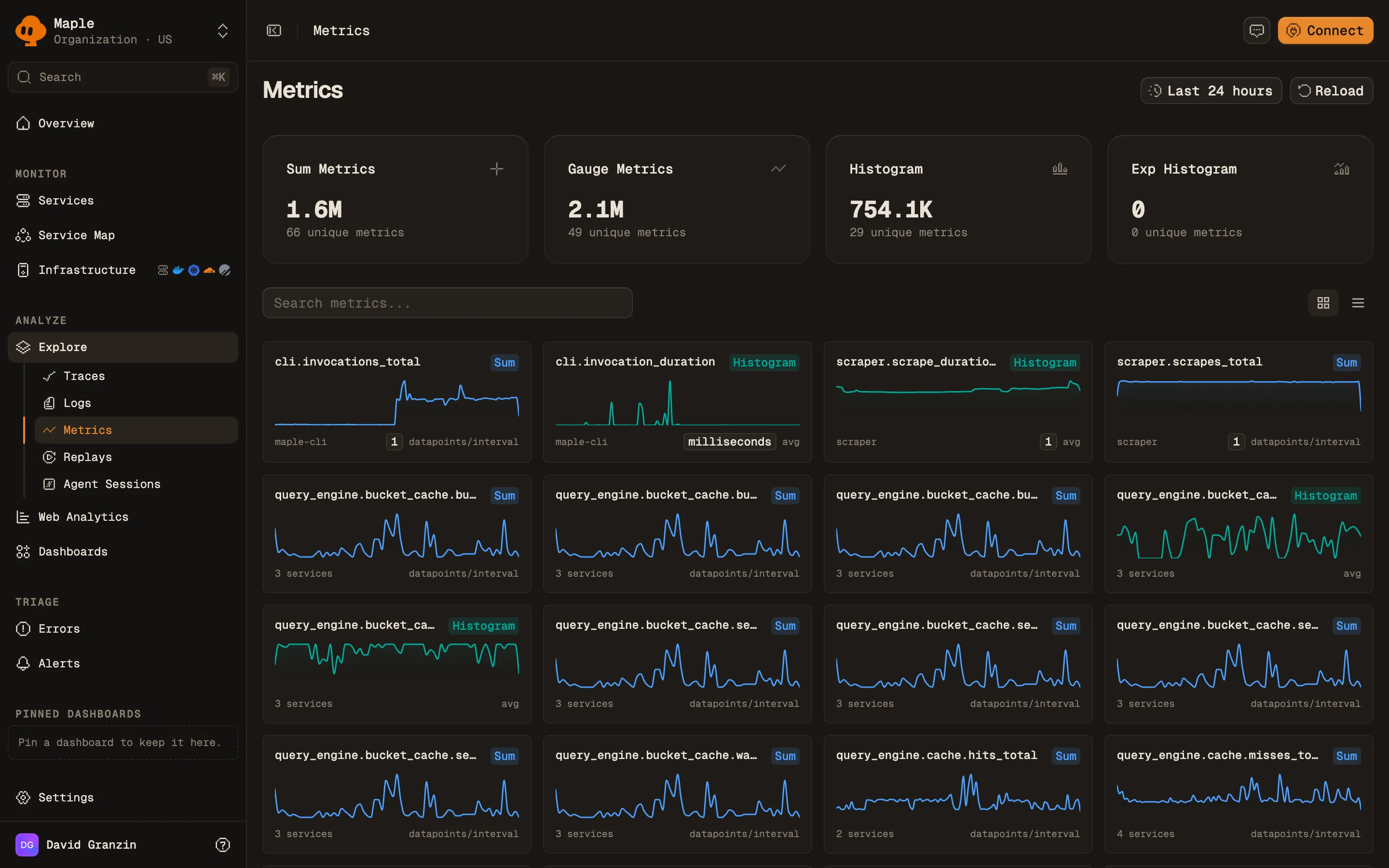
The Metrics page: four cards counting sum, gauge, histogram and exponential histogram metrics, a search box, and a grid of sparkline cards, one per metric, each labelled with its type and the services that emit it.
The metric catalog in grid view. Click a type card to filter the list.
Type in **Search metrics...** to filter by metric name. Switch between **Grid view** (a sparkline card per metric, the default) and **Table view**. The table, headed **Available Metrics**, has these columns: **Metric Name** (with its description), **Type**, **Service**, **Points**, and **Last Seen**. Click **Load more** to page through long lists. Click a metric to open it. ## Chart a metric The metric page has a chart, a breakdown panel, and a side panel of metadata. Query controls above the chart: | Control | What it does | | ------------- | --------------------------------------------------------------------------------------------------------------------------------------------------------------------- | | **Aggregate** | How data points combine per time bucket. Monotonic sums offer `rate` (the default), `increase`, and `sum`. Other types offer `avg`, `sum`, `min`, `max`, and `count`. | | **Where** | A filter on attributes, with autocomplete. For example `http.route = "/api/users"`. | | **Group by** | **Everything (no breakdown)**, `service.name`, or any data point attribute as `attr.`. | | **Every** | The bucket size in seconds. **Auto** picks one from the time range. | The chart header shows the query, such as `rate(http.server.requests) by service.name`, and the metric's unit. The **Top values** panel ranks values of one attribute. Choose it with **Break down by...** (default `service.name`). Click a bar to add that value to **Where**. The side panel shows the type, unit, and whether a sum is monotonic. It also shows **Datapoints in range**, **First seen**, **Last seen**, how many services emit the metric, and each attribute key with its usage count. ## Save and share - **Add to dashboard** adds the chart to an existing dashboard, or creates one with **Create & add**. - **Create alert** opens a new [alert rule](/docs/alerting/alert-rules) with this query filled in. - **Copy link** copies a URL that restores the aggregation, filter, grouping, and step. ## Query metrics from an assistant The [MCP server](/docs/reference/mcp) exposes the same data: - `list_metrics`: search metrics by name, service, or type, with unit, monotonicity, and volume. - `query_data` with `source=metrics`: a time series or breakdown for one metric, with the same aggregations and grouping by service or attribute. ## Troubleshooting - **"No metrics found".** No metric matched the search, type, or time range. Clear the search and widen the range. - **"No data for this metric in the selected range".** The metric exists but had no data points in this window. Widen the range, or check that the emitting service is still running. - **A summary metric is missing.** OTLP summaries are dropped at ingest. Export histograms instead. - **"Not enough datapoints for a preview".** The metric has too few data points in range to draw a sparkline. Open the metric to see its values. - **Rates look wrong.** `rate` and `increase` apply to monotonic cumulative sums. For a gauge, use `avg` or `max`. ## Next steps - [Build dashboards](/docs/dashboards/build-dashboards): combine metric charts with trace and log queries. - [Prometheus scraping](/docs/integrations/prometheus): pull metrics from exporters. - [Uptime monitoring](/docs/alerting/uptime-monitoring): alert on HTTP check metrics from the OpenTelemetry Collector. - [Services](/docs/explore/services): latency and error metrics derived from traces. --- # Services > Explore · https://maple.dev/docs/explore/services Latency percentiles, error rate, throughput, and Apdex for every service that sends traces, with a detail page per service for its endpoints, operations, and dependencies. The **Services** page lists every service that sent spans in the selected time range, with latency percentiles, error rate, and throughput. Open a service to see its charts over time, its HTTP endpoints, its operations, the services and databases it calls, and its open error issues. ## What data it needs Services are built from traces. Each distinct `service.name` resource attribute is one service. The metrics come from entry spans: root spans and spans with kind `Server` or `Consumer`. - **Error rate** counts spans with status `Error`. - **Environment** and **Namespace** read `deployment.environment` and `service.namespace`. - **Commit SHA** and **Last deploy** read `vcs.ref.head.revision`. See [OpenTelemetry conventions](/docs/concepts/otel-conventions#service-identity) for these attributes. ## The services list The default time range is the last 12 hours. The table has these columns: **Service**, **P50**, **P95**, **P99**, **Error Rate**, **Throughput**, and **Last deploy**. **Error Rate** and **Throughput** include a sparkline. Rows are grouped by environment, or by namespace when your services set one. Switch grouping with **Group services by**.
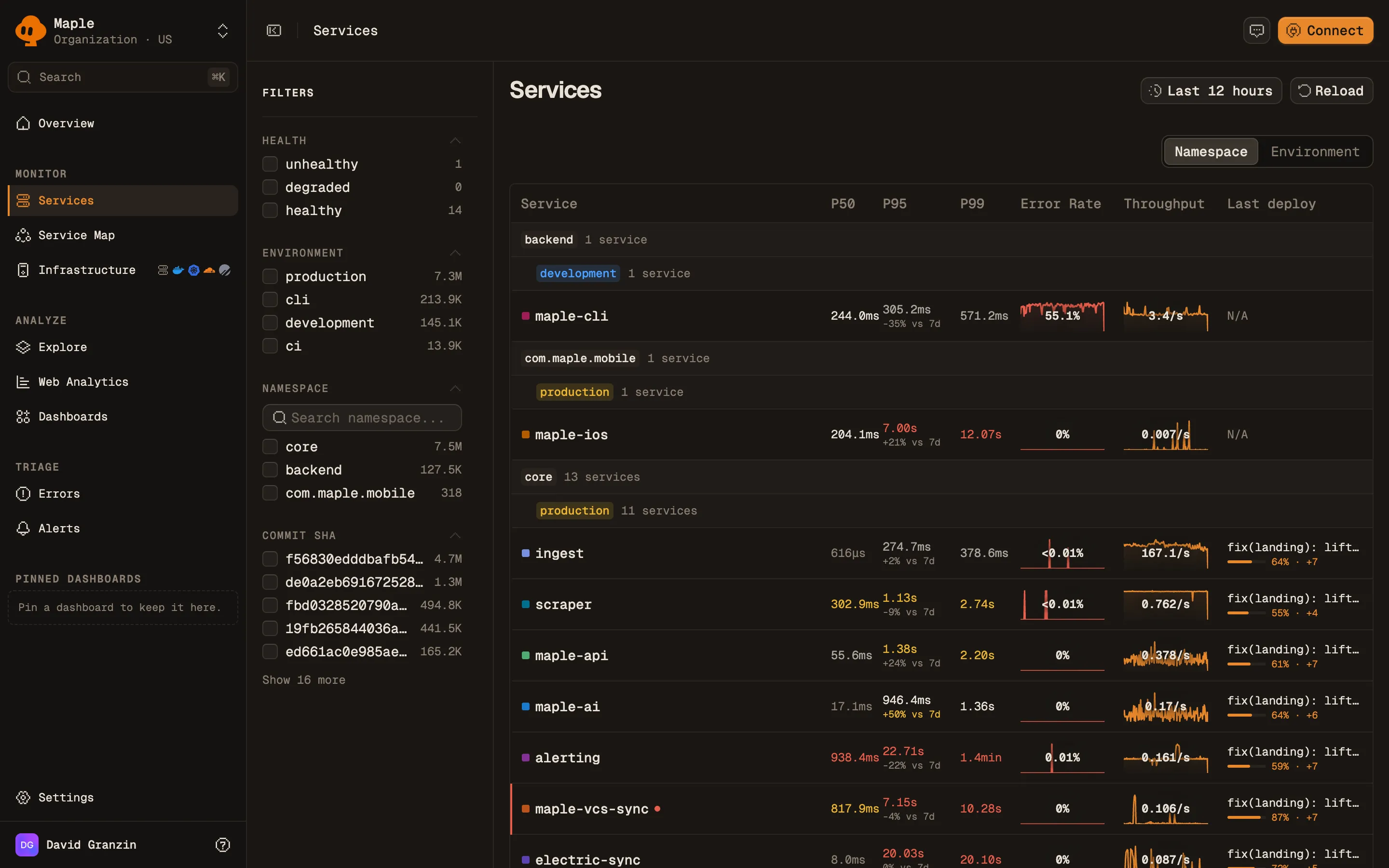
The Services list grouped by namespace and environment, with P50, P95 and P99 latency, error rate and throughput sparklines, and the last deploy for each service. A filter sidebar on the left lists health, environment, namespace and commit SHA.
Services grouped by namespace and environment, each with latency percentiles, error rate, throughput and last deploy.
A colored dot marks a service as degraded or unhealthy. Health comes from open alert incidents (**Alert firing**) and anomalies (**Anomaly**) on that service. A critical cause makes a service unhealthy. Any other cause makes it degraded. The footer counts services and how many are unhealthy or degraded. ### Filters The sidebar filters by **Health**, **Environment**, **Namespace**, and **Commit SHA**. Each filter can include or exclude a value. Click a row to open the service, scoped to that row's environment. ## Service detail The header has an environment switcher (**All environments** or one environment) and a **Create Alert** button. The page has four tabs. ### Overview Four charts: **Latency**, **Throughput** (requests per second), **Apdex**, and **Error Rate**. Deploys appear as commit markers on every chart.
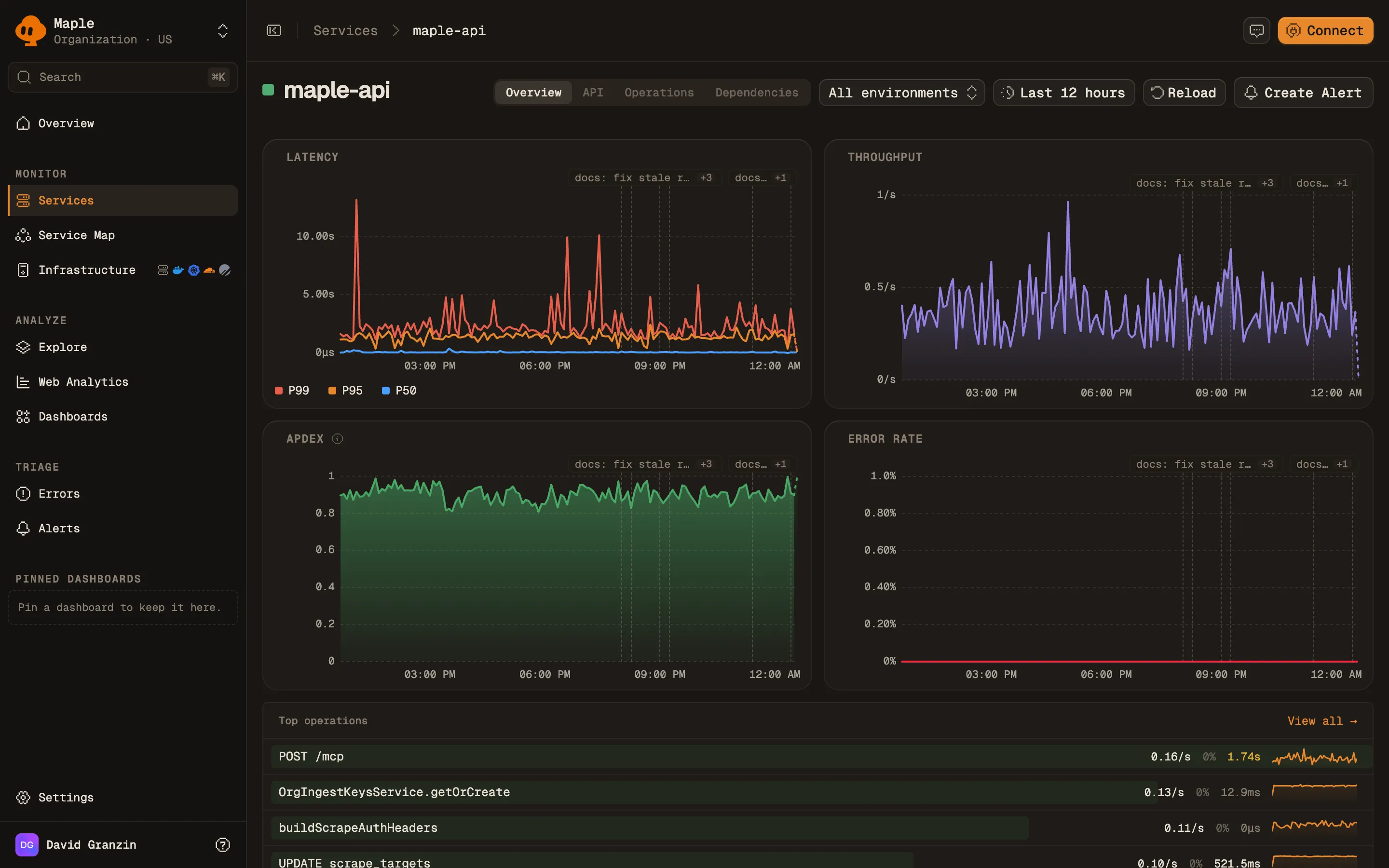
The overview tab of the maple-api service: Latency, Throughput, Apdex and Error Rate charts over 12 hours with commit markers along the top, and a Top operations list below.
A service's Overview tab. The dashed markers on each chart are deploys.
**Apdex** scores requests from 0 to 1 against a 500 ms target (T): - Satisfied: no error and duration under T. - Tolerating: no error and duration from T up to 4T. - Frustrated: slower than 4T, or an error. Apdex = (satisfied + 0.5 × tolerating) / total. See [Apdex alerts](/docs/alerting/apdex-alerts) to alert on it. Panels below the charts: - **Top operations**, with **View all** to open the **Operations** tab. - **Open issues**: [error issues](/docs/errors/overview) for this service from the latest 90 days. - **Recent deploys**. - **Ingest this window**: logs, spans, and metrics this service sent in the time range. - **Kubernetes**: workloads running the service, with CPU and memory, when Kubernetes resource attributes are present. - **Talks to**: the services and databases it calls. ### API HTTP endpoints served by this service, with **Req/s**, **Errors**, **p50**, **p95**, and **p99**. Summary stats show the endpoint count, total requests per second, errors, and the worst p99. Requests that did not match a route are split into **Unrouted paths** and **Scanner probes**, hidden until you click **Show anyway**. Click an endpoint to open matching traces. ### Operations Every span name the service handles, with **Calls /s**, **Errors**, **p50**, and **p95**. Click a row to open matching traces. ### Dependencies Everything this service calls, with **Calls /s**, **Errors**, and **p95**. Each row has a type badge: **Service**, **Database**, **HTTP**, **Queue**, or **RPC**. The header highlights the **Busiest**, **Most errors**, and **Slowest p95** dependency. Click a row to open the traces for those calls. Dependencies come from spans with kind `Client` or `Producer`. See [Service map](/docs/explore/service-map) for how Maple identifies the target of a call. ## Query services from an assistant The [MCP server](/docs/reference/mcp) exposes the same data: - `list_services`: throughput, error rate, and P95 per service, filterable by environment. - `diagnose_service`: health metrics, Apdex, top errors, and recent traces and logs for one service. - `get_service_top_operations`: a service's operations ranked by a chosen metric (call count by default). ## Troubleshooting - **"No services yet".** Maple has never received a span. Services come from traces, so set up an OpenTelemetry SDK first. See [Instrumentation](/docs/instrumentation). - **"No services in this time range".** Maple has traces, just not in this window. Widen the range. - **"No services match these filters".** Your filters excluded everything. Clear them. - **A service is missing.** Only services with entry spans (root, `Server`, or `Consumer`) get a row. A service that only emits `Client`, `Producer`, or `Internal` spans with a parent does not. - **A service appears under the wrong name.** Set `service.name` explicitly in your SDK. Without it, many SDKs report `unknown_service`. - **"No HTTP endpoints in this window" on the API tab.** An endpoint needs a `Server` span that carries a route. Most HTTP framework instrumentations set `http.route`. See [HTTP attributes](/docs/concepts/otel-conventions#http-attributes). ## Next steps - [Service map](/docs/explore/service-map): how services and databases connect. - [Traces](/docs/explore/traces): the requests behind each number. - [Apdex alerts](/docs/alerting/apdex-alerts): alert when user-facing latency degrades. --- # Service map > Explore · https://maple.dev/docs/explore/service-map A live graph of your services and the databases they call, drawn from trace context, with call volume, error rate, and latency on every node and edge. The **Service Map** draws your services and the databases they call as a graph. Maple builds it from your traces: an edge appears when one service calls another with trace context propagated, or when a service calls a database. Each node shows throughput, error rate, and latency. Each edge shows call volume and errors. Click a node to see its details. ## What creates nodes and edges ### Service to service Maple draws an edge from service A to service B when a `Client` or `Producer` span in A has a child `Server` or `Consumer` span in B, in the same trace. Calls within one service do not draw an edge. Both sides must be instrumented, and the caller must propagate trace context (the `traceparent` header) so the callee's span becomes a child of the client span. Instrumented HTTP and RPC clients do this for you. `peer.service` does not create edges. ### Service to database A `Client` or `Producer` span with `db.system.name` (or the older `db.system`) creates a database node. Maple splits nodes by database name, taken from `db.namespace`, then `db.name`, then `server.address`, then `net.peer.name`. Services that call the same database share one node. Database nodes are labeled by category from the `db.system.name` value: | Category | Systems | | -------- | --------------------------------------------------------- | | Cache | `redis`, `memcached`, `hazelcast` | | Queue | `kafka`, `rabbitmq`, `pulsar`, `nats`, `activemq`, `sqs` | | Search | `elasticsearch`, `opensearch`, `solr` | | Database | Everything else, such as `postgresql`, `mysql`, `mongodb` | When the [PlanetScale integration](/docs/integrations/planetscale) is connected, PlanetScale databases are marked on their nodes. Databases reached through Cloudflare Hyperdrive are grouped into one **Hyperdrive** node. ### Calls the map does not draw Outbound HTTP calls to hosts you do not instrument, and messaging or RPC calls without `db.system.name`, do not appear on the map. They appear on the **Dependencies** tab of the calling [service](/docs/explore/services#dependencies), keyed by `server.address`, `messaging.system`, or `rpc.system`. See [OpenTelemetry conventions](/docs/concepts/otel-conventions#service-map) for the attributes to set. ## Read the map Service nodes show requests per second (**req/s** or **calls/s**), error percentage (**err%**), and average latency (**avg**). A badge shows the runtime platform, such as **Kubernetes**, **Cloudflare Workers**, **AWS Lambda**, or **Web (browser)**. With Kubernetes infrastructure monitoring set up, nodes also show a pod count.
The Service Map in 2D: services grouped by namespace, each node showing requests per second, error percentage and average latency, with animated edges to databases such as Postgres, ClickHouse and Tinybird on the right.
The Service Map. Databases and external services sit to the right of the services that call them.
Node color follows error rate. The legend shows **Healthy**, **Degraded** (above 1%), and **Error** (above 5%). Each edge shows its call count and, when above zero, its error percentage. Counts come from traced requests. When your SDK samples traces, counts are prefixed with `~` and the real rate may be higher. See [Sampling and throughput](/docs/concepts/sampling-throughput). The map shows at most 200 edges. ## Controls | Control | What it does | | --------------------------------------- | ------------------------------------------------------------------------------------------------------------------------------------------------------------------------------ | | **2D** / **3D** | Switch between a flat layout (the default) and a 3D view. | | Environment | Show one `deployment.environment`, or **All Environments**. Defaults to `production` when it exists. | | Time range | Defaults to the last 12 hours. | | **Focus a service…** | Center the map on one service and its neighbors. Pick **1 hop** or **2 hops**. **Hide rest** hides everything outside the focus instead of dimming it. **Clear focus** resets. | | Traffic threshold | **All traffic**, or hide edges below 0.1%, 1%, or 5% of the busiest edge. A button shows how many services and edges are hidden. | | **Color nodes by** | **Service**, **Health**, or **Platform**. | | **Re-sort** | Discard manual positions and auto-arrange. | | **Zoom In**, **Zoom Out**, **Fit View** | Canvas zoom. You can also scroll to zoom and drag nodes to arrange them. | The focused service, hop count, and hide mode are kept in the URL, so you can share a focused view. ## Node details Click a node to open its side panel. Click the canvas to close it. Click a collapsed namespace to expand it. A service panel has two tabs: - **Service**: **Throughput**, **Error Rate**, **Avg Latency**, and **P95 Latency**, plus **Dependencies** and **Called By** lists. **View service** opens the [service page](/docs/explore/services). - **Infrastructure**: the Kubernetes workloads running the service. See [Kubernetes](/docs/infrastructure/kubernetes) to set it up. A database panel shows **Queries**, **Throughput**, **Error Rate**, **P50 Latency**, **P95 Latency**, and **Avg Latency**. ## Query the map from an assistant The [MCP server](/docs/reference/mcp) tool `service_map` returns the edges with call counts, error rates, and latency, filtered by service and environment. ## Troubleshooting - **"No service map yet".** Maple has not seen a cross-service call or a database call. Instrument at least two services that call each other, or a service with database instrumentation. If your services are active, widen the time range. - **Two services are not connected.** The callee is not instrumented, or the caller drops the `traceparent` header (common across proxies, queues, and custom HTTP clients). Open a trace for the call and check that the callee's `Server` span has the client span as its parent. - **Every database collapses into one node.** Set `db.namespace` on database spans, or at least `server.address`. - **The same database appears twice.** Services spell `db.system.name` differently (for example `postgresql` and `PostgreSQL`). Use the OpenTelemetry well-known values. - **The Infrastructure tab says "No Kubernetes workloads found".** The service's spans lack Kubernetes workload attributes. See [Kubernetes](/docs/infrastructure/kubernetes). ## Next steps - [OpenTelemetry conventions](/docs/concepts/otel-conventions#service-map): attributes that shape the map. - [Services](/docs/explore/services): per-service metrics and all outbound dependencies. - [Traces](/docs/explore/traces): inspect the calls behind an edge. --- # Errors and issues > Errors · https://maple.dev/docs/errors/overview How Maple groups error spans into issues, how an issue moves from triage to done, and how to claim, prioritize, and get notified about them. Maple turns error spans into **issues**. Every error span is fingerprinted, and all occurrences with the same fingerprint belong to one issue. An issue is the durable record of a bug: it has a workflow state, a severity, a lease for whoever is working on it, and a history. The **Errors** page lists your issues. Each issue page shows its stack, its occurrences, and the traces behind them. An issue can flare up many times. Each flare-up is an **incident** under the issue. The issue is the bug; incidents record when it was active. ## What counts as an error An error is a span with status `Error`. Log severity does not create errors. Maple reads the exception from the span in this order: 1. The first `exception` span event: `exception.type`, `exception.message`, and `exception.stacktrace`. 2. The span's status message, when there is no exception event. 3. The span attributes `exception.type`, `exception.message`, and `exception.stacktrace`, then `error.type` and `error.message`. If none of these are set, the error is labeled **Unknown Error**. Record exceptions on the span (most SDKs have a `recordException` call) to get a useful title and stack. HTTP 4xx spans are skipped unless they carry real exception data. A span with status `Error` and a 400 to 499 status code is ignored when it has no exception event, no `exception.type` attribute, and an `error.type` that is empty or equal to the status code. 5xx spans are always kept. See [Errors and exceptions](/docs/concepts/otel-conventions#errors-and-exceptions) for the attributes to set. ## How errors are grouped The fingerprint combines five things: - The organization. - The service (`service.name`). - The exception type. - The top 3 stack frames, with line numbers, URL origins, bundle hashes, and memory addresses removed. - A message signature: the first 120 characters of the message after emails, URLs, quoted values, IDs, and numbers are replaced with placeholders. JSON messages are normalized by key. The environment is not part of the fingerprint, so the same bug in staging and production is one issue. A fingerprint becomes an issue after 3 occurrences. Until then it notifies nobody. A fingerprint that stays below 3 occurrences for 24 hours is dropped. Issues come from three sources. The **Source** filter names them: - **Exceptions**: fingerprinted errors from spans. - **Alert rules**: opened by an [alert rule](/docs/alerting/alert-rules), one per rule and group. - **Integrations**: raised by a connected system, such as a [PlanetScale](/docs/integrations/planetscale) event. ## Issue states | State | Set by | Meaning | | --------------- | ------------- | ------------------------------------------------------ | | **Triage** | Maple, or you | New and not yet looked at. | | **Todo** | You | Accepted, not started. | | **In progress** | You | Someone holds the lease and is working on it. | | **In review** | You | A fix is proposed or a pull request is attached. | | **Verifying** | Maple | The fix merged. Maple is watching for new occurrences. | | **Done** | You, or Maple | Fixed. | | **Regressed** | Maple | It was done, and it fired again from a newer build. | | **Won't fix** | You | Suppressed, forever or until a snooze time. | | **Cancelled** | You | Closed for good. Cannot be reopened. | Maple sets **Regressed** and **Verifying** itself. You cannot pick them. ### Regressions A **Done** issue becomes **Regressed** when a new occurrence arrives more than 1 hour after it was resolved, from a `service.version` that was not running when it was resolved. Occurrences from the old build only update counts. They open no incident and send no notification. If your services report no `service.version`, any occurrence after the 1-hour grace period is a regression. **Regressed** is distinct from **Triage** so the next person can see the bug was fixed once before. ### Won't fix and snooze **Won't fix** suppresses an issue. With a snooze time, the issue returns to **Triage** when it expires. Set a snooze time with the `transition_error_issue` MCP tool (`snooze_until`). The issue page shows **Snoozed until**. ### Fix verification Attach a GitHub pull request to an issue from the **Pull requests** panel (**Attach**). This requires the [GitHub integration](/docs/integrations/github). When the pull request merges, the issue moves to **Verifying** and a **Fix verification** card shows progress: - **Watching**: Maple is counting occurrences after the merge. The window is sized to see about 20 occurrences at the pre-merge rate, within a range set by severity: 30 minutes to 1 day for critical, 1 to 3 days for high, 4 hours to 7 days for medium, and 12 hours to 14 days for low or unset. - **Fix holds**: no occurrences from builds that postdate the merge. Issues with low, medium, or no severity close as **Done** automatically. High and critical issues show the verdict and wait for you to close them. - **Still broken**: the error kept firing. The issue returns to **In progress** or **In review**. - **Inconclusive**: the window ended without a clear answer. After a first inconclusive check, Maple watches for longer. - **Stopped**: verification was abandoned. ### Archiving **Done** issues resolved more than 14 days ago are archived. Archived issues are deleted after 90 days. ## Claim an issue An issue has one lease at a time, so two people (or two agents) do not fix the same bug. In the issue sidebar under **Lease**: - **Claim** takes the lease and moves a **Triage**, **Regressed**, or **Todo** issue to **In progress**. - **Extend** renews it. - **Release** gives it up. An **In progress** issue returns to **Todo**. A lease lasts 30 minutes by default. Any action by the holder renews it. When it expires, an issue still **In progress** returns to **Todo**. Moving an issue to **In progress** also takes the lease. Claiming fails while someone else holds it. ## Severity Severity is **Critical**, **High**, **Medium**, **Low**, or not set. Set it from the **Severity** select in the issue sidebar, or for several issues at once from the bulk bar. A severity you set by hand overrides one set by an agent or an alert rule. To route issues to destinations by severity, open **Settings → Automation** and turn on **Severity escalation**. Pick destinations per severity and click **Save policy**. Escalation fires once per issue and severity level, and only upward. When a manual severity change would notify destinations, Maple asks you to confirm with **Change severity and notify**. Only organization admins can change this policy. ## Notifications The error notification policy decides when Maple sends an issue to your [notification destinations](/docs/alerting/notification-destinations). Defaults: | Event | Default | | ------------------------- | ------- | | First seen (new incident) | On | | Regression | On | | Incident resolved | Off | A minimum occurrence count (default 1) applies to first-seen and regression notifications. No destinations are selected by default, so nothing is sent until you add one. The Errors page has no screen for this policy. Organization admins change it with the `update_error_notification_policy` MCP tool, which sets the destinations, the first-seen, regression, and resolve toggles, and the minimum count. An incident opens when an issue fires with no open incident. It resolves after 30 minutes without new occurrences, or when the issue is marked **Done**. ## The Errors page The page opens with a stat strip: error count, share of all spans, and affected services and traces.
The Errors page on the Open tab: a stat strip with error count, share of spans, services and traces, then a list of issues with a 24-hour trend, event count, service, status and last seen time, next to service, environment and source filters.
The Errors page. Each row is an issue, with its trend over the last 24 hours.
Tabs filter by state: | Tab | States | | ------------ | ----------------------------------------------- | | **Open** | Triage, Regressed, Todo, In progress, In review | | **Triage** | Triage, Regressed | | **Active** | Todo, In progress, In review | | **Resolved** | Done, Cancelled, Won't fix | | **All** | Every state | Columns: **Error**, **Trend · 24h**, **Events**, **Service**, **Status**, and **Last seen**. The trend and event counts cover the last 24 hours. The list covers all time. - Sort by **Most recent** (default), **Most errors**, or **Severity**. - Filter by severity, and in the sidebar by **Regressed only**, **Service**, **Environment**, and **Source**. - Select rows to change **Severity** or **Move to** a new state in bulk. - Right-click a row for **Change status**, **Open in new tab**, **Copy link**, **Copy ID**, and **Copy agent prompt**. The list loads 50 issues at a time. Click **Load more** for the next page. ## The issue page The header shows the service, the error title, severity, state, and an **Open incident** marker while one is open. It has three tabs: - **Overview**: the **Culprit** (top stack frame) and **Fingerprint**; facts such as **Events · all time**, **First seen**, **Last seen**, and **Regressions**; an occurrence chart; and an **Incidents** table with each incident's status, reason (**First seen**, **Regression**, or **Manual**), and event count. - **Occurrences**: **Latest occurrences**, with time, service, message, and a link to each trace. Shown for issues from spans. - **Activity**: a timeline of state changes, claims, and comments. Add a comment with **Comment**. Markdown is supported.
An issue page for @maple/cli/ServerError: the error message, culprit and fingerprint, event counts with first and last seen, an occurrences chart, a linked investigation, and a details panel with status, severity, priority, scope and pull requests.
An issue page. The right panel holds state, severity, lease and linked pull requests.
The sidebar holds **Details** (status, severity, assignee), **Scope** (service, environment, issue ID), **Lease**, **Pull requests**, and **Fix verification**. **Copy agent prompt** copies a prompt with the issue context for a coding agent. ## Work with issues from an assistant The [MCP server](/docs/reference/mcp) covers the whole workflow: | Tool | What it does | | ------------------------------------------ | ---------------------------------------------------------------------- | | `list_error_issues` | List issues by state, severity, source, service, or last seen time. | | `find_errors` | Error types with their fingerprints and counts. | | `error_detail` | Sample occurrences and logs for one fingerprint. | | `list_error_issue_events` | An issue's activity history. | | `list_error_incidents` | Incidents under an issue. | | `claim_error_issue`, `release_error_issue` | Take or give up the lease. | | `transition_error_issue` | Change state, with an optional `snooze_until` for Won't fix. | | `set_issue_severity` | Set severity. Never overrides a severity set by hand. | | `comment_on_error_issue` | Add a comment. | | `propose_fix` | Claim the issue, move it to In review, and optionally attach a PR URL. | | `link_pull_request` | Attach a GitHub pull request. Its merge starts fix verification. | | `update_error_notification_policy` | Change the notification policy (admins only). | ## Troubleshooting - **Errors show in traces but no issue appears.** A fingerprint needs 3 occurrences to become an issue. Also check that the span status is `Error`, and that a 4xx span carries an exception. - **Many issues titled "Unknown Error".** Your spans set status `Error` without an exception. Record the exception on the span. - **One bug is split across many issues.** The message differs in a way the normalizer does not catch, or the stack differs in its top 3 frames. Put variable data in attributes instead of the exception message. - **A fixed issue keeps regressing.** Old instances are still running. Set `service.version` on your services so occurrences from pre-fix builds do not count as regressions. - **No notifications arrive.** The policy has no destinations by default. Add one with `update_error_notification_policy`. ## Next steps - [Traces](/docs/explore/traces): inspect the requests behind an occurrence. - [Notification destinations](/docs/alerting/notification-destinations): set up Slack, email, and webhooks. - [GitHub](/docs/integrations/github): attach pull requests and verify fixes. - [MCP server](/docs/reference/mcp): let a coding agent triage and fix issues. --- # Browser SDK > Session Replay · https://maple.dev/docs/session-replay/browser-sdk Instrument a website with OpenTelemetry tracing, logs, Web Vitals, error capture and session replay using the @maple-dev/browser SDK. `@maple-dev/browser` adds OpenTelemetry tracing, logs, Web Vitals, error capture and session replay to a website in one package. Everything it sends is OpenTelemetry (OTLP traces and logs), apart from the replay recording itself. Every span and every replay event carries the same `session.id`, so a trace links to the replay that produced it, and a replay links to its traces.
Browsers Beta
> **Using Effect?** The browser entry point of `@maple-dev/effect-sdk` has the same replay engine built in, with the recorder in a lazily loaded chunk. See [Session Replay & Sessions](/docs/sdks/effect-client#session-replay-and-sessions). Run replay from one SDK, not both. ## Install ```bash npm install @maple-dev/browser ``` ## Quick start Call `MapleBrowser.init` once, as early as possible in your app's entrypoint: ```ts import { MapleBrowser } from "@maple-dev/browser" MapleBrowser.init({ ingestKey: "maple_pk_...", // public ingest key serviceName: "acme-web", region: "eu", // only for EU organizations; omit for the US region }) ``` Use a **public** ingest key (`maple_pk_…`) from **Settings → Ingestion**. It is safe to ship in browser code. Ingest keys belong to one region, so set `region: "eu"` if your organization is in the EU region. That single call: - starts OpenTelemetry browser tracing, auto-instrumenting `fetch` and exporting to Maple's ingest (`POST /v1/traces`); - records uncaught errors and unhandled promise rejections as error spans; - records the session with rrweb, in chunks of about 5 seconds or 100 KB, gzipped with the browser's `CompressionStream` and uploaded to `POST /v1/sessionReplays/blob`; - writes session metadata at start (`active`) and on page hide (`ended`), including the trace ids observed during the session. The SDK is best-effort. A telemetry network failure never throws into your app. `init()` returns a handle, `{ sessionId, shutdown }`, for reading the active session id and tearing telemetry down. See [Sessions](#sessions). ## Configuration Every field accepted by `MapleBrowser.init`: | Option | Type | Default | Description | | -------------------------------------- | -------------------------------------------------------- | ----------------------------------------- | -------------------------------------------------------------------------------------------------------------------------------------------------------------------------- | | `serviceName` | `string` | none | **Required.** Service name reported on traces and stored on replay sessions. | | `ingestKey` | `string` | none | Public ingest key (`maple_pk_...`), sent as `Authorization: Bearer`. Leave it unset only when `endpoint` points at your own proxy that adds the key. | | `region` | `"us"` \| `"eu"` | `"us"` | Region of your Maple organization. `"us"` sends to `https://ingest.maple.dev`, `"eu"` to `https://ingest.eu.maple.dev`. Ignored when `endpoint` is set. | | `endpoint` | `string` | from `region` | Ingest base URL. Overrides `region`. Use it for a proxy. | | `serviceNamespace` | `string` | none | Logical group this service belongs to, sent as the `service.namespace` resource attribute on traces. | | `serviceVersion` | `string` | none | Service version or commit SHA, attached to traces. | | `environment` | `string` | none | Deployment environment, for example `"production"`. | | `user` | `object` | none | End-user identity: `id`, `email`, `username`, `groupId`, `groupName`, `traits`. Attached to the session and to browser spans. See [Identifying users](#identifying-users). | | `userId` | `string` | none | **Deprecated.** A bare user id. Use `user` instead. When both are set, `user` wins. | | `tracing.enabled` | `boolean` | `true` | Enable OpenTelemetry browser tracing. | | `tracing.instrumentFetch` | `boolean` | `true` | Create spans for `fetch()` calls. Set `false` when another tracer (such as the Effect client SDK) already instruments requests, to avoid duplicate network spans. | | `tracing.instrumentXhr` | `boolean` | `true` | Create spans for `XMLHttpRequest` calls (axios and older clients). Turn it off for the same reason as `instrumentFetch`. | | `tracing.captureErrors` | `boolean` | `true` | Record uncaught errors and unhandled promise rejections as error spans. Turn it off only when another tool owns the page's global error handlers. | | `tracing.propagateTraceHeaderCorsUrls` | `Array` | `[]` | Cross-origin URLs whose `fetch()` and XHR requests carry the `traceparent` header. See [Connect browser and backend traces](#connect-browser-and-backend-traces). | | `tracing.sampleRate` | `number` | `1` | Fraction of sessions whose traces are exported, `0` to `1`. Error spans are always exported. See [Sampling](#sampling). | | `tracing.captureHeaders` | `{ request?, response? }` | none | Header names to record on `fetch`/XHR spans. See [Request and response detail](#request-and-response-detail). | | `tracing.longFrames` | `boolean` | `false` | Span main-thread frames of 100ms or more. See [Jank](#jank). | | `tracing.slowInteractions` | `boolean` | `false` | Span interactions of 200ms or more. See [Jank](#jank). | | `errors` | `object` | see [Filtering errors](#filtering-errors) | `ignore`, `denyUrls`, `allowUrls`, `beforeCapture`, `defaultFilters` and `captureHttpStatus`. | | `breadcrumbs` | `boolean` | `true` | Keep the last clicks, inputs, navigations and console lines, and send them with the next error. See [Breadcrumbs](#breadcrumbs). | | `webVitals` | `boolean` | `true` | Report Core Web Vitals. See [Web Vitals](#web-vitals). | | `logs.captureConsole` | `Array<"debug" \| "log" \| "info" \| "warn" \| "error">` | `[]` | Console levels sent as logs as they happen. See [Logs](#logs). | | `reporting.csp` | `boolean` | `true` | Content Security Policy violations as logs. See [Browser reports](#browser-reports). | | `reporting.browserReports` | `boolean` | `false` | Browser deprecation and intervention reports as logs. | | `transport.offline` | `boolean` | `false` | Keep batches that could not be sent and send them later. See [Offline](#offline). | | `replay.enabled` | `boolean` | `true` | Enable session recording. | | `replay.sampleRate` | `number` | `1` | Fraction of sessions to record, `0` to `1`. See [Sampling](#sampling). | | `replay.onErrorSampleRate` | `number` | `0` | Fraction of the sessions not recorded that keep the last minute in memory and upload it only if an error happens. See [Replay on error](#replay-on-error). | | `replay.canvasFps` | `number` | off | Record `` content at this many frames per second. Never with `privacy.maskAllText`. | | `replay.networkBodies` | `{ urls, maxLength? }` | none | Keep request and response bodies of these URLs in the replay. See [Request and response detail](#request-and-response-detail). | | `privacy.maskAllInputs` | `boolean` | `true` | Mask all `` values in the recording. | | `privacy.maskAllText` | `boolean` | `false` | Mask all text in the recording, and omit captured click-target text from session events. | | `privacy.sanitizeUrl` | `(url: string) => string` | none | Rewrite every URL before it leaves the page. See [Redacting URLs](#redacting-urls). | | `privacy.persistVisitorId` | `boolean` | `true` | Store a persistent visitor id (localStorage and cookie) so unique and returning visitors can be counted. Turning it off also deletes any id already stored. | | `privacy.persistence` | `"browser" \| "memory"` | `"browser"` | `"memory"` keeps everything in memory: no cookies, Web Storage or IndexedDB, and no visitor id. See [Memory-only mode](#memory-only-mode). | | `privacy.crossSubdomainCookie` | `boolean` | `true` | Scope the visitor-id cookie to the registered domain so sibling subdomains share it. See [Linking a marketing site to your app](#linking-a-marketing-site-to-your-app). | | `privacy.cookieDomain` | `string` | probed | Explicit cookie `Domain=` (no leading dot). `""` forces a host-only cookie. | | `privacy.requireConsent` | `boolean` | `false` | Capture nothing until `MapleBrowser.setConsent(true)`. See [Consent](#consent). | | `privacy.captureUserEmail` | `boolean` | `true` | Store the email passed to `identify()`. | | `privacy.respectDoNotTrack` | `boolean` | `false` | Treat `navigator.doNotTrack` like Global Privacy Control (suppresses the persistent visitor id). | A fully-specified call: ```ts MapleBrowser.init({ ingestKey: "maple_pk_...", serviceName: "acme-web", environment: "production", serviceVersion: "1.4.2", user: currentUser ? { id: currentUser.id, email: currentUser.email } : undefined, tracing: { enabled: true, instrumentFetch: true, captureErrors: true, propagateTraceHeaderCorsUrls: [/^https:\/\/api\.example\.com\//], }, replay: { enabled: true, sampleRate: 1.0 }, privacy: { maskAllInputs: true, maskAllText: false }, }) ``` ## Sessions Every span and replay event the SDK emits carries one **`session.id`** (a `crypto.randomUUID()` v4), created on the first `MapleBrowser.init` call. That shared id is what links a trace to the replay that produced it. ### Storage and continuity The session is stored in `sessionStorage` under the key `maple.session`, so it **survives reloads within a tab**. `sessionStorage` is per tab, so **each tab or window gets its own session**. When `sessionStorage` is unavailable (for example in some private-browsing modes), the SDK keeps the session in memory for the life of the page. The replay chunk a page is still sending when it unloads is kept in `sessionStorage` under `maple.replay.pending` and sent by the next page of the same session in that tab, if that page starts recording within ten minutes. Revoking consent removes it; with `privacy.requireConsent`, it is sent once consent is granted on that next page, unless it was revoked in between. Client-side route changes in a single-page app do **not** start a new session. Session boundaries are purely time-based. ### Rotation A new `session.id` is created when either limit is crossed, whichever comes first: - **30 minutes idle.** No recorded activity for half an hour rotates the session. - **24 hours old.** A hard cap on a session's lifetime regardless of activity, so a tab left open for days does not become one giant replay. While replay is recording, each uploaded chunk marks the session active and pushes back the idle deadline, so a session that keeps recording stays whole. ### Start and end metadata The SDK writes a small session-metadata row at two points: - an **`active`** row when recording starts (and again on each reload); - an **`ended`** row when the page is hidden or unloaded. It fires on `visibilitychange` to `hidden` (the reliable "leaving" signal on mobile) and on `pagehide` (tab close or navigation on desktop). The `ended` row carries the session duration, the click count, and the **trace ids observed during the session**. Maple uses these to link traces and replays, and to fill the user and session columns on the Replays page. The unload write uses `keepalive`, so it survives the page going away. ### Accessing the session id `init()` returns a handle whose `sessionId` is the active session's id. Use it to correlate Maple sessions with your own backend logs: ```ts const { sessionId } = MapleBrowser.init({ ingestKey: "maple_pk_...", serviceName: "acme-web", }) // for example, forward it on your own requests fetch("/api/checkout", { headers: { "x-maple-session": sessionId } }) ``` `init()` is idempotent: calling it again returns the same live handle. On the server (SSR, no `window`) it returns a no-op handle with an empty `sessionId`. ### Teardown Call `shutdown()` to upload the final replay chunk and stop tracing and replay. After it resolves, telemetry is stopped and a later `init()` may start a new session. Use it when a single-page app unmounts its telemetry client: ```ts const maple = MapleBrowser.init({ ingestKey: "maple_pk_...", serviceName: "acme-web" }) // later, on teardown await maple.shutdown() ``` ## Identifying users Pass `user` to `init()` so replays and traces are tied to a known user. It fills the user columns on the Replays page, and browser-created spans include `user.id`: ```ts MapleBrowser.init({ ingestKey: "maple_pk_...", serviceName: "acme-web", user: { id: "user_123", email: "ada@acme.com", username: "ada", groupId: "org_42", groupName: "Acme", traits: { plan: "pro", signup_month: "2026-01" }, }, }) ``` `groupId` and `groupName` are the company or team the Replays page can group by. `traits` are capped at 24 keys, 64-character keys and 256-character values. The identity is never written to browser storage. If you do not know the user at init time (for example, the SDK starts before login resolves), leave `user` out and the session starts anonymous. Call `MapleBrowser.identify()` once you know who the user is. It takes the same object, or a bare user id: ```ts // after the user signs in MapleBrowser.identify({ id: user.id, email: user.email, groupId: org.id, groupName: org.name }) // after the user signs out MapleBrowser.identify(null) ``` Each call **replaces** the identity. It does not merge, so a signed-out user's email never carries over to whoever signs in next on a shared device. Future session rows and spans read the latest identity. `userId` still works as a bare user id, but it is deprecated. Use `user`. ## Capturing errors With `tracing.captureErrors` on (the default), uncaught errors and unhandled promise rejections are recorded as error spans with status `Error`, which feed the [Errors](/docs/errors/overview) page. An error your app catches never reaches those global handlers. Report it with `captureException`, for example from a framework error boundary: ```ts try { await submitOrder() } catch (error) { MapleBrowser.captureException(error, { name: "checkout.submit_failed", // span name, default "exception" attributes: { "order.step": "payment" }, }) showErrorToast() } ``` The same error object is recorded once, even if your code reports it and then rethrows it, or [`traced`](#navigation-and-data-loading-spans) already recorded it. `captureException` accepts any thrown value: strings and plain objects are turned into an `Error`. Calls before `init()` do nothing. A cross-origin script that throws shows up in the browser as a bare "Script error." with no details, and the SDK skips it. Add the `crossorigin` attribute to the script tag to get the real error. `error.cause` chains and the errors inside an `AggregateError` (up to five) are added to the stack trace as `Caused by:` blocks, after the error's own frames. ### Filtering errors Filters run before an error is recorded, so a dropped error costs nothing and never opens an issue. They apply to the global handlers and to `captureException`. ```ts MapleBrowser.init({ // ... errors: { ignore: ["ChunkLoadError", /^AbortError: /], // matched against "Name: message" denyUrls: [/widgets\.example\.net/], // matched against the top frame's script URL allowUrls: [/^https:\/\/app\.example\.com\//], // errors with no stack frames are kept beforeCapture: (error, { source, originalError }) => !error.message.includes("401"), }, }) ``` Errors thrown by browser extensions and the harmless `ResizeObserver loop` notices are dropped by default. Set `errors.defaultFilters: false` to keep them. ### Failed HTTP requests `fetch` and `XMLHttpRequest` spans follow the OpenTelemetry HTTP conventions for client requests: a response with a 4xx or 5xx status marks the span as an error, with `error.type` set to the status code (`"404"`, `"503"`), so it opens an issue. Issues group by status code. To count fewer statuses, narrow the list (the default is `[[400, 599]]`). A status left out is not an error: ```ts errors: { captureHttpStatus: [[500, 599], 429] } // a 404 from a search box is expected here ``` A request that gets no response at all (offline, DNS, CORS, or a timeout from `AbortSignal.timeout()`) is always an error. A request your code aborts with its own `AbortController` is not. ### Breadcrumbs The SDK keeps the last 50 clicks, inputs, navigations and console lines in memory. Nothing is sent until an error is recorded. Then the trail is sent as OpenTelemetry log records linked to the error, so you see what the user did right before it on the error's trace. Each breadcrumb is sent once. Clicks and inputs are recorded as a short selector (`button#save`), never with input values. Turn it off with `breadcrumbs: false`. ## Connect browser and backend traces For a request to the same origin as the page, the `fetch()` span sends a W3C `traceparent` header, and your backend's span joins the same trace. For a request to another origin, such as `https://api.example.com` from `https://app.example.com`, the header is not sent unless you list the URL: ```ts MapleBrowser.init({ ingestKey: "maple_pk_...", serviceName: "acme-web", tracing: { propagateTraceHeaderCorsUrls: [/^https:\/\/api\.example\.com\//], }, }) ``` Your API must also allow the header in its CORS configuration. Add `traceparent` to `Access-Control-Allow-Headers` in the preflight response. Without it, the browser blocks the request. Your backend must be instrumented with OpenTelemetry and read `traceparent`, which every OpenTelemetry HTTP server instrumentation does. ## Logs `MapleBrowser.logger` writes OpenTelemetry log records, each linked to the span that was active when it was written and to the session: ```ts MapleBrowser.logger.info("checkout started", { "cart.items": 3 }) MapleBrowser.logger.error("payment declined", { "payment.provider": "card" }) ``` To send console output as logs, list the levels: `logs: { captureConsole: ["warn", "error"] }`. Calls before `init()` are queued. ## Web Vitals LCP, CLS, INP, FCP and TTFB are reported as OpenTelemetry log events named `browser.web_vital`, with the `browser.web_vital.name`, `value`, `delta`, `rating`, `id` and `navigation_type` attributes from the OpenTelemetry browser conventions, plus `url.path`. Each is linked to the page load's trace when you use [navigation spans](#navigation-and-data-loading-spans). CLS, INP and LCP are final when the page is hidden, so they arrive then. Turn them off with `webVitals: false`. ## Jank Two opt-in options show where the main thread got stuck: ```ts tracing: { longFrames: true, slowInteractions: true } ``` - `longFrames` records every frame of 100ms or more as a `longAnimationFrame` span, with the script that ran longest (file, function and what invoked it, such as `BUTTON#save.onclick`). Browsers without the Long Animation Frames API record `longtask` spans instead. - `slowInteractions` records every interaction of 200ms or more as an `interaction click` (or `keydown`, ...) span, split into input delay, processing and presentation time, with the element that was used. Both nest under the open navigation span, and include what happened before the SDK finished loading. ## Request and response detail List the headers to record on `fetch` and XHR spans: ```ts tracing: { captureHeaders: { request: ["x-request-id"], response: ["x-cache", "server-timing"] } } ``` They are stored as `http.request.header.` and `http.response.header.`. `authorization`, `proxy-authorization`, `cookie` and `set-cookie` are never recorded, even when listed. XHR spans get response headers only, and a cross-origin response only exposes the headers its server lists in `Access-Control-Expose-Headers`. Request and response bodies can be kept in the session replay's network events, for the URLs you list only: ```ts replay: { networkBodies: { urls: [/^https:\/\/api\.example\.com\/checkout/] } } ``` Only text and JSON bodies are kept, cut to `maxLength` characters (1,000 by default, which is also the most Maple stores), and nothing is kept with `privacy.maskAllText`. Bodies can contain personal data, so list only endpoints whose payloads you are allowed to record. ## Browser reports Content Security Policy violations are sent as `maple.browser.csp_violation` warning logs, with the directive, the blocked URL and, when known, the script location. Set `reporting.browserReports: true` to also get the browser's deprecation and intervention reports. These are logs, not errors, so they never open an issue. Each kind of report is sent once per page. ## Navigation and data-loading spans Three calls turn one click into one trace: a navigation span, the data-loading spans under it, the `fetch()` spans those make, and the backend spans behind them. Call them from your router's hooks. The [frontend guides](/docs/frontend) show where for each framework. ```ts // the router starts a navigation MapleBrowser.startNavigation(location.pathname) // a route's data loading const project = await MapleBrowser.traced("loader /projects/:id", () => fetchProject(id), { isFailure: (error) => !isRedirect(error), // control-flow throws aren't failures }) // the new route is ready: pass its template, not the concrete URL MapleBrowser.endNavigation("/projects/:id") ``` - `startNavigation(path)` opens a `pageload` span on the first call and a `navigate` span on every later one, with the path as `url.path`. A navigation still open is ended with `app.navigation.interrupted: true`. The page load joins the server render's trace when the document response has a `Server-Timing: traceparent;desc="…"` entry or the page a `` tag. - The page load starts at the browser's navigation start, and once the page has loaded it gets child spans for fetching the HTML (`documentFetch`, with `dns`, `connect`, `request` and `response` under it), `domProcessing` and `loadEvent`. - `endNavigation(route?)` renames the span to `navigate ` (or `pageload `) and ends it. It does nothing when no navigation is open. - `traced(name, fn, options?)` runs `fn` in a span under the open navigation and returns its result unchanged. A throw is recorded on the span, marks it `Error`, and is rethrown; `isFailure` returning `false` leaves the span `Ok`. An error `traced` recorded isn't reported again by `captureException` or the global handlers. Using React Router or TanStack Router? `instrumentReactRouter` and `instrumentTanStackRouter` from `@maple-dev/browser/react` make these calls for you. See [React](#react). The browser has no async context: only requests `fn` starts before its first `await` nest under its span. Start independent requests together, with `Promise.all`. All three do nothing on the server, before `init()`, with tracing disabled or before consent is granted; `traced` then only runs `fn`. A page load that happened before consent isn't traced later: the next navigation is a `navigate` span. Leaving the page or calling `shutdown()` ends an open navigation as interrupted, so it still exports. ## Custom events `track(name, props)` records a product event against the current session. It appears inline in the session transcript next to the clicks and network calls around it, and counts as a [product event](/docs/product-events/overview). ```ts MapleBrowser.track("checkout_completed", { plan: "pro", seats: 12 }) ``` Names are capped at 128 characters. Props are capped at 32 keys, 64-character keys, 1024-character values and 8 KB in total. Values are converted to strings (`Date` to ISO, objects to JSON; `null`, `undefined` and functions are dropped). Calls before `init()` finishes are queued, and `track()` never throws. Every session event, page views and `track()` calls alike, carries the person it belongs to: the visitor id, plus the `id` and `groupId` from `identify()`. That is what lets a funnel follow one person from an anonymous marketing visit through sign-in, and lets browser events line up with the same user's [server-side events](/docs/sdks/effect-server#server-side-track). Identity is resolved when the batch is sent, so an `identify()` shortly after `init()` still lands on the first page view. The visitor id is empty when the visitor cookie is off (consent not granted, Global Privacy Control, `persistVisitorId: false`). Events from older SDK builds arrive with no identity. ## Linking a marketing site to your app The visitor id is stored in **both** localStorage and a cookie scoped to your registered domain, so `example.com` and `app.example.com` resolve to the same visitor. Initialize the SDK on both and an anonymous visit links to the signed-in sessions it later becomes. On a replay, the link next to **Visitor ID** lists every session from that visitor, which shows the whole journey. The **session** id is not shared: each origin keeps its own session, and the visitor id is the join key between them. The SDK finds the cookie domain by probing, without a public-suffix list. Override it when the default is wrong: ```ts MapleBrowser.init({ // … privacy: { crossSubdomainCookie: true, // default; false keeps the cookie host-only cookieDomain: "example.com", // explicit override }, }) ``` ## Consent Capture is on by default. Set `privacy.requireConsent` to hold everything until the user agrees, then call `setConsent()`: ```ts MapleBrowser.init({ ingestKey, serviceName, privacy: { requireConsent: true } }) // once the banner is accepted MapleBrowser.setConsent(true) ``` Revoking stops capture without uploading what is buffered, and a later grant starts a new session. Global Privacy Control is honored regardless of `requireConsent`. It suppresses the persistent visitor id (the one cross-session identifier the SDK stores) and leaves session-scoped capture alone. `doNotTrack` is ignored unless you set `privacy.respectDoNotTrack`. `privacy.persistVisitorId: false` turns the visitor id off entirely and deletes any already stored. `privacy.captureUserEmail: false` keeps the email from `identify()` out of Maple. ### Memory-only mode For sites that must not store anything on the device, set `privacy.persistence: "memory"`: ```ts MapleBrowser.init({ ingestKey, serviceName, privacy: { persistence: "memory" } }) ``` The SDK then writes no cookies, localStorage, sessionStorage or IndexedDB. Sessions, replays, traces, errors and `track()` events still work within a page load. What you give up: - **Each page load is a new session.** A reload or a full-page navigation starts a new session and a new replay. Single-page apps keep one session across client-side navigation. - **No visitor id.** Unique, new and returning visitors are not counted, and an anonymous visit cannot be linked to the account it becomes. `identify()` still attaches the user to the current session. - **Nothing is kept for later.** `transport.offline` stores no failed batches, and the last replay chunk of a closing page is sent only if the upload finishes before the page unloads. Turning it on also deletes the visitor id and visit cookies from an earlier configuration. The setting only tightens: if two SDKs on a page disagree, memory-only wins. ## Privacy and masking `maskAllInputs` is **on by default**, so every `` value is masked before it leaves the browser. Set `maskAllText: true` to also mask all rendered text. To block specific elements or subtrees, use rrweb's attributes: - `data-rr-block` attribute, or the `.rr-block` class: block an element and its subtree. It is recorded as a placeholder. - `.rr-ignore` class: ignore input events on an element. ```html
``` ### Redacting URLs The SDK already replaces the values of credential-shaped query and fragment parameters (`token`, `code`, `access_token`, `password` and similar) in every URL it sends. To redact more, pass `privacy.sanitizeUrl`. It runs after the built-in redaction, on session entry and exit URLs, event rows, network events, replay metadata and span attributes: ```ts MapleBrowser.init({ ingestKey: "maple_pk_...", serviceName: "acme-web", privacy: { // hide invite codes in paths like /invite/abc123 sanitizeUrl: (url) => url.replace(/\/invite\/[^/?#]+/, "/invite/:code"), }, }) ``` ## Sampling To record only a fraction of sessions, set `replay.sampleRate` between `0` and `1`. For example, `0.1` records about 10% of sessions. Tracing is not affected. ```ts MapleBrowser.init({ ingestKey: "maple_pk_...", serviceName: "acme-web", replay: { sampleRate: 0.1 }, }) ``` A value outside `0` to `1` is clamped, with a console warning. `tracing.sampleRate` samples traces the same way. The decision is made once per session, so a sampled session keeps all of its traces and its replay never links to a missing one. Errors reported as their own spans (uncaught errors, unhandled rejections, `captureException` and failures inside `traced()`) are always sent. Failed request spans follow the session's sampling like any other span. Sampled traces carry their sampling rate so request counts in Maple stay accurate. ### Replay on error `replay.onErrorSampleRate` covers the sessions `replay.sampleRate` leaves out. Those sessions record into memory only, keeping roughly the last minute, and upload nothing. When an error is recorded, the buffered minute is uploaded and the rest of the session is recorded normally, including its later page loads. ```ts replay: { sampleRate: 0.05, onErrorSampleRate: 1 } // 5% of sessions, plus every session with an error ``` These sessions download the recorder like recorded ones, and keep up to 4 MB in memory. ## Offline The SDK retries a failed send for a few seconds. With `transport: { offline: true }`, a batch of spans or logs that still could not be sent is kept in IndexedDB and sent again when the browser is back online or on the next page load. At most 100 batches are kept, for up to 24 hours, and revoking consent deletes them. ## Session size limit A single session records at most **1 GiB** of decompressed replay data. Past that, the recording is cut at a chunk boundary: earlier chunks stay playable, later ones are dropped, and the session is still listed with its metadata and linked traces. Normal sessions are far below this. The limit stops a runaway recording, which in practice means canvas capture, unmasked media, or a page whose DOM changes continuously. `replay.sampleRate` does not help here, because it drops whole sessions. Mask or block the noisy subtree instead. ## Framework examples ### Plain HTML ```html ``` ### React and Vite Initialize at the top of your client entry point so it runs once before the app renders: ```ts // src/maple.ts import { MapleBrowser } from "@maple-dev/browser" MapleBrowser.init({ ingestKey: import.meta.env.VITE_MAPLE_INGEST_KEY, serviceName: "acme-web", environment: import.meta.env.MODE, }) ``` ```ts // src/main.tsx import "./maple" // import first, before rendering import { createRoot } from "react-dom/client" import { App } from "./App" createRoot(document.getElementById("root")!).render() ``` ### React `@maple-dev/browser/react` adds an error boundary, a handler for React 19's root error options, and router integrations that record navigations for you: ```tsx import { createBrowserRouter, RouterProvider } from "react-router" import { instrumentReactRouter, mapleReactErrorHandler, MapleErrorBoundary } from "@maple-dev/browser/react" const router = createBrowserRouter(routes) instrumentReactRouter(router) // or instrumentTanStackRouter(router) createRoot(document.getElementById("root")!, { onCaughtError: mapleReactErrorHandler(), onUncaughtError: mapleReactErrorHandler(), }).render( }> , ) ``` - `MapleErrorBoundary` reports a render error once, with the component stack, and renders `fallback`. - `instrumentReactRouter` works with data routers (`createBrowserRouter`). A navigation starts when the router starts loading and ends when its loaders finish, named after the route (`navigate /projects/:id`). - `instrumentTanStackRouter` does the same, named after the route's full path (`navigate /projects/$projectId`). Changing only search params is not a navigation. With a router integration, don't call `startNavigation` and `endNavigation` yourself. ### Next.js Next.js exposes `NEXT_PUBLIC_*` variables through `process.env`, not `import.meta.env`. Initialize from a client component and render it in the root layout: ```tsx // app/maple.tsx "use client" import { MapleBrowser } from "@maple-dev/browser" // init() is a no-op during server rendering, so module scope is safe here. MapleBrowser.init({ ingestKey: process.env.NEXT_PUBLIC_MAPLE_INGEST_KEY!, serviceName: "acme-web", environment: process.env.NODE_ENV, }) export function Maple() { return null } ``` ```tsx // app/layout.tsx import { Maple } from "./maple" export default function RootLayout({ children }: { children: React.ReactNode }) { return ( {children} ) } ``` ## Verify Load a page with the SDK installed, click around for a few seconds, then leave the tab. 1. Open **Traces** and filter by your `serviceName`. The page's `fetch()` spans appear within about a minute. 2. Open **Replays**. The session appears in the list. Open it to play the recording. 3. If you set `propagateTraceHeaderCorsUrls`, open a `fetch()` span in **Traces**. Your backend's span is in the same trace. ## Troubleshooting - **Nothing arrives, and requests to the ingest endpoint return `401`.** The ingest key is wrong, or it belongs to the other region. EU keys need `region: "eu"`. - **No replay, but traces arrive.** Check `replay.enabled` and `replay.sampleRate`, and whether `requireConsent` is on without a `setConsent(true)` call. - **Cross-origin API calls fail after adding `propagateTraceHeaderCorsUrls`.** The API's CORS preflight does not allow `traceparent`. Add it to `Access-Control-Allow-Headers`. - **Browser and backend spans are in separate traces.** The API origin is not in `propagateTraceHeaderCorsUrls`, or the backend does not read `traceparent`. - **Each error appears twice.** Another tool on the page also handles uncaught errors and reports them to Maple. Set `tracing.captureErrors: false` so only one of them does. - **Duplicate network spans.** Another tracer, such as the Effect client SDK, also instruments `fetch`. Set `tracing.instrumentFetch: false`. ## Notes - Replay recordings are stored as compressed blobs. Only small, queryable metadata is indexed, and playback streams the blobs through signed URLs. - The SDK is browser-only and best-effort. Telemetry network failures never surface to your application. ## Next steps - [Replays](/docs/session-replay/replays): find and play back sessions. - [Product events](/docs/product-events/overview): funnels on `track()` and server-side events. - [Web analytics](/docs/product-events/web-analytics): visitors, pages and referrers from the same SDK. --- # Replays > Session Replay · https://maple.dev/docs/session-replay/replays Find a browser session on the Session Replays page, play it back next to its events and backend traces, and move between a trace and the replay that produced it. The **Replays** page (**Session Replays** in its header) lists the browser sessions recorded by the [Browser SDK](/docs/session-replay/browser-sdk). Open a session to watch what the user saw, with the clicks, console messages, network requests, errors and backend traces from that session beside the player. ## Prerequisites The [Browser SDK](/docs/session-replay/browser-sdk) initialized with replay enabled (the default). Sessions sampled out by `replay.sampleRate` are not recorded. ## Find a session The toolbar shows how many sessions match and how many are **live** (still recording). Use the time range picker to change the window, and **Search by URL…** to find sessions that visited a page. The **Analytics** button opens [Web analytics](/docs/product-events/web-analytics) for the same window. The sidebar narrows the list: | Filter | What it matches | | ------------------------ | -------------------------------------------------------------------------------------------- | | Session length | Duration. **Bounced** is under 10 seconds. The other presets come from your own p50 and p95. | | Active time | Time the user was active. **Idle** is under 5 seconds, **Engaged** over 30 seconds. | | Page visited | Sessions that visited a page. | | Service | The `serviceName` the SDK was initialized with. | | Browser, Device, Country | The visitor's environment. | | Group | The company or team passed to `identify()`. Shown once any session has one. | | Identity | **Name or email…** and **User ID…**, from `identify()`. | Sessions with errors are marked in the list. ## Watch a session Click a session to open it. The player rebuilds the page as the user saw it. - **Space** plays and pauses. The left and right arrow keys seek 5 seconds. - Playback speed is 0.5×, 1×, 2×, 4× or 8×. - **Skip idle** jumps over periods with no activity. The rail on the right has three tabs: - **Events.** Every recorded event in order. Filter it to **Product events**, **Console messages**, **Network requests** or **Errors**. Click an event to seek the player to that moment. A network request that carried a trace has an **Open trace** link. - **Traces.** The backend traces observed during the session. Click one to seek the player to it, or open it in the trace view. - **Session.** The session's metadata: identity (name, email, user id, group, traits), visitor id, entry and exit page, referrer and UTM source and campaign, browser, operating system, device, country, service, and session id. From the **Session** tab, the links next to **User ID**, **Group** and **Visitor ID** list every session from that user, group or visitor. ## Replay and trace links The SDK tags every span and replay event with the same `session.id`, so Maple links the two both ways: - **From a replay to a trace.** Use the **Traces** tab, or **Open trace** on a network event. - **From a trace to a replay.** When a browser session observed a trace, the trace page shows **View Session Replay**. It opens the replay at that session. For a backend span to appear in the same trace as the browser request, the request must carry the `traceparent` header. Same-origin requests always do. For a cross-origin API, see [Connect browser and backend traces](/docs/session-replay/browser-sdk#connect-browser-and-backend-traces). ## Privacy Masking happens in the browser, before anything is sent. A replay never contains what the SDK masked. - Every `` value is masked by default (`privacy.maskAllInputs`). - `privacy.maskAllText: true` masks all rendered text. - Elements with the `rr-block` class or `data-rr-block` attribute are recorded as placeholders. - URLs are redacted: the values of credential-shaped parameters such as `token` or `password` are replaced, and `privacy.sanitizeUrl` can rewrite the rest. See [Privacy and masking](/docs/session-replay/browser-sdk#privacy-and-masking) and [Consent](/docs/session-replay/browser-sdk#consent) for the options. ## Verify Load a page with the SDK installed, click around, then close the tab. Open **Replays**. The session is listed within about a minute, and it plays back when you open it. ## Troubleshooting - **"No sessions recorded yet".** Check that the SDK initializes on the page, that `replay.enabled` is not `false`, and that consent was granted if `privacy.requireConsent` is on. - **Some sessions are missing.** `replay.sampleRate` below `1` records only that fraction of sessions. - **The Traces tab is empty.** The session made no traced requests, or the backend traces are in a different trace because the request did not carry `traceparent`. - **A replay stops partway.** A session records at most 1 GiB of replay data. See [Session size limit](/docs/session-replay/browser-sdk#session-size-limit). ## Next steps - [Browser SDK](/docs/session-replay/browser-sdk) - [Web analytics](/docs/product-events/web-analytics) - [Traces](/docs/explore/traces) --- # Product events > Product Events · https://maple.dev/docs/product-events/overview Track the steps that matter, like signup, checkout and plan started, from the browser, a span you already emit, or any backend, and build funnels, drop-off and path analysis on them. A product event is a named thing a person did: `signup_completed`, `checkout_completed`, `plan_started`. Maple stores every one in a single `product_events` table, keyed to a person by `user_id`, `group_id` and `visitor_id`, and keeps it for 365 days. Funnels, drop-off and paths in the dashboard query builder run on that table, and **Web Analytics** filters and breaks down browser events. Product events do not require session replay or the browser SDK. Any service that emits OpenTelemetry spans, or can make an HTTP request, can send them. ## Three ways to send one | Source | How | Use when | | ----------------- | ---------------------------------------------------------------- | ------------------------------------------------------------------------ | | Browser | `track(name, props)` in `@maple-dev/browser` or the Effect SDK | The step is a user action in the page, and you want it in the replay. | | Span annotation | `maple.product_event.name` on a span you already emit | The step already runs inside a traced request or job. | | `POST /v1/events` | NDJSON to the ingest gateway, or `MapleEvents` in the Effect SDK | There is no span: webhooks, batch scripts, mobile apps, other languages. | All three key on the same `user_id`, `group_id` and `visitor_id`, so one funnel can mix them. ### Browser ```ts import { MapleBrowser } from "@maple-dev/browser" MapleBrowser.track("checkout_completed", { plan: "pro", seats: 12 }) ``` The event appears in the session transcript next to the clicks and requests around it. Calls made before the SDK finishes initializing are queued. See the [Browser SDK](/docs/session-replay/browser-sdk#custom-events). ### From a span ```ts span.setAttributes({ "maple.product_event.name": "plan_started", "maple.product_event.user_id": user.id, }) ``` Every other attribute on that span becomes an event property, and the event links back to the trace that performed it. See [Product events from traces](/docs/product-events/from-traces). ### Direct ```bash curl -X POST https://ingest.maple.dev/v1/events \ -H "Authorization: Bearer YOUR_INGEST_KEY" \ -H "Content-Type: application/x-ndjson" \ --data-binary $'{"name":"plan_started","user_id":"user_123","attributes":{"plan":"startup"}}\n' ``` See the [Product events API](/docs/product-events/api) for the full field list, and the [Effect server SDK](/docs/sdks/effect-server#server-side-track) for a batching client. ## Identity All three paths carry the same ids. `user_id` is whatever you pass to `identify()` in the browser and to your backend calls. `visitor_id` is the anonymous browser cookie, shared across your subdomains. Maple links a visitor to the user it later becomes. A funnel counted by person therefore joins an anonymous visit on the marketing site, the signed-in app session, and a server-side event from a webhook handler into one person. `group_id` is the account, workspace or org the event belongs to. It is a filter and breakdown dimension. Funnels count persons, visitors, users or sessions, never groups. An event that carries only a `group_id` is stored and queryable, but it cannot be linked to a person. ## Naming Names are 1 to 128 bytes. Names starting with `$` are reserved for Maple's SDKs. Use stable, lowercase, past-tense names like `plan_started`. The name is the funnel step key, so renaming an event splits its history. ## Verify Send one event, then check within a minute: - **Browser `track()`**: open **Web Analytics**. The event is listed on the **Events** card, and in the **Event** section of the sidebar. - **Span annotation**: open the trace that produced it. The trace page lists it under **Product events**. - **Any source**: open a dashboard, add a chart, and pick **Product events** as the data source. The event name is available to count and filter. For `POST /v1/events`, a `200` response with `{"accepted": 1}` means the row was queued. `{"accepted": 0}` means the row was dropped, usually for a bad `name`, `source` or `timestamp`. ## Next steps - [Product events from traces](/docs/product-events/from-traces) - [Product events API](/docs/product-events/api) - [Web analytics](/docs/product-events/web-analytics) --- # Product events from traces > Product Events · https://maple.dev/docs/product-events/from-traces Turn a span you already emit into a product event by annotating it with maple.product_event.* attributes. No second SDK call, and each event links back to the request that performed it. Browser `track()` calls and `POST /v1/events` are explicit calls made for analytics. Most conversion steps already happen inside a traced code path: the handler that creates the subscription, the job that finishes the import. Annotate that span and Maple writes it into the same `product_events` table as everything else, linked to the trace that did the work. For when to use this path instead of the other two, see [Three ways to send one](/docs/product-events/overview#three-ways-to-send-one). ## Annotate the span Set one attribute on the span that performs the step. Its presence is the switch. Nothing else has to be declared. ```ts span.setAttributes({ "maple.product_event.name": "plan_started", // required "maple.product_event.user_id": user.id, // optional identity "maple.product_event.group_id": org.id, "maple.product_event.visitor_id": anonId, "maple.product_event.url": req.url, // optional page context }) ``` With the Effect SDK the same keys go through `Effect.annotateCurrentSpan`: ```ts const startPlan = Effect.gen(function* () { yield* Effect.annotateCurrentSpan({ "maple.product_event.name": "plan_started", "maple.product_event.user_id": user.id, "maple.product_event.group_id": org.id, }) }).pipe(Effect.withSpan("start-plan")) ``` Any OpenTelemetry SDK works, in any language. The contract is a set of attribute keys on the span. | Attribute | Notes | | -------------------------------- | -------------------------------------------------------------------------------------------------------------------------------------------------------------------------------------------------------------------------------------- | | `maple.product_event.name` | **Required.** The event name. Names starting with `$` are reserved. | | `maple.product_event.user_id` | The signed-in user, matching what you pass to `identify()` in the browser. | | `maple.product_event.group_id` | Account, workspace or org id. | | `maple.product_event.visitor_id` | The browser visitor cookie value, when the backend has it. | | `maple.product_event.url` | Page the step happened on. `host` and `page_path` are derived from it. | | `session.id` | OpenTelemetry's own session key. When the span carries one, it becomes the event's session id, so a browser-originated trace joins its replay session. Without it the event has no session and takes no part in session-keyed funnels. | The `service_name` of the event is the span's service, and its timestamp is the span's start time. ## Event properties **Every other attribute on the span becomes an event property by default.** Whatever the code already sets (`plan`, `order.total`, the HTTP and database semconv keys) lands in the event's attributes and is available for funnel breakdowns and filters. The `maple.product_event.*` control keys are stripped, because they are promoted to their own columns. Two optional attributes narrow or replace that default: ```ts "maple.product_event.include": "plan,seats" // copy ONLY these span keys "maple.product_event.prop.plan": "pro" // set a property explicitly; wins on collision ``` | `include` | `prop.*` | Resulting properties | | -------------- | -------- | ----------------------------------------------------------------- | | absent | absent | every span attribute | | absent | set | every span attribute, with the `prop.*` values overriding on ties | | `"plan,seats"` | absent | only `plan` and `seats` | | `""` | set | only the `prop.*` values | `include` switches on key presence, so an empty string means "no span attributes". A server span's attribute map is mostly semconv keys, and product events are kept for 365 days, longer than raw traces (see [Retention](/docs/reference/retention)). Set `include` once you know which properties you need. ## Where the link shows up `product_events` rows from this path carry the trace and span id. - The **trace detail page** lists the product events a trace produced, under **Product events**. - On **Web Analytics**, setting the **Event** filter to an event that annotated spans produce shows a **Traces behind** panel with sample traces for that event. A drop-off in a funnel step is one click from the requests behind it. ## When events start Maple turns annotated spans into product events as the spans are ingested. Only spans ingested after you deploy the annotation become events. Spans already stored are not converted, so a new annotation has no history before its deploy. ## Why an attribute A product event has to be emitted by the code path that performed the step, at the moment it performed it. An attribute marks every trace that code path produces, and it is reviewed in your own diff like any other code change. The span is the record and the product event is its projection, so there is no second store to keep in sync. ## Verify Deploy the annotation, trigger the step once, and open the resulting trace in **Traces**. Within a minute, the trace page lists the event under **Product events**. The event is then available to funnels and charts that use **Product events** as their data source. If the trace appears but no product event does: - Check that `maple.product_event.name` is set on a span in the trace, and that its value does not start with `$`. - Check that the trace was ingested after the annotation was deployed. --- # Product events API > Product Events · https://maple.dev/docs/product-events/api Post product events from a backend or mobile app to POST /v1/events on the Maple ingest gateway. The raw NDJSON contract every server-side track() call uses. Browser page views and `track()` calls reach Maple through the session SDKs. Everything else is posted directly to the ingest gateway: a `signup_completed` from a webhook handler, a `plan_started` from your billing worker, a screen view from a native app. Rows land in the same `product_events` table as the browser events, so one funnel can span the marketing site, the app and the backend. ## Endpoint ``` POST https://ingest.maple.dev/v1/events Authorization: Bearer YOUR_INGEST_KEY # or X-Maple-Ingest-Key: YOUR_INGEST_KEY Content-Type: application/x-ndjson ``` EU organizations use `https://ingest.eu.maple.dev`. The body is **NDJSON**: one JSON object per line, any number of lines. The organization is resolved from the ingest key. An `org_id` in the body is ignored. ```json {"name":"signup_completed","user_id":"user_01H…","service_name":"maple-api"} {"name":"plan_started","user_id":"user_01H…","group_id":"org_01H…","attributes":{"plan":"startup"}} {"name":"$screen","source":"mobile","visitor_id":"install-8f3…","page_path":"Checkout"} ``` ## Fields | Field | Type | Notes | | -------------- | ------ | --------------------------------------------------------------------------------------------------------------------------------------------------------------- | | `name` | string | **Required.** 1–128 bytes. Names starting with `$` are reserved for Maple's SDKs and dropped, except `$screen` (mobile screen view, stored as `Kind = screen`). | | `timestamp` | string | RFC 3339 (`2026-08-17T10:15:30.123Z`) or `YYYY-MM-DD HH:MM:SS[.fff]` (UTC). Defaults to the time the gateway received the batch. Stored as UTC. | | `source` | string | `server` (default) or `mobile`. `browser` is reserved for the SDKs; other values drop the row. | | `visitor_id` | string | Anonymous or device id: the browser SDK cookie value, or a persistent mobile install id. ≤ 256 bytes. | | `user_id` | string | Your user id after sign-in, matching what you pass to `identify()`. ≤ 256 bytes. | | `group_id` | string | Account / workspace / org id. ≤ 256 bytes. | | `session_id` | string | Optional link to a browser or mobile session. ≤ 256 bytes. | | `service_name` | string | The emitting service (`maple-api`, `acme-ios`). ≤ 128 bytes. | | `url` | string | Optional. `host` (lowercase) and `page_path` (pathname only) are derived from it. | | `page_path` | string | Optional explicit path; overrides the one derived from `url`. Mobile `$screen` events put the screen name here. | | `attributes` | object | Optional properties. ≤ 32 keys, key ≤ 64 bytes, value ≤ 1024 bytes; non-string values are stringified. | Over-long strings are truncated at the caps above. Unknown fields are discarded. ## Responses | Status | Meaning | | ------ | -------------------------------------------------------------------------------------------------------------------------------------- | | `200` | `{"accepted": }`: rows durably queued. Malformed rows (bad `name`, `source`, `timestamp`) are dropped individually and not counted. | | `400` | A line is not valid JSON, or not a JSON object. The whole batch is rejected. | | `401` | Missing or invalid ingest key. | | `402` | The organization is out of quota for product events (`product_events` is metered per event, separately from browser sessions). | | `503` | Storage temporarily unavailable. Retry with backoff. | Product events are metered as their own unit, one per accepted row. Browser `track()` calls count in the same unit. ## Example ```bash curl -X POST https://ingest.maple.dev/v1/events \ -H "Authorization: Bearer YOUR_INGEST_KEY" \ -H "Content-Type: application/x-ndjson" \ --data-binary $'{"name":"plan_started","user_id":"user_123","attributes":{"plan":"startup"}}\n' ``` ## Verify Send the example above. A `200` with `{"accepted": 1}` means the row was queued. Within a minute, the event is available in dashboard charts that use **Product events** as their data source. `{"accepted": 0}` means the row was dropped: check `name`, `source` and `timestamp` against the table above. --- # Web analytics > Product Events · https://maple.dev/docs/product-events/web-analytics What the Web Analytics page shows: visitors, sessions, page views, referrers, devices, countries and custom events from the Maple browser SDK, and what data each part needs. **Web Analytics** shows who visited your sites, which pages they read, and where they came from. It reads the sessions, page views and `track()` events that the Maple browser SDK already sends for session replay. There is no separate analytics script. ## Prerequisites The [Browser SDK](/docs/session-replay/browser-sdk) (`@maple-dev/browser`), or the browser entry point of `@maple-dev/effect-sdk`, initialized on every site you want to measure. Server-side product events from spans or `POST /v1/events` do not appear on this page. Query them with a dashboard chart instead. ## What the page shows The page opens on the last 7 days. The time range picker, the filters and the **Replays** button (which opens the same window on the Replays page) are in the header.
The Web Analytics page over the last 7 days: a live visitors badge, a note that 17% of sessions were bots and are excluded, eight headline metric tiles with sparklines, and a unique visitors and page views chart.
Web Analytics over the last 7 days. Bot sessions are excluded from every number.
### Live visitors The badge left of the time range counts visitors active in the last few minutes. It ignores the selected range and refreshes every 15 seconds. ### Headline metrics | Metric | What it counts | | --------------- | --------------------------------------------------------------------------------------------------- | | Unique visitors | Distinct browsers, by visitor id. If some sessions have no visitor id, the tile says what share do. | | Sessions | Browser sessions in the window. | | Page views | Page views across every session. | | Pages / session | Page views divided by sessions. | | Bounce rate | Share of sessions that bounced, over sessions that report a visitor id. | | Avg. session | Average duration of sessions that ended. | | New visitors | Sessions that were a visitor's first ever. | | Returning | Sessions from visitors seen before this window. | Pick a metric to chart it over the window. ### Breakdowns Five cards break the traffic down, each with its own tabs. Click any row to filter the whole page by it. - **Referrers**, **UTM source**, **Medium** and **Campaign**: where visitors came from. - **Pages**, **Entries** and **Exits**: what they read, and where sessions started and ended. - **Devices**, **Browsers** and **OS**. - **Countries**, **Languages** and **Sites**. - **Events**: custom events from `track()`, with the number of sessions that fired each. **Sites** lists each host that sends data, so one organization can measure a marketing site and an app side by side. With more than one site, **Pages** shows each page's site icon. ### Filters The sidebar filters by **Traffic**, **Site**, **Page**, **Event**, **Referrer**, **UTM source**, **UTM medium**, **UTM campaign**, **Visitor** (**New** or **Returning**), **Country** and **Language**. Active filters show as chips under the page title. **Clear all** removes them and keeps the time range. **Traffic** chooses **Humans**, **Bots** or both. Only **Humans** is checked when the page opens. When more than 5% of recorded sessions in the window came from crawlers or automated browsers, a notice says how many and whether they are counted. It only covers bots that ran the browser SDK. Fetchers that do not run JavaScript never create a session. When the **Event** filter names an event that annotated spans also produce, a **Traces behind** panel lists sample traces for it. See [Product events from traces](/docs/product-events/from-traces). ## What each part needs | To see | You need | | ------------------------------------------------------ | ------------------------------------------------------------------------------------------------------------------------------------------------------------------------------------------------------------------------------------------- | | Sessions, page views, pages, devices | The browser SDK initialized on the page. | | Unique, new and returning visitors, bounce rate | The persistent visitor id. It is on by default. It is off when `privacy.persistVisitorId` is `false`, when `privacy.persistence` is `"memory"`, when consent is required and not granted, or when the browser sends Global Privacy Control. | | One visitor across `example.com` and `app.example.com` | `privacy.crossSubdomainCookie` left on (the default) and the SDK on both sites. | | Events | `MapleBrowser.track(name, props)` calls. | | UTM source, medium and campaign | `utm_source`, `utm_medium` and `utm_campaign` on the landing URL. | | Countries | Country is resolved at the ingest gateway. When it is not available the tab says so, and it is never backfilled. | See [Consent](/docs/session-replay/browser-sdk#consent) for how the SDK handles consent and privacy signals. ## Verify Open your site in a browser with the SDK installed, visit two pages, then open **Web Analytics**. Within a minute, the live badge counts you, **Page views** includes your two pages, and both pages are listed under **Pages**. ## Troubleshooting - **Page views appear but Unique visitors is 0.** No session carried a visitor id. Check `privacy.persistVisitorId`, consent, and Global Privacy Control. - **Numbers lower than another analytics tool.** Bots are excluded by default, and sessions only start once the SDK runs. Check the **Traffic** filter and the bot notice. - **Countries is empty.** Country is resolved at ingest, and only for traffic received after it was available. ## Next steps - [Browser SDK](/docs/session-replay/browser-sdk) - [Replays](/docs/session-replay/replays) - [Product events](/docs/product-events/overview) --- # Agent Sessions > Agent Sessions · https://maple.dev/docs/agent-sessions/overview Agent Sessions groups the OpenTelemetry traces of one AI agent conversation into a single view of its turns, model calls, tool calls, tokens, cost and failures. Each user message in a conversation is usually its own trace. **Agent Sessions** groups those traces into one conversation and shows it turn by turn. To send your agent's traces, pick your framework in [Trace your AI agent](/docs/agent-tracing). ## Sessions, turns and calls | Level | What it is | Where it comes from | | -------------- | -------------------------------------------------------------------- | ------------------------------------------------------------------------------- | | **Session** | One conversation, from the first message to the last. | Every trace that carries the same session id, such as `gen_ai.conversation.id`. | | **Turn** | One user message and everything the agent did to answer it. | Usually one trace, rooted at an `invoke_agent` span. | | **Model call** | One request to an LLM: the prompt, the reply, tokens, finish reason. | A `chat` (or `generate_content`, `text_completion`) span. | | **Tool call** | One function the model asked to run, with its arguments and result. | An `execute_tool` span. | Sub-agents show up inside a turn as their own lane, labeled with their `gen_ai.agent.name`. A background job with no user is also a session, usually one trace long. ## Read a session The example below is a support agent where the customer asks to change a delivery address and ends up canceling the order.
A session's overview page: a Needs attention check naming a rejected update_shipping_address call in turn 2, the passed and unchecked checks, a tools table with calls, failures and a timeline, and a right column with where the time went, cost by model and token buckets.
The overview. The failed tool call leads the page: update_shipping_address rejected a call in turn 2 with Order region is US, and the check says what to tighten.
The **overview** splits the session's wall clock into model time, tool time and idle time, and totals cost and tokens per model. Below that is the verdict (completed, completed with warnings, or failed, with the span that ended it) and the checks behind it, failing ones first. A check that needs data your instrumentation doesn't record says it was skipped and what to capture.
The transcript view of a session: turns headed by their tokens, cost, start time and duration, system prompts, user and assistant messages in sequence with each reply labeled by its model, and a tool call row with its latency and payload sizes.
The transcript. Each turn carries its tokens and cost, each reply its model; tool calls sit where the model made them.
The **transcript** is the conversation as the model saw it: system instructions, user and assistant messages, and tool calls with arguments and results. It needs message content on your spans, which most instrumentations leave off by default; each framework guide shows the switch.
The trace view of a session: three turns, each with an invoke_agent span, chat spans labeled with their model and token counts, and execute_tool spans, on a time axis with the idle gaps between turns removed. One tool span is marked with its error type.
The trace. Spans grouped by turn, with 2 minutes 10 seconds of idle time cut from the axis and the failed tool span flagged.
The **trace** view puts every span of every turn on one time axis, with the idle time between turns removed.
The Agent Sessions list in Maple, one row per session with services, model, duration, LLM call and tool call counts, tokens, cost, errors and start time, and a filter sidebar on the left.
The list. One row per conversation, filterable by framework, service, environment, model, agent and tool.
The **list** has one row per session with its model, duration, call counts, tokens, cost and errors. Sort by cost to find expensive conversations, or filter to sessions that called a given tool. ## Find the tools that fail The **Tools** tab covers every tool call across all sessions.
The Tools tab: a metric strip with tool calls, sessions, error rate and duration, a chart of calls over time, and a table ranking each tool by calls, p50, p90, p95, error rate, errors, sessions and last call.
Which tool is failing? Every tool ranked by calls, latency percentiles and error rate. Failing only keeps just the ones that have failed.
A tool's detail page: four charts for tool calls, error rate, duration percentiles and calls per session, then an errors table with one row per error showing trend, share, count, sessions and last seen.
Why? A tool's page charts its calls, error rate, duration and calls per session, then groups its failures with a trend and the sessions they hit.
The error group dialog for a tool: the error type, how many calls and sessions it affected, a failed-calls-per-day chart, a Where it happens panel listing the model and service, a sessions list, and a sample failed call with its JSON arguments and JSON result side by side.
What exactly happened? An error group opens on the failed calls themselves: arguments on the left, the result on the right, and a link to the trace.
A tool call counts as failed when its span has an `ERROR` status or an `error.type` attribute. Failures with the same message, ignoring ids and numbers, form one group. ## Query sessions from your coding agent The [MCP server](/docs/reference/mcp) exposes the same data. `list_agent_sessions` finds sessions by cost, model, tool or failure, `get_agent_session` returns a session's verdict, checks and turns, `get_agent_session_transcript` returns what it did step by step, and `get_agent_tools_overview` and `get_agent_tool_error` return the tool rankings and failure groups. ## When a session doesn't look right - **Every message is its own session.** No span carried a session id Maple reads (`gen_ai.conversation.id` for most frameworks, `session.id` for some). The framework's guide shows where to set it. - **The transcript is empty.** Content capture is off, or the framework writes content only to span events or logs. Content on span attributes must be a JSON string such as a `[{role, parts}]` array. - **Cost shows as unpriced.** Maple shows cost only when spans carry `gen_ai.usage.cost`, `gen_ai.usage.total_cost` or `llm.cost.total`; it doesn't price tokens itself. - **Token totals look doubled.** Two instrumentations recorded the same model call, usually the framework's and a provider SDK instrumentor. Turn one off. - **Nothing appears at all.** Check **Explore → Traces** for the service first. No traces there means the exporter isn't reaching Maple, often a short-lived script that exits before flushing. Traces there but no session means the framework's tracing isn't on. A framework shown as **Unidentified** still gets sessions, transcripts and tools. If yours has no guide, [the OpenTelemetry GenAI guide](/docs/agent-tracing/opentelemetry) works for any agent, and a sample trace sent to [support@maple.dev](mailto:support@maple.dev) or [Discord](https://discord.gg/BnXjKuwJqP) helps us add one. --- # Build dashboards > Dashboards · https://maple.dev/docs/dashboards/build-dashboards Create a Maple dashboard from scratch or a template, add charts, stats, tables and funnels over traces, logs, metrics and product events, add variables, and share it. A dashboard is a grid of widgets that query your telemetry over one time range. Each widget is a chart, a single number, a table, a list, a funnel or a note, built with the query builder or with SQL. Dashboards live on the **Dashboards** page.
A dashboard named Query Engine: four stat tiles for total queries, error rate, end-to-end P95 and warehouse SQL P95, then line charts of query latency percentiles and bar charts of query throughput by source and kind.
A dashboard mixing stat tiles, latency percentiles and stacked throughput charts.
## Create a dashboard On **Dashboards**, pick one of three starting points: - **Create Dashboard** opens an empty dashboard named "Untitled Dashboard". Click the name to rename it. - **Browse templates** opens **Start from a template**. See [Templates](#templates). - **Import** loads a dashboard from a JSON file exported from Maple.
The Dashboards list with a search box, All and Favorites tabs, tag and sort filters, and rows showing each dashboard's name, description, widget count, data sources and last update, next to Browse templates, Import and Create Dashboard buttons.
The Dashboards list, with Browse templates, Import and Create Dashboard in the header.
A new dashboard opens in edit mode. Click **Add Widget** to add the first widget. ## Templates Templates are ready-made dashboards for common setups: | Group | Templates | | -------------- | ----------------------------------------------------------------------------------------------------------------------------------------------------------- | | Application | Service Health, HTTP Endpoints, gRPC Service, Error Tracking, Top Errors, Platform Overview, Metric Overview, Node.js Runtime, JVM Runtime, Blank Dashboard | | Database | Postgres Overview, MySQL Overview, MongoDB Overview, Redis Overview | | Messaging | Kafka Overview, NATS Overview, RabbitMQ Overview | | Infrastructure | Host Metrics, Docker Containers, Kubernetes Cluster, Kubernetes Pods, Cloudflare Edge, PlanetScale Databases, Google Cloud | Pick a template to see a live preview on your own data and what it needs. Some templates take **Parameters**, such as a service name. Click **Create dashboard** to create your own copy, which you can edit or delete freely. If the data a template needs is not arriving yet, the panel links to the setup for it. **Create it anyway** creates the dashboard now. Its widgets stay empty until the data arrives, then fill in on their own. ## Add widgets In edit mode, click **Add Widget**. The picker offers these widget types: | Widget | Shows | | ------------------ | -------------------------------------------------------------- | | Line, Area, Bar | A value over time, optionally split into series by a group-by. | | Horizontal Bar | Values compared across groups. | | Pie | Share of a total across groups. | | Histogram, Heatmap | A distribution, such as request durations. | | Stat | One number, such as the current error rate. | | Gauge | One number against a range. | | Table | Grouped values as rows. | | List | Recent rows, such as the latest traces or log lines. | | Funnel | Conversion through a sequence of product event steps. | | Paths | The paths people take between product events. | | Note | Markdown text, for headings, explanations and links. | Most types come with presets you can start from. Pick one, then edit its query. ### Queries A widget's editor has two tabs: - **Query Builder** reads **Traces**, **Logs**, **Metrics** or **Product events**. Pick an aggregation, add filters and a group-by, and combine queries with a formula. - **Raw SQL** runs your own SQL. The query must reference `$__orgFilter`. See the [SQL reference](/docs/reference/sql). The preview updates as you edit. Save the widget to put it on the dashboard. ### Arrange and manage widgets In edit mode, drag widgets to move them and drag their corners to resize. From the **⋮** menu in the dashboard header: - **Auto Layout** rearranges the widgets to fill the grid without gaps. - **Add group** adds a titled section you can move widgets into. - **Variables** and **Tags** open their editors. Each widget's **⋮** menu has **Edit**, **Clone**, **Create alert**, **Embed chart** and **Delete**. **Create alert** turns the widget's query into an [alert rule](/docs/alerting/alert-rules). **Embed chart** is covered in [Embed dashboard charts](/docs/dashboards/embed-charts). Click **Done** to leave edit mode. ## Variables A variable adds a selector to the dashboard header. Widgets that reference it re-query when the selection changes. Add variables from **⋮ → Variables** in edit mode. | Type | Values | | ------- | ------------------------------------------------------------------------------------ | | Query | Values from your telemetry: services, environments, or a span or resource attribute. | | Custom | A fixed, comma-separated list you define. | | Textbox | Free text, for example a search term. | Each variable has a **Name**, an optional **Label** and **Default value**, and can include an **All** option. Reference it in a widget's query as `$name`, for example `$service`. The selected values are part of the URL (`?var-service=checkout`), so a link to the dashboard opens with the same selection. ## Time range and refresh The time range picker in the header applies to every widget. The refresh control reloads widgets on an interval, and the dashboard remembers its default interval. ## Share a dashboard Open **⋮ → Share…** and pick who can open the dashboard's link: | Option | Who can view | | --------------------------- | --------------------------------------------------------------------------------- | | Not shared | Members of your organization, inside Maple. | | Anyone in this organization | Signed-in members of your organization, from the link. | | Anyone with the link | Anyone who has the link, without signing in. They see the dashboard and its data. | **Replace** issues a new link and stops the old one working. Shared views render query builder charts, raw SQL, notes, funnels, paths, and the errors, service and logs widgets. The dialog names any widget that will not render for viewers. To put a single chart into another page, see [Embed dashboard charts](/docs/dashboards/embed-charts). ## Find, export and restore - **Dashboards** lists every dashboard, with search, sorting, and tags. Star a dashboard to add it to **Favorites**. Favorites are stored on your device. - **⋮ → Export as JSON** downloads the dashboard. **Import** on the Dashboards page loads it back, into this or another organization. - **⋮ → Version history** lists every saved version of the dashboard, so you can look at an earlier one and restore it. ## Next steps - [Embed dashboard charts](/docs/dashboards/embed-charts) - [Alert rules](/docs/alerting/alert-rules) - [SQL reference](/docs/reference/sql) --- # Embed dashboard charts in your own product > Dashboards · https://maple.dev/docs/dashboards/embed-charts Put a live Maple chart in your admin panel, internal tool or customer-facing page with a plain iframe. Make the dashboard public, copy the chart's embed snippet, and set theme, time range, refresh and variables in the URL. Any chart on a public Maple dashboard can go into another page as a plain ` ``` Use the **React** tab in JSX. React only accepts `style` as an object, so the HTML version fails to compile there: ```jsx ``` A relative window, from `range` or from the dashboard, is recalculated on every load and refresh, so the chart always ends at the current time. A `range` the chart can't read is ignored and the dashboard's range is used instead. ## What a viewer of the embed can see - **This chart and nothing else.** The chart's link only returns data for that one chart. It can't open the rest of the dashboard, and the chart's query definition isn't sent to the browser. - **Live data.** Every load and every `refresh` runs the chart's query against your Maple data at that moment. - **The chart as it is now.** Edit the chart on the dashboard and the embed shows the change on its next load. Delete the chart and the embed shows "This link isn't available". - **No sign-in.** Anyone who has the link can load it, the same as the dashboard's own public link. Requests are rate-limited per link and per viewer IP. ## Which charts can be embedded Only charts on a dashboard. Pages such as Traces, Logs, Errors or the Service Map can't be embedded; put the chart you need on a dashboard first. On a dashboard, every chart you can add today can be embedded except **Recent Traces**. That covers query builder charts, raw SQL charts, markdown, funnels, paths and the service, error and log presets. Older dashboards can hold charts built on data sources Maple no longer offers, such as trace facets or metric summaries. Those can't be embedded either. For any chart that can't be embedded, **Embed chart** is greyed out, and hovering it says why. ## FAQ ### How do I stop embedding a chart? Pick the option that matches how permanent you want it to be: - **Turn off every embed on the dashboard, reversibly.** Set the dashboard back to **Not shared** in its Share dialog. Every chart link on it stops working. Set it to **Anyone with the link** again and the same links, and the embeds using them, work again. - **Kill one chart's link for good.** Open **Embed chart** on that chart and click **Replace**. The old link never works again, and the dialog shows a new one. Anyone still embedding the chart needs the new link. - **Remove one chart's link without replacing it via the API.** Use a key that has `dashboards:write`: ```bash curl -X DELETE \ -H "Authorization: Bearer $MAPLE_API_KEY" \ https://api.maple.dev/v2/dashboards//widgets//share ``` Opening **Embed chart** on that chart later creates a new link. ### Does replacing the dashboard's share link break my embeds? No. **Replace** in the Share dialog only replaces the dashboard's own link. Chart embeds keep working as long as the dashboard stays public. ### Why does my embed say "This link isn't available"? One of these happened: the dashboard is no longer shared, the chart's link was replaced or removed, or the chart was deleted from the dashboard. ### Can I embed a whole dashboard? No. Only a single chart's link can be shown inside another site. The dashboard's own link shows "This link can't be embedded" in an iframe; open it directly or link to it instead. ### What if my dashboard is shared with "Anyone in this organization"? Embeds don't work, even for people who are signed in to Maple. A chart link is never more open than its dashboard, and embedding needs the dashboard to be public. ### Do I need to change my Content Security Policy? Only if your page sets `frame-src` (or `child-src`) in its `Content-Security-Policy`. Add `https://app.maple.dev`, or `https://app.eu.maple.dev` if your organization is in the EU region. The chart is a JavaScript app, so it won't render inside an iframe whose `sandbox` attribute leaves out `allow-scripts`. Some page builders add that restriction to embedded HTML. ### Does the embed work when my app uses a light theme? Add `&theme=light` to the link. Without `theme`, a viewer who has never opened Maple sees the dark theme, and a viewer who has sees the theme they last chose. Set `theme` explicitly so every viewer sees the same chart. The embed has no background, so the chart's card sits on your page in either theme. --- # Alert rules > Alerting · https://maple.dev/docs/alerting/alert-rules Create an alert rule in Maple: pick a signal, scope it to services and environments, set the threshold and evaluation timing, attach destinations, and preview it against past data. In the app or over the API. An **alert rule** watches one signal, checks it against a threshold every minute, and opens an [incident](/docs/alerting/incidents) when the threshold is crossed for long enough. Each incident notifies the [destinations](/docs/alerting/notification-destinations) attached to the rule. You manage rules on the **Alerts** page. Creating, editing and deleting rules requires the organization admin role.
The Alerts overview: counts of firing, needs-attention, healthy and disabled rules, then a table of rules with severity, status, a 24-hour check strip, last value and last evaluation time.
The Alerts overview. The strip in each row shows the last 24 hours of checks.
## Prerequisites - Telemetry arriving in Maple. Built-in signals read traces. - At least one [notification destination](/docs/alerting/notification-destinations). A rule cannot be saved without one. ## Create a rule 1. Open **Alerts** and click **New rule**. To start from a service, open the service and click **Create Alert**, which fills in the scope. 2. **Start with a template** opens first. Pick a template, **Start blank**, or **From a dashboard chart**. Every field a template sets stays editable. 3. Fill in **Signal & threshold**, **Scope**, **Notifications** and **Details**, described below. 4. Click **Test rule** to preview the rule against past data. 5. Click **Create rule**.
The Start with a template dialog with six options: High error rate, Slow P95 latency, Slow P99 latency, Low Apdex score, Throughput drop and Start blank, plus From a dashboard chart.
The template picker that opens when you create a rule.
The templates: | Template | Signal | Fires when | Window | Also sets | | ---------------- | ---------- | ------------------- | ------ | ------------------------------------------------ | | High error rate | Error rate | above 5% | 5 min | **Group by** `service.name` when no scope is set | | Slow P95 latency | P95 | above 1000 ms | 5 min | | | Slow P99 latency | P99 | above 2000 ms | 5 min | | | Low Apdex score | Apdex | below 0.8 (T 500ms) | 5 min | | | Throughput drop | Throughput | below 100 | 5 min | **Min samples** 0 | ## Signals The signal kind is **Built-in**, **Query** or **Raw SQL**. **Built-in** signals read the entry-point spans of each service: server and consumer spans, and trace roots. That is the same set of requests the service pages chart. | Signal | API `signal_type` | Value compared against the threshold | | ---------- | ----------------- | ------------------------------------------------------------------------------------------------------------ | | Error rate | `error_rate` | Share of requests with status `Error`. Entered as a percent in the app, a 0 to 1 ratio in the API. | | P95 | `p95_latency` | 95th percentile duration, in milliseconds. | | P99 | `p99_latency` | 99th percentile duration, in milliseconds. | | Apdex | `apdex` | Apdex score from 0 to 1, against the **Apdex target (ms)**. See [Apdex alerts](/docs/alerting/apdex-alerts). | | Throughput | `throughput` | Estimated number of requests in the window. | Counts and rates are weighted for sampling. See [Sampling and throughput](/docs/concepts/sampling-throughput). A built-in signal only sees entry-point spans. A service that records a failure on a child span and still returns success from its entry point stays healthy on these signals. Use a **Query** or **Raw SQL** rule for that case. **Query** (`builder_query`) uses the same query builder as dashboard charts. It can read traces, logs, metrics or product events, with its own filters and group-by. The quickest way to build one is from a chart: open a dashboard, open the chart's menu and choose **Create alert**. **Raw SQL** (`raw_query`) runs your own SQL. The query must include `$__orgFilter` and a `$__timeFilter(...)` on the time column, and return a time bucket and a value. **Reduce buckets by** turns the buckets in the window into one value: **Last bucket**, **Sum**, **Average**, **Minimum** or **Maximum**. To evaluate several groups, return a group column. Return a `samples` column with the number of events behind each row: **Min samples** sums it, and without it every row counts as one sample, so the minimum counts buckets rather than events. See the [SQL reference](/docs/reference/sql). For **Query** and **Raw SQL** rules the query carries its own filters, so the **Scope** section is hidden. ## Threshold **Condition** is one of `>`, `>=`, `<`, `<=`, `=`, `!=`, `between` or `not between`. The range conditions use **Lower** and **Upper**. **Threshold** is the value the signal is compared against. **Severity** is **Warning** or **Critical**. It is shown on the incident and in every notification. ## Scope Scope applies to built-in signals. - **Services.** Empty means every service. When you pick more than one service, Maple evaluates each service on its own and opens a separate incident per service. - **Environments.** Empty means every environment. Otherwise the rule only counts spans from the listed deployment environments (`deployment.environment.name`). - **Group by.** With no services selected, a group-by such as `service.name` or an attribute like `attr.http.route` evaluates each group on its own. You get one incident per group that breaches, instead of one blended value that may never cross the threshold. - **Exclude services.** Skips named services. It needs **Group by** set to `service.name` and no services selected. ## Evaluation timing Maple evaluates every enabled rule once a minute. Each check aggregates the last **Window (min)** minutes, so a 5-minute window is a rolling 5 minutes re-scored every 60 seconds. **Evaluation timing** is collapsed to a summary line (for example `5min · 2× · renotify 30min`) until you open it: | Field | App default | API field | API default | What it does | | ------------------ | ----------- | ------------------------------- | ----------- | ------------------------------------------------------------------- | | Window (min) | 5 | `window_minutes` | required | Length of the window each check aggregates. 1 to 1440 minutes. | | Breaches to fire | 2 | `consecutive_breaches_required` | 2 | Consecutive breaching checks before an incident opens. | | Healthy to resolve | 2 | `consecutive_healthy_required` | 2 | Consecutive healthy checks before an incident resolves. | | Min samples | 50 | `minimum_sample_count` | 0 | A check with fewer samples than this is skipped. | | Renotify (min) | 30 | `renotify_interval_minutes` | 30 | How often an open incident notifies again while it keeps breaching. | A skipped check counts neither as a breach nor as healthy. It leaves the breach and healthy counters where they were. A window with no data at all is skipped, with two exceptions: a rule with **Alert when there is no data** on (`alert_on_no_data`) counts it as a breach, and otherwise a **Throughput** rule with `<` or `<=` treats it as zero. Turn the switch on for **Raw SQL** rules, where a query that stops matching otherwise goes quiet instead of firing. It is not available on grouped rules: a group that stops reporting keeps its open incident until its telemetry returns. On a **Raw SQL** rule that returns a group column, it fires only when the query returns no rows at all. The **Min samples** check runs before the threshold comparison, and that zero still counts as zero samples. For **Throughput** the sample count is the signal, so a drop rule with the blank form's default of 50 skips every window below 50 requests, including a full outage, and cannot fire for those windows. Set **Min samples** to 0 for throughput drop rules, as the **Throughput drop** template does. Then traffic stopping entirely fires the rule. Short windows on low-traffic services are noisy, because a few slow or failed requests move the value a long way. Raise **Min samples** or widen the window for those services. ## Notifications Pick one or more destinations in **Notifications**. **Send test** delivers a test notification for this rule to the selected destinations. **Message template** customizes the title and Markdown body of Slack, Discord, Telegram and PagerDuty notifications with `{{ variable }}` substitution, for example `{{ rule.name }}`, `{{ value }}` or `{{ links.app }}`. Leave it blank for the built-in format. Email, webhook and Hazel destinations always use the built-in format. ## Details **Rule name** is required. **Tags** (up to 20, each up to 32 characters) group and filter rules and incidents on the Alerts page. **Notes** are free text shown with the rule. ## Preview a rule The chart at the top of the form replays the rule over a past time range. Pick the range and click **Test rule**. The chart shows the value for each window, the threshold, and shaded spans where the rule would have held an incident open. The badge reads **Would trigger** or **Within threshold** for the latest window. The preview sends nothing. Use it to check that a threshold would not have fired all week, or would have caught last Tuesday's incident. ## Create a rule over the API Rules are available at `/v2/alerts/rules` on `https://api.maple.dev` (`https://api.eu.maple.dev` for EU organizations). Use an API key (`maple_ak_…`) from **Settings → Keys**. Creating, updating, deleting and testing a rule requires the `alerts:write` scope and the org admin role. ```bash curl -X POST https://api.maple.dev/v2/alerts/rules \ -H "Authorization: Bearer maple_ak_…" \ -H "Content-Type: application/json" \ -d '{ "name": "Checkout error rate", "signal_type": "error_rate", "comparator": "gt", "threshold": 0.05, "window_minutes": 5, "service_names": ["checkout"], "environments": ["production"], "severity": "critical", "minimum_sample_count": 50, "destination_ids": ["dest_oybbpTBhtSFGShMjjLiCrh"] }' ``` Error rate thresholds are 0 to 1 ratios in the API (`0.05` is 5%). `destination_ids` must name at least one existing destination. To preview a rule over a past range, `POST /v2/alerts/rules/preview` with the rule under `rule` and the range in `start_time` and `end_time`. It needs the `alerts:read` scope and sends nothing. ```bash curl -X POST https://api.maple.dev/v2/alerts/rules/preview \ -H "Authorization: Bearer maple_ak_…" \ -H "Content-Type: application/json" \ -d '{ "rule": { "name": "Checkout error rate", "signal_type": "error_rate", "comparator": "gt", "threshold": 0.05, "window_minutes": 5, "service_names": ["checkout"], "severity": "critical", "destination_ids": ["dest_oybbpTBhtSFGShMjjLiCrh"] }, "start_time": "2026-07-14T00:00:00.000Z", "end_time": "2026-07-15T00:00:00.000Z" }' ``` The response lists the value and status of each window per group in `series`, and the spans where an incident would have been open in `would_fire`. `POST /v2/alerts/rules/test` evaluates a rule once against current data. Set `send_notification` to `true` to also deliver a test notification. See the [API reference](/docs/reference/api) for every endpoint and field. ## Troubleshooting - **The rule never fires.** Open the rule and look at its checks. If every check is skipped, each one says why: **no data** means the scope or query matches nothing, **below min samples** means the window has fewer samples than **Min samples**. Check the service names and environments against what is arriving. - **The rule fires and resolves over and over.** Raise **Breaches to fire** and **Healthy to resolve**, or widen the window. - **Save is disabled.** The action bar lists what is missing, such as a rule name or a destination. ## Next steps - [Incidents](/docs/alerting/incidents): what happens after a rule fires. - [Apdex alerts](/docs/alerting/apdex-alerts): choosing the target and threshold for an Apdex rule. - [Uptime monitoring](/docs/alerting/uptime-monitoring): availability alerts from traces, and HTTP checks from the OpenTelemetry Collector. - [Notification destinations](/docs/alerting/notification-destinations): where notifications go. --- # Incidents > Alerting · https://maple.dev/docs/alerting/incidents What happens after a Maple alert rule fires: how an incident opens, renotifies, waits on missing data and resolves, what each notification contains, and where to see incidents. An **incident** is one period during which an [alert rule](/docs/alerting/alert-rules) is breaching. Maple opens it, notifies the rule's [destinations](/docs/alerting/notification-destinations), repeats the notification while the breach continues, and resolves it when the signal recovers. A rule that evaluates several groups (several services, or a **Group by**) keeps a separate incident for each group. One slow route opens one incident. It does not open or resolve the others. ## Lifecycle Maple checks every enabled rule once a minute. Each check is **breached**, **healthy** or **skipped** (too few samples, or no data). | Step | When it happens | Notification | | -------- | ------------------------------------------------------------------------------------------------------- | ------------ | | Open | The rule breaches on **Breaches to fire** consecutive checks. | `trigger` | | Renotify | The incident is still breaching and **Renotify (min)** minutes have passed since the last notification. | `renotify` | | Resolve | The rule is healthy on **Healthy to resolve** consecutive checks. | `resolve` | Skipped checks do not move the incident either way. The breach and healthy counters keep their values until the next check that has enough data. An incident has two statuses, **open** and **resolved**. A resolved incident stays resolved. If the rule breaches again later, Maple opens a new incident. ### Flapping If a rule resolves and then opens a new incident for the same group within its **Renotify (min)** interval, Maple opens the incident without sending a `trigger`. The matching `resolve` is not sent either. This stops a signal that hovers around the threshold from sending a notification every few minutes. ## Waiting on data A breach can stop appearing because the problem is fixed, or because the service stopped sending telemetry. Before it resolves an incident on an empty window, Maple checks whether the service's traffic is still arriving. It compares the current window with the traffic just before the incident opened, and with the same time the day before. If Maple cannot confirm the traffic, the incident stays open and shows **Waiting on data** in place of its current value. Hovering the badge shows why: | Situation | Resolves | | ----------------------------------------------------------------------------- | ------------------------------------------------------------ | | The service stopped reporting. | When telemetry returns, or after 6 hours. | | Traffic fell below half of its usual level. | When data returns, or after 3 windows (at least 30 minutes). | | Raw span counts fell while sample-weighted counts did not (sampling changed). | When the signal settles, or after 6 hours. | | Maple could not verify telemetry for the service. | On the next successful check. | If the breach reappears while the incident is waiting, it goes back to firing. If the time limit passes without a breach, Maple resolves the incident and says so in the resolve reason. ## What a notification contains The built-in format carries: - The rule name and the event (**Triggered**, **Re-notification**, **Resolved** or **Test**). - The severity (**Warning** or **Critical**). - The signal, the observed value and the threshold it was compared against. - The group, or `all` for an ungrouped rule. - The evaluation window. - A link to the alert in Maple and a link to ask Maple AI about it. A rule's **Message template** replaces the title and body for Slack, Discord, Telegram and PagerDuty destinations. Email, webhook and Hazel destinations use the built-in format. PagerDuty receives a stable `dedup_key` so the trigger and resolve land on the same PagerDuty incident. The webhook payload is in the [alert webhooks reference](/docs/reference/webhooks). If a delivery fails with an error that can be retried, Maple retries it up to 5 attempts, with a delay that doubles from 1 minute up to 15 minutes. ## Where to see incidents - **Alerts → Overview.** When anything is firing, **Active incidents** lists every open incident with its **Severity**, **Rule**, **Group**, **Current value**, **Duration** and **Last notified** time. The summary cards count rules that are **Firing**, **Needs attention**, **Healthy** and **Disabled**. - **The rule's page.** Click a rule or an incident row. The **Overview** tab charts the signal with the threshold and lists recent checks. The **History** tab lists past incidents, filterable by **All**, **Fired** and **Resolved**, with **Total triggered**, **Avg resolution** and **Top contributors**. - **MCP.** `list_alert_incidents` and `get_incident_timeline` on the [MCP server](/docs/reference/mcp) return the same data to an AI assistant. ## Troubleshooting - **An incident is stuck on Waiting on data.** The service stopped sending the telemetry the rule reads. Check the service under **Traces**. The incident resolves on its own once data returns or the time limit passes. - **An incident opened but nobody was notified.** Check that the rule has destinations and that none is marked **Disabled** on the **Destinations** tab. A re-opened incident inside the renotify interval is silent by design (see [Flapping](#flapping)). - **Too many notifications.** Raise **Renotify (min)**, or raise **Breaches to fire** and **Healthy to resolve** on the rule. ## Next steps - [Alert rules](/docs/alerting/alert-rules): the settings that control when incidents open and resolve. - [Notification destinations](/docs/alerting/notification-destinations): where notifications go. - [Alert webhooks reference](/docs/reference/webhooks): the webhook payload. --- # Apdex alerts > Alerting · https://maple.dev/docs/alerting/apdex-alerts How to set up an Apdex alert in Maple: pick the target latency T, choose the score worth paging for, scope and tune the rule, and create the same rule over the API. A p95 latency alert tells you that 5% of requests were slower than some number. It does not tell you whether that was 5 requests or 50,000, and it says nothing about the requests that failed outright. **Apdex answers a different question:** of everything that hit this service in the last five minutes, what share of it was fast enough to keep a user happy?
A p95 alert says
“The slow 5% crossed 1 second.”
Shape of the tail. Silent when requests fail fast.
An Apdex alert says
“One request in five was slow or broken.”
Size of the tail, counting failures as unhappy users.
## The score in one line Apdex compresses a latency distribution into a single number between 0 and 1: the share of requests that were fast enough to keep a user happy. You set one target time, T. Requests under T are satisfied and score a point, requests under 4T are tolerating and score half, and everything slower is frustrated and scores nothing. A request that failed is frustrated too, at any speed.
Apdex = (satisfied + 0.5 × tolerating) / total
Always between 0 and 1. Both boundaries come from the single value you set for T.
Counting failures as frustrated is what makes this worth alerting on. A dependency that starts failing 15% of requests in 40ms makes your p95 _faster_, so a latency alert stays quiet while Apdex falls from 0.97 to about 0.83. [**What is Apdex?**](/guides/what-is-apdex) walks through the formula, a worked example, and where Apdex and latency percentiles disagree. The rest of this page is the Maple-specific part: picking T for a rule, and building it. ## Choosing T for the rule T is the whole rule. It sets the satisfied boundary directly and the frustrated boundary implicitly, since the tolerating band always ends at 4T. Move T from 500ms to 1s and you have also moved the frustrated line from 2s to 4s. Pick T as the latency at which your users stop perceiving the response as immediate, per class of traffic:
200ms – 300ms
Internal or service-to-service APIs
They sit inside someone else's request, so their budget is small.
500ms
User-facing API endpoints
Maple's default, and a fair starting point for a JSON API behind a UI.
1s – 2s
Full page loads and heavy reports
Users accept more from something that visibly does more work.
n/a
Background and batch endpoints
Nobody is waiting. Alert on throughput or failure rate instead.
> **Two ways to pick a T that tells you nothing.** Setting T to your current p95 guarantees a score near 0.95 forever. Setting it so tight that a healthy week already reads 0.6 buries every threshold you might pick inside your normal noise. To choose, open the service's Apdex chart in Maple, set T, and check that a healthy week reads somewhere in the 0.9 to 1.0 band. That leaves the 0.8 line meaningful. ## Choosing the threshold you defend
0.94 – 1.00 Healthy, with a normal slow tail.
0.85 – 0.94 Degraded, and users can feel it.
below 0.80 The common alerting line. Roughly a fifth of traffic is frustrated or worse.
below 0.50 Most requests are failing or timing out.
0.8 is a common convention. Set the threshold from where your service sits when it is healthy, and how far it has to fall before you would want to be woken up. ## Setting up an Apdex alert in Maple Maple computes Apdex over the entry-point spans of a service: server spans, consumer spans and trace roots. The service's Apdex chart draws the same set of requests, so a rule you build here matches the chart. ### 1. Start from the Low Apdex score template Open **Alerts → New rule**. Starting from a service page instead (**Services → your service → Create Alert**) pre-fills the scope. The rule builder opens on **Start with a template**. Pick Low Apdex score and every field below is filled: signal Apdex, target 500ms, fires below 0.8, five-minute window. Nothing is locked afterwards.
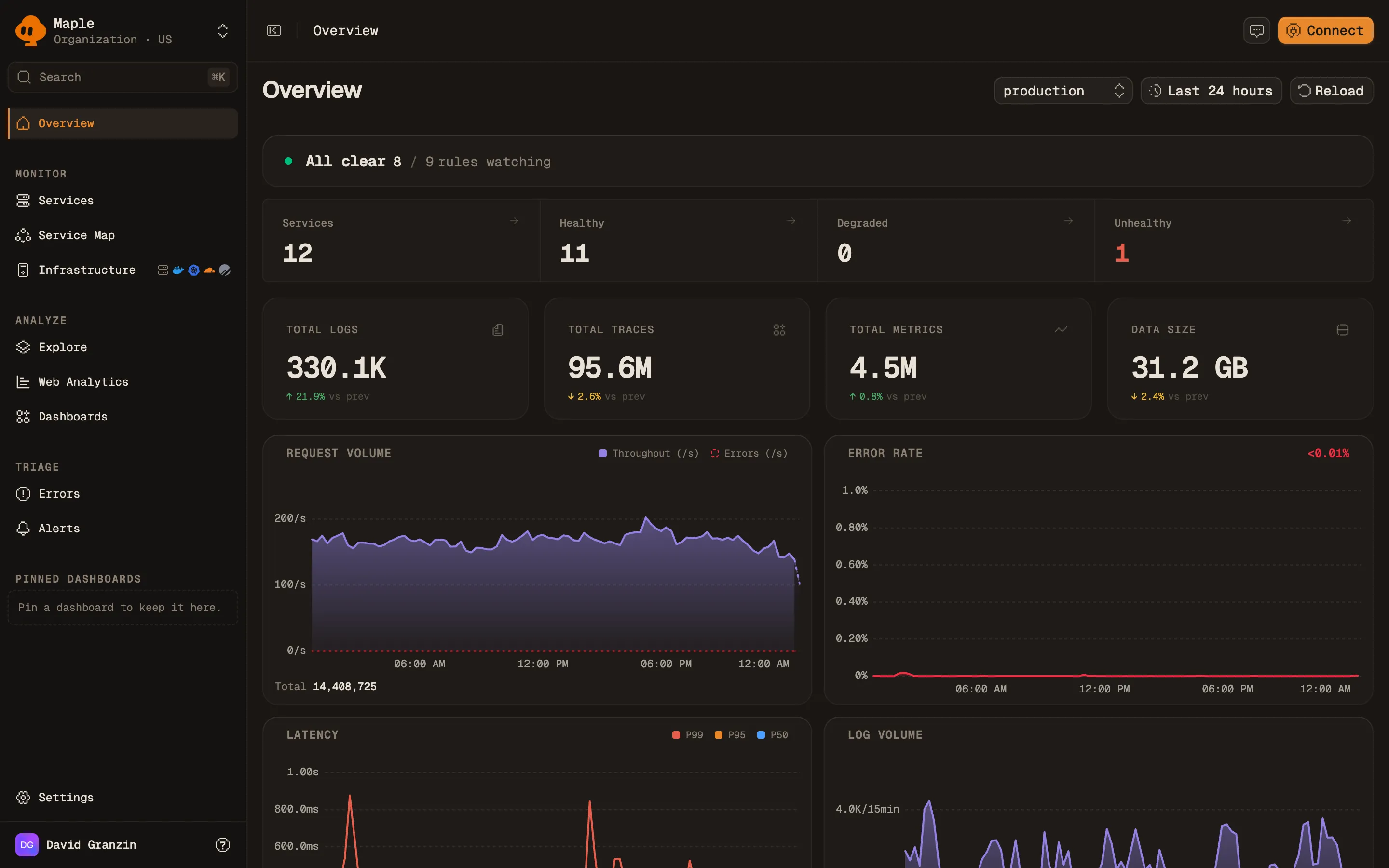
The Start with a template dialog in Maple's rule builder, with the Low Apdex score template reading “Apdex < 0.8 / 5min (target 500ms)”.
The Low Apdex score template. Every value it sets stays editable.
### 2. Set the target, then the score you defend Apdex target (ms) is your T: requests under it count as fully satisfied, and the frustrated line follows automatically at 4T. Then set **Condition** to `<` and **Threshold** to the score worth paging for, typically `0.8`. The panel also states the measurement boundary: built-in signals read entry-point spans only. A service that swallows failures on child spans and returns success from its entry point stays healthy here at any threshold. Use a **Query** or **Raw SQL** rule for that case.
The Signal & threshold panel with the Apdex chip selected, Apdex target 500 ms, condition less-than, threshold 0.8 and severity Warning.
Apdex target 500 ms, condition <, threshold 0.8. (The decimal comma is the browser's locale, not a Maple setting.)
### 3. Scope it One T fits one class of traffic. If a rule covers many services or routes, set **Group by** to `service.name` or `attr.http.route` so each group is scored on its own and opens its own incident. Scope, grouping and the other fields shared by every signal are described in [Alert rules](/docs/alerting/alert-rules#scope).
The Scope panel of the rule builder, with Services, Environments, Group by and Exclude services fields.
Scope and grouping. Empty means every service and every environment.
### 4. Window, timing, destinations Five minutes is the default window. Short windows on low-traffic services are noisy for Apdex in particular, because a handful of slow requests moves the ratio a long way. Keep **Min samples** at 50 or higher, and raise it on low-traffic services, so a service with 4 requests at 3am cannot post a score of 0.5 and page someone.
The severity toggle set to Warning, and the expanded evaluation timing row: window 5 minutes, 2 breaches to fire, 2 healthy checks to resolve, minimum 50 samples, renotify every 30 minutes.
Severity and evaluation timing. The defaults shown are the ones the template sets.
An Apdex rule skips windows with no requests, so a service that goes quiet overnight does not read as a score of 0. The other timing fields (**Breaches to fire**, **Healthy to resolve**, **Renotify (min)**) work as on every rule. See [Evaluation timing](/docs/alerting/alert-rules#evaluation-timing). Pick a **Severity**, attach your [notification destinations](/docs/alerting/notification-destinations), click **Test rule** to replay the rule over the past week, and save. ### Creating the same rule over the API Every field in the form is a field on the API. `apdex_threshold_ms` is T in milliseconds. It defaults to 500 when omitted. ```bash curl -X POST https://api.maple.dev/v2/alerts/rules \ -H "Authorization: Bearer maple_ak_…" \ -H "Content-Type: application/json" \ -d '{ "name": "Checkout Apdex below 0.8", "signal_type": "apdex", "apdex_threshold_ms": 500, "comparator": "lt", "threshold": 0.8, "window_minutes": 5, "service_names": ["checkout"], "environments": ["production"], "severity": "critical", "minimum_sample_count": 50, "consecutive_breaches_required": 2, "destination_ids": ["dest_oybbpTBhtSFGShMjjLiCrh"] }' ``` To see what the rule would have done over a past range before it can wake anyone, send the same object as `rule` to `POST /v2/alerts/rules/preview`, with `start_time` and `end_time`: ```json { "rule": { "name": "Checkout Apdex below 0.8", "signal_type": "apdex", "apdex_threshold_ms": 500, "comparator": "lt", "threshold": 0.8, "window_minutes": 5, "service_names": ["checkout"], "severity": "critical", "destination_ids": ["dest_oybbpTBhtSFGShMjjLiCrh"] }, "start_time": "2026-07-08T00:00:00.000Z", "end_time": "2026-07-15T00:00:00.000Z" } ``` See [Alert rules](/docs/alerting/alert-rules#create-a-rule-over-the-api) and the [API reference](/docs/reference/api) for the full schema. ### Or hand it to an agent You can also create the rule from an AI assistant. Connect Maple's [MCP server](/docs/reference/mcp) to any MCP client, then ask for the rule in plain language: > Create an Apdex alert on the checkout service. Target 500ms, page me when the score drops below 0.8, and send it to the on-call Slack channel. The agent builds the same rule you would build by hand. It cannot save an Apdex rule without a target, and it only sees your own organization's data. After the rule exists, you can ask which of your Apdex rules would never fire, or why one paged last night. The agent reads the rule's checks and incidents to answer. ## Known limitations - **Apdex is computed on sampled spans.** Under uniform sampling the score stays representative. A sampler that keeps slow or failed traces preferentially, without reporting its sampling weight, drags the score down. See [Sampling and throughput](/docs/concepts/sampling-throughput). - **One T per rule.** A service whose `/healthz` and `/reports/export` share a rule is being measured against a target that fits neither. Group by `attr.http.route`, or write separate rules. - **The score hides magnitude.** It counts frustrated requests without weighting how frustrated they were. Pair it with a p99 rule. The [What is Apdex?](/guides/what-is-apdex) guide covers the formula, a worked example, what counts as a good score, and how Apdex compares to p95 and p99. --- # Notification destinations > Alerting · https://maple.dev/docs/alerting/notification-destinations Route Maple alerts to Slack, email, PagerDuty, Discord, Telegram, Hazel or any HTTP endpoint. How to add a destination, send a test, and get the right credentials for each provider. A **notification destination** is where Maple delivers an alert when one of your rules fires. You add a destination once and attach it to any number of [alert rules](/docs/alerting/alert-rules). When a rule opens an incident, Maple sends a `trigger`. When the incident resolves, it sends a `resolve`. See [Incidents](/docs/alerting/incidents) for when each is sent. Destinations live on the **Destinations** tab of the **Alerts** page. Click **Add destination**, pick a provider, and fill in the **Connection** fields. Only organization admins can add, edit or delete destinations. Provider credentials are encrypted at rest and never returned to the browser after they are saved. ## Sending a test Every destination has a **Send test** button. It delivers a sample alert through the same code path that delivers real alerts, so it confirms your credentials before you attach the destination to a rule. If a test fails, Maple shows the provider's own rejection reason in the toast and on the destination card. For example, a bad PagerDuty key reports `PagerDuty delivery failed with 400: Invalid routing key`. ## Failed deliveries A delivery that fails with an error retrying cannot fix, such as a rejected credential, counts against the destination. After 3 such failures in a row, Maple disables the destination and marks it **Disabled** on its card. A successful delivery resets the count. Fix the credential, send a test, and re-enable the destination. ## Slack Link your Slack workspace to Maple, then choose the channel alerts go to. Maple posts through the linked workspace's bot. Incoming-webhook URLs are not supported. 1. Open **Settings → Integrations → Slack** and connect your workspace. See the [Slack integration](/docs/integrations/slack). 2. On the **Destinations** tab, click **Add destination** and pick the linked workspace. 3. Pick a **Channel** and save. ## Email Send alerts by email to members of your Maple organization. 1. Click **Add destination** and pick **Email**. 2. Under **Recipients**, select up to 10 members of the organization. 3. Save, then click **Send test**. Recipients must be members of the organization. Maple looks up each member's email address when you save, so you cannot enter an arbitrary address. To alert a distribution list or an external address, use a [Webhook](#webhook) destination. Email always uses Maple's built-in message format. A rule's **Message template** does not apply to it. ## PagerDuty Maple triggers PagerDuty incidents through the **Events API v2**. It needs an Events API v2 **integration key** (also called a routing key): a 32-character string scoped to one PagerDuty service. > A PagerDuty **REST API token** (from _User Settings_ or _API Access Keys_) does not work here. It fails the test with `PagerDuty delivery failed with 400: Invalid routing key`. The REST API manages PagerDuty itself. The Events API is what Maple posts alerts to. To get the right key: 1. In PagerDuty, go to **Services → Service Directory** and open (or create) the service that should receive these alerts. 2. Open the **Integrations** tab. 3. Click **Add integration** and choose **Events API v2**. 4. Copy that integration's **Integration Key** (32 characters). 5. Paste it into Maple's **Integration key** field and click **Send test**. See PagerDuty's [services and integrations guide](https://support.pagerduty.com/main/docs/services-and-integrations) for screenshots. | Field | Notes | | ------------------- | ---------------------------------------------------------------- | | **Integration key** | The 32-character Events API v2 routing key from the steps above. | Maple sends each `trigger` with a stable `dedup_key` and a matching `resolve` when the incident closes, so PagerDuty groups the lifecycle into one incident. ## Discord Post alerts to a Discord channel through an incoming webhook. 1. In Discord, open **Channel settings → Integrations → Webhooks → New Webhook**. 2. Copy the webhook URL (`https://discord.com/api/webhooks/...`) into the **Discord webhook URL** field. ## Telegram Send alerts to a Telegram chat, group or channel through a bot you create. Telegram has no per-channel webhook, so a destination needs two values: the bot's token and the id of the chat it posts to. **1. Create the bot.** In Telegram, message [@BotFather](https://t.me/BotFather), send `/newbot`, and follow the prompts. BotFather replies with a token of the form `123456789:AAH…`. That is the **Bot token** field. Copy it without the `bot` prefix. **2. Add the bot to the chat.** Invite it to the group or channel you want alerts in. For a channel, add it as an administrator with permission to post messages. A bot cannot message a chat it is not a member of. **3. Pick the chat.** In Maple, paste the bot token and click **Detect chats**. Maple asks Telegram which chats the bot can see and lists them by name. Pick one and the chat ID fills in. Detection reads the bot's recent updates: - **Adding the bot is enough.** You do not need to send a message first. Telegram notifies the bot when it is added to a chat, and Maple reads that notification. - **Telegram keeps about 24 hours of updates.** An empty list usually means the bot was added longer ago than that. Send it a message, or remove and re-add it, and detect again. - **A bot with a webhook registered cannot be inspected this way.** Telegram allows one reader at a time. If you pointed this bot at your own webhook, enter the chat ID by hand. To find the ID by hand, post a message in the chat and open `https://api.telegram.org/bot/getUpdates`, then read `result[].message.chat.id`. Group and channel IDs are negative (`-1001234567890`). A one-to-one chat is positive. Public channels can use `@channelusername` instead. | Field | Notes | | ------------- | ------------------------------------------------------------- | | **Bot token** | From @BotFather. Write-only: never returned after saving. | | **Chat ID** | `-1001234567890`, or `@channelusername` for a public channel. | When you save, Maple verifies the token and checks that the bot can reach the chat. A valid token pointed at a group the bot was never added to fails at save time, not at the first real alert. Alerts arrive as a formatted message with **Open in Maple** and **Ask Maple AI** buttons, and the alert chart as the message preview when one is available. ## Webhook POST a signed JSON payload to any HTTP endpoint you control. Use it for custom routing, on-call tools without a native integration, or your own automation. - Maple sends a JSON body describing the rule, the observed value, and links back into Maple. - Set an optional **signing secret** to receive an `x-maple-signature` HMAC-SHA256 header, so your endpoint can verify the payload came from Maple. - Your endpoint should respond with a `2xx` status. Any other status is a delivery failure and is shown on the destination. The payload, headers, signature verification and retry behavior are in the [alert webhooks reference](/docs/reference/webhooks). ## Hazel Connect [Hazel](https://hazel.sh/docs/integrations/maple) through OAuth and pick a workspace channel to route alerts into. See Hazel's [Maple integration guide](https://hazel.sh/docs/integrations/maple). ## Next steps - [Alert rules](/docs/alerting/alert-rules): attach destinations to a rule. - [Incidents](/docs/alerting/incidents): when Maple sends trigger, renotify and resolve. - [Alert webhooks reference](/docs/reference/webhooks): the webhook payload. --- # Uptime monitoring > Alerting · https://maple.dev/docs/alerting/uptime-monitoring Monitor availability in Maple: alert on traffic stopping and failing requests from your traces, and add HTTP checks from the OpenTelemetry Collector for endpoints and TLS certificates. Maple monitors availability from two sources. Alert rules on your traces fire when a service stops receiving requests or starts failing them. HTTP checks from the OpenTelemetry Collector cover what real traffic cannot: endpoints with little traffic, and failures that happen before a request reaches your code, such as a DNS change or an expired certificate. Maple does not run hosted probes. The checks run in a Collector you operate. > **Recommended reading first.** [Uptime monitoring with traces and HTTP checks](/guides/uptime-monitoring) is the background for this page: which failures a probe catches, which ones only traces see, and when a probe is worth adding. This page is the setup. ## Prerequisites - Traces arriving from the services you want to watch. - At least one [notification destination](/docs/alerting/notification-destinations). - For HTTP checks: the [OpenTelemetry Collector Contrib](https://github.com/open-telemetry/opentelemetry-collector-releases/releases) distribution (`otelcol-contrib`) on a host outside the system it checks, and a private ingest key (`maple_sk_…`) from **Settings → Ingestion**. ## Alert on real traffic 1. Open **Alerts**, click **New rule** and pick the **Throughput drop** template. 2. Under **Scope**, select the service. The template sets **Min samples** to 0, so a window with no requests counts as zero and fires. 3. Set **Threshold** below the service's quietest five minutes on a normal day. 4. Pick a range above the chart to replay the rule. The shaded periods are where it would have held an incident open. 5. Attach a destination and click **Create rule**.
The alert rule form with the Throughput signal selected, condition below 100, the checkout service in scope, and Evaluation timing opened to show a 5 minute window and Min samples 0.
A Throughput drop rule scoped to one service. Evaluation timing is opened to show Min samples at 0.
The rule preview chart over the last hour: throughput near 200 requests per window, a drop to zero for about 15 minutes, and a shaded band marked Would have fired 1 time, longest 25 minutes.
The rule replayed over the last hour. Requests stopped for about 15 minutes.
Add the **High error rate** template for failing requests and **Low Apdex score** for slow ones. [Alert rules](/docs/alerting/alert-rules) describes every field. A throughput rule needs traffic to drop from. For a service that sits idle for hours, use an HTTP check. ## Add HTTP checks The Collector's `http_check` receiver requests a list of URLs on an interval and reports each result as metrics. Save this as `config.yaml`: ```yaml receivers: http_check: collection_interval: 60s metrics: httpcheck.tls.cert_remaining: enabled: true targets: - method: GET endpoints: - https://example.com - https://api.example.com/health processors: resource/uptime: attributes: - key: service.name value: uptime-checks action: upsert batch: {} exporters: otlphttp/maple: endpoint: https://ingest.maple.dev compression: gzip headers: x-maple-ingest-key: ${env:MAPLE_INGEST_KEY} service: pipelines: metrics/uptime: receivers: [http_check] processors: [resource/uptime, batch] exporters: [otlphttp/maple] ``` Start the Collector with your key in the environment: ```bash MAPLE_INGEST_KEY=YOUR_INGEST_KEY otelcol-contrib --config config.yaml ``` Notes on the config: - **Older Collector releases name the receiver `httpcheck`.** Use that name in both places if your release rejects `http_check`. - **`resource/uptime` sets `service.name`.** The checks appear in Maple under the service `uptime-checks`. - **EU organizations** use `https://ingest.eu.maple.dev` as the endpoint. - **Run the Collector outside the system it checks.** On the same machine as the service, it goes down with it. ## What the receiver reports | Metric | Value | | ------------------------------ | ------------------------------------------------------------------------------------------------------------------------------------------------ | | `httpcheck.status` | One data point per status class (`1xx` to `5xx`): 1 for the class the response matched, 0 for the rest. A failed connection reports 0 for every class. | | `httpcheck.error` | 1 when the request failed before a response arrived, with the reason in `error.message`. | | `httpcheck.duration` | Total request time in milliseconds. | | `httpcheck.tls.cert_remaining` | Seconds until the certificate expires. Off unless enabled, as in the config above. | Every data point carries the checked address in `http.url`. ## Alert when an endpoint stops answering 1. Open **Metrics** and open `httpcheck.status`. 2. Set **Aggregate** to `max`, **Where** to `attr.http.status_class = "2xx"`, and **Group by** to `attr.http.url`. Keep the `attr.` prefix on the filter, or it is dropped when the chart becomes a rule. 3. Click **Create alert**. 4. Set **Condition** to `<` and **Threshold** to `1`. 5. Open **Evaluation timing**. Set **Window (min)** to 2 and **Min samples** to 1. A two-minute window holds two data points per URL, so the default of 50 would skip every check. 6. Leave **Breaches to fire** at 2. 7. Attach a destination and click **Create rule**. The rule reads: no check of this URL returned a 2xx in the last two minutes. It opens one incident per URL, about three minutes into an outage, and one failed check on its own does not fire it.
The metric page for httpcheck.status with Aggregate max, the filter attr.http.status_class equals 2xx and Group by attr.http.url. The chart shows two URLs at 1, and one of them at 0 for five minutes.
Step 2: the check charted per URL. One endpoint returned 503 for five checks while the other stayed up.
The Signal and threshold section of the alert rule form: a Metrics query on httpcheck.status filtered to the 2xx status class and grouped by attr.http.url, condition below 1, window 2 minutes, breaches to fire 2, Min samples 1.
Steps 4 to 6: the condition, the window and Min samples.
The rule preview chart over the last 30 minutes, grouped by URL. One URL drops from 1 to 0 for about five minutes inside a shaded band marked Would have fired 1 time, longest 8 minutes.
The rule replayed over the last 30 minutes. It would have fired once, for the endpoint that returned 503.
## Alert when the checks stop arriving A grouped rule skips a window with no data, so a stopped Collector would go unnoticed. Create a second rule on `httpcheck.status` with no group-by: - **Aggregate** `count`, **Condition** `<`, **Threshold** `1` - **Min samples** 1 - **Alert when there is no data** switched on ## Alert before a certificate expires Create a rule on `httpcheck.tls.cert_remaining`: - **Aggregate** `min`, **Group by** `attr.http.url` - **Condition** `<`, **Threshold** `1209600` (14 days in seconds) - **Min samples** 1 ## Verify Open **Metrics** and search for `httpcheck`. The metrics appear after the first check, emitted by the service `uptime-checks`. Open `httpcheck.status` and group by `attr.http.url` to see one series per target. ## Limits - One Collector probes from one place, through one DNS resolver. It cannot show that users in another region are cut off, and a network problem next to the Collector looks the same as an outage. - There is no status page. For probes from several regions, a public status page, or an availability report for customers, run a dedicated uptime product next to Maple. ## Troubleshooting - **No `httpcheck` metrics appear.** Check the Collector's output for exporter errors. A `401` means the ingest key is wrong or was rotated. - **The alert form warns "Unsupported metrics filter ignored".** The filter key is missing the `attr.` prefix. Use `attr.http.status_class`. - **Every check of the rule is skipped.** The window holds fewer data points than **Min samples**. Set it to 1. - **The rule fires on a single failed check.** **Aggregate** is `min`. With `max`, every check in the window has to fail. ## Next steps - [Alert rules](/docs/alerting/alert-rules): every signal, field and template. - [Incidents](/docs/alerting/incidents): what happens after a rule fires. - [Metrics](/docs/explore/metrics): chart `httpcheck.duration` and the other check metrics. - [Uptime monitoring with traces and HTTP checks](/guides/uptime-monitoring): the reasoning behind this setup. --- # Prometheus scraping > Integrations · https://maple.dev/docs/integrations/prometheus Point Maple at any Prometheus exposition endpoint. Maple scrapes it on a schedule, converts the samples to OpenTelemetry metrics, and records the health of every scrape. Maple can scrape any endpoint that serves the Prometheus or OpenMetrics text format. You add the endpoint as a scrape target. Maple polls it at the interval you choose, converts the samples to OpenTelemetry metrics, and ingests them like your own OTLP traffic. Scraped metrics appear in the [metrics explorer](/docs/explore/metrics), dashboards, and alert rules, and each target keeps a history of its scrapes. ## Prerequisites - An endpoint reachable from the public internet that serves `/metrics` in the Prometheus exposition format. ## Add a scrape target Open **Integrations → Prometheus** in Maple and click **Add Target**. The **Add Scrape Target** dialog has these fields: | Field | Notes | | ----------------------------- | ------------------------------------------------------------------------------------------------------------------------------------ | | **Name** | Display name. Used as the service name when **Service Name** is empty. | | **Service Name** | Optional. Sets `service.name` on the resource and the `job` attribute on every data point. | | **URL** | Full endpoint URL, for example `https://myapp.com:9090/metrics`. Loopback, private-range, and cloud-metadata addresses are rejected. | | **Scrape Interval (seconds)** | 5 to 300. Default 15. | | **Authentication** | **None**, **Bearer Token** (sent as `Authorization: Bearer …`), or **Basic Auth** (**Username** and **Password**). | Credentials are encrypted at rest. The scraper receives the decrypted auth header from Maple's API for each run and sends it directly to your endpoint. Requests carry the user agent `maple-prometheus-scraper`. Each request times out after the scrape interval minus one second, capped at 60 seconds. You can also manage targets through the [REST API](/docs/reference/api) under `/v2/scrape_targets`, with endpoints to create, update, delete, probe, and list checks. The API accepts one extra field, `labels_json`: a JSON object of labels added to every sample (for example `{"cluster": "prod"}`). The keys `job` and `instance`, and any key starting with `maple_` or `__`, are reserved and rejected. ## How the data looks - Metric names are kept as they appear in the exposition. - Counters become cumulative monotonic sums. Gauges and untyped metrics become gauges. Histograms become OTLP histograms with the original bucket bounds. - Summaries become three series: `_sum` as a cumulative sum, `_count` as a cumulative monotonic sum, and the quantiles as a gauge named `` with a `quantile` attribute. Summary samples that are not finite numbers (such as a `NaN` quantile with no observations yet) are dropped. - Every data point carries `job` (the service name) and `instance` (the host of the target URL), plus the target's labels and the sample's own labels. ## Verify 1. On the target row, click **Test**. Maple runs an immediate scrape and reports success or the exact failure: HTTP status, timeout, TLS or connection error. 2. Wait one scrape interval. The status badge changes from **No checks** to **Up**, and the row shows **Last scrape** with a relative time. 3. Open the target to see its check history. Each run lists **Time**, **State**, **Duration**, and **Samples**. 4. Search for one of your metric names in the [metrics explorer](/docs/explore/metrics). ## Troubleshooting - **Status is Down.** Open the target. The error message and a **How to fix** hint explain the failure. A failed scrape never advances the last successful scrape time, so the data gap stays visible next to the error. - **The URL is rejected.** The endpoint resolves to a loopback, private, or metadata address. Expose it through an authenticated public endpoint, or use the collector option below. - **401 or 403.** Check the authentication type and credentials. Basic Auth sends the username and password exactly as entered. - **The endpoint is only reachable inside your network.** Run an OpenTelemetry Collector inside the network with a `prometheus` receiver and an OTLP exporter pointed at Maple's [ingest endpoint](/docs/reference/ingest). ## Next steps - [WarpStream](/docs/integrations/warpstream): scrape WarpStream Agents or the hosted Prometheus endpoint. - [PlanetScale](/docs/integrations/planetscale): branch metrics discovered automatically. - [Alert rules](/docs/alerting/alert-rules): alert on a scraped metric. --- # WarpStream > Integrations · https://maple.dev/docs/integrations/warpstream Monitor WarpStream clusters in Maple. Scrape Agent /metrics endpoints directly, or pull consumer lag, request latency, and object-store health from WarpStream's hosted Prometheus endpoint. WarpStream exposes Prometheus metrics in two places. Every Agent serves a local `/metrics` endpoint, and the WarpStream control plane offers a hosted, authenticated Prometheus endpoint per virtual cluster. Both work with [Maple's Prometheus scraping](/docs/integrations/prometheus). Pick the one that matches your network topology. ## Option A: Hosted Prometheus endpoint (recommended) The control plane serves cluster health (consumer group lag, partition sizes, agent heartbeats) at a single internet-reachable URL. Maple can scrape it without network changes: ``` https://api.warpstream.com/api/v1/monitoring/prometheus/virtual_clusters/$VIRTUAL_CLUSTER_ID ``` 1. In WarpStream, create a **read-only Agent Key** for the cluster (least privilege; an account-level API key also works if you want one key for several clusters). 2. In Maple, open **Integrations → WarpStream** (or **Prometheus**), click **Add Target**, and configure: - **URL**: the hosted endpoint above, with your virtual cluster ID (`vci_…`) - **Authentication**: **Basic Auth**, with **Username** `prometheus` and **Password** set to the API key - **Scrape Interval (seconds)**: 30 to 60 is enough for control-plane metrics To tag every series with a cluster name, set `labels_json` (for example `{"cluster": "prod-kafka"}`) through the [scrape targets API](/docs/integrations/prometheus#add-a-scrape-target). See WarpStream's [Hosted Prometheus Endpoint docs](https://docs.warpstream.com/warpstream/agent-setup/monitor-the-warpstream-agents/hosted-prometheus-endpoint) for the metric set, which includes Tableflow and Schema Registry metrics on those cluster types. ## Option B: Scrape the Agents directly Each WarpStream Agent serves the full agent-level metric set (request latency histograms, produce/fetch byte counters, object-store operation latency) on its internal port. The endpoint is enabled by default and has no authentication: ``` http://$AGENT_IP:8080/metrics ``` Because Agents run inside your VPC under WarpStream's BYOC model, Maple's scraper can only reach them if you expose the endpoint (for example through an internal load balancer with auth, which you can pair with Maple's **Bearer Token** or **Basic Auth** options). If the Agents are fully private, run an OpenTelemetry Collector next to them with a `prometheus` receiver scraping `:8080/metrics` and an OTLP exporter pointed at Maple's [ingest endpoint](/docs/reference/ingest) instead. Add one Maple target per agent (or per load-balanced agent pool), with the agent host in **URL**. Every series already carries an `instance` attribute with the target host. To add cluster or agent names, set `labels_json` such as `{"cluster": "...", "agent": "..."}` through the API. ## Metrics worth alerting on All WarpStream metrics carry the `warpstream_` prefix. From WarpStream's [Important Metrics and Logs](https://docs.warpstream.com/warpstream/agent-setup/monitor-the-warpstream-agents/important-metrics-and-logs): | Metric | Why it matters | | ---------------------------------------------------------------------- | ------------------------------------------------------------------ | | `warpstream_consumer_group_lag` | Consumer lag in offsets. The main "are we keeping up" gauge. | | `warpstream_agent_kafka_request_latency` | Produce/fetch latency histogram by request type. | | `warpstream_agent_kafka_request_outcome` | Success vs. error counters per Kafka request type. | | `warpstream_blob_store_operation_latency` | Object-store PUT/GET health. Check this first when latency spikes. | | `warpstream_agent_control_plane_operation_latency` | Agent ↔ control-plane RPC health. | | `warpstream_topics_count` / `warpstream_partitions_count` (+ `_limit`) | Headroom against cluster limits. | Once samples arrive, build dashboards and alert rules on these like any other Maple metric. For example, alert when `warpstream_consumer_group_lag` stays above a threshold for 5 minutes. ## Troubleshooting - **401 from the hosted endpoint.** The Basic Auth username must be exactly `prometheus`. The password is the API or Agent key. - **Timeouts scraping Agents.** Confirm the Agent's internal port (8080 by default) and that the endpoint is reachable from the internet. `curl $AGENT_IP:8080/v1/status` should return `OK`. - Use the target's **Test** button in Maple to see the exact upstream error. --- # PlanetScale > Integrations · https://maple.dev/docs/integrations/planetscale Connect a PlanetScale organization to Maple. Maple discovers every database branch's metrics endpoint, scrapes connections, WAL size, and pod CPU, and adds your databases to the service map. PlanetScale publishes Prometheus metrics per database branch behind a [service-discovery API](https://planetscale.com/docs/vitess/integrations/prometheus). One organization endpoint returns the current list of branch metrics targets, and that list changes as branches are created and deleted. You connect the organization once. Maple runs the discovery call, scrapes every branch it returns, and refreshes the branch list every 10 minutes. Setup has two parts. An OAuth authorization covers the management plane: database inventory, query insights, and webhooks. PlanetScale serves branch metrics only to service tokens, so you add a service token to turn on metrics. ## Prerequisites - Permission in the PlanetScale organization to authorize an OAuth application and create a service token. ## 1. Authorize Maple Open **Integrations → PlanetScale** in Maple and click **Connect PlanetScale**. A popup takes you to PlanetScale to authorize Maple's OAuth application. You can revoke access from PlanetScale at any time. - If the authorization covers one organization, Maple binds it automatically. - If it covers several, pick one. You can also set **Only these branches (optional)** and **Exclude branches (optional)**. Both take glob patterns, where `*` matches any run of characters and `?` matches exactly one (for example `pr-*, preview-*`). To switch organizations later, click **Change organization**. The OAuth application needs `read_databases` for the database inventory, the service map, and query insights. If it is missing, the **Permissions** step shows **Reauthorize with read_databases**. ## 2. Add a service token for branch metrics After authorization the card shows a four-step checklist: **Authorization**, **Permissions**, **Branch metrics access**, and **Metrics arriving**. The **Branch metrics access** step asks for a service token. If the OAuth authorization already covers the metrics endpoints, this step completes without one. 1. Click **Create a token in PlanetScale**. Create a service token with the `read_metrics_endpoints` organization permission. No other permission is needed. 2. Paste the **Service token ID** and **Service token secret** into Maple. 3. Click **Enable metrics**. The secret is encrypted at rest. Maple derives the discovery URL (`https://api.planetscale.com/v1/organizations/{org}/metrics`), authenticates discovery and every scrape with the token, and scrapes each branch as its own target. New branches are picked up on the next discovery refresh. Deleted branches stop being scraped. To replace the token later, click **Rotate token**. ## 3. Optional: webhooks Under **Webhooks**, click **Show setup** to reveal an endpoint URL and signing secret. Register them in each database's webhook settings on PlanetScale. Only Maple organization admins can view the secret. ## Verify 1. The **Metrics arriving** step changes from **Waiting for the first scrape.** to done, and the checklist collapses to a single health row reading **Streaming branch metrics from** your organization. The card polls while it waits, so you do not need to reload. 2. Open **Infrastructure → PlanetScale** to see your databases and branches. 3. In the [metrics explorer](/docs/explore/metrics), search for `planetscale_` to see branch series. ## What you get Each branch series carries PlanetScale's discovery labels. The most useful is `planetscale_database_branch_id`, which keys every series to a branch. Highlights from the metric set ([Postgres](https://planetscale.com/docs/postgres/monitoring/prometheus-postgres), [Vitess](https://planetscale.com/docs/vitess/integrations/prometheus)): | Metric | What it tells you | | ---------------------------------------------- | ---------------------------------------------------------- | | `planetscale_postgres_connection_state` | Connections by state (active, idle, idle in transaction). | | `planetscale_edge_postgres_active_connections` | Active connections at the edge. | | `planetscale_postgres_wal_size_bytes` | WAL size. An early warning for replication and disk usage. | | `planetscale_pgbouncer_current_connections` | PgBouncer pool utilization. | | `planetscale_pods_cpu_util_percentages` | CPU per pod backing the branch. | | `planetscale_vtgate_total_pods` | (Vitess) vtgate pods per availability zone. | Group dashboards and [alert rules](/docs/alerting/alert-rules) by `planetscale_database_branch_id`. For example, alert when WAL size passes a threshold or active connections approach your pool limit. ## Troubleshooting - **Metrics arriving shows "The last scrape failed."** The health row shows the error. A failure for one branch is prefixed with `[branch:]`. - **401 or 403 on discovery or scrapes.** The service token was deleted or lacks `read_metrics_endpoints`. Click **Rotate token** and paste a new one. - **Authorization shows as revoked.** Click **Reconnect** to authorize again. - **Metrics stopped arriving.** The **Metrics arriving** step reports a stall after three scrape intervals without data. Check the error on the health row. - **A discovery call fails.** Maple keeps scraping the last known branch list and shows the discovery error on the target, so branch metrics do not drop out during a PlanetScale API outage. - **Branch filters did not apply.** Changes take effect on the next scrape because the cached branch list is cleared on save. ## Next steps - [Service map](/docs/explore/service-map): PlanetScale databases linked to the services that query them. - [Prometheus scraping](/docs/integrations/prometheus): how scraped samples become OpenTelemetry metrics. - [Alert rules](/docs/alerting/alert-rules): alert on branch metrics. --- # GitHub > Integrations · https://maple.dev/docs/integrations/github Install the Maple GitHub App to sync repositories and commit history, resolve commit SHAs in your telemetry, trace your GitHub Actions runs, and give the MCP server read access to your source code. The Maple GitHub App syncs your repositories and their commit history into Maple. You install the app, choose which repositories to share, and pick one branch to track per repository. Maple backfills the last 90 days of commits on that branch and keeps it current through GitHub webhooks. Once connected, the integration does three things: - **Commit context in telemetry.** When your services report the `vcs.ref.head.revision` resource attribute, Maple resolves the SHA against synced commits. The trace view and service pages show a commit hover card with the author, message, and a link to GitHub. - **CI traces.** Every finished GitHub Actions run becomes a trace under the `github-actions` service: the run is the root span, each job a child span, and each step a span inside its job. No workflow changes are needed. Each job's log comes along as logs on those spans. - **Source code tools for the MCP server.** The [MCP server](/docs/reference/mcp) gains three read-only tools that reach your repositories through the app installation: `list_source_repositories`, `search_source_code` (GitHub code search on the default branch), and `read_source_file` (a line range at a branch, tag, or commit SHA). An assistant can go from an exception in a trace to the code that raised it. ## Prerequisites - Permission to install GitHub Apps on the personal account or organization that owns the repositories. ## 1. Connect your GitHub account Open **Integrations → GitHub** in Maple and click **Connect GitHub**. A popup walks you through installing the **Maple GitHub App**. During install you choose the scope: - **All repositories**: Maple syncs every repository the account can access, including ones added later. - **Only select repositories**: Maple syncs only the repositories you pick. You can change the selection from GitHub at any time. When the install completes, the popup closes and the card shows **Connected** with the account and repository scope. Maple discovers repositories and queues a backfill for each. Each row moves from **Queued** to **Syncing** to **Synced**. ## 2. Pick a tracked branch per repository Each repository tracks one branch. It starts as the repository's default branch, and Maple syncs commits only from that branch. Use the **Tracked branch** selector on a repository row to change it. Changing the tracked branch is destructive. Maple deletes the repository's synced commits and re-syncs the last 90 days from the new branch. The app asks you to confirm before it applies the change. ## How syncing works - **90-day backfill** on connect and whenever you change the tracked branch. - **Webhooks** deliver pushes to a tracked branch as they happen. Force-pushes are reconciled. Repositories added to or removed from the installation, and a suspended app, are picked up automatically. - **A scheduled reconcile** runs every 12 hours for every installation, so a missed webhook does not leave gaps. ## CI traces Maple receives GitHub's `workflow_run` and `workflow_job` webhooks for the repositories the app can see and writes one trace per run attempt. A re-run gets its own trace. - **Spans:** the run is a `SERVER` span named `RUN ` (for example `RUN CI`), from when it started to when it finished. A job that waited a second or more for a runner spans from when it was queued to when it finished, with a `Waiting for a runner` child span for that wait; otherwise it starts when the runner picked it up, and a job that never started has no length. The wait is always on the job span as `maple.cicd.queue_duration_ms`. Each step is a span inside its job, named without the commit a pinned action points at (`Run actions/checkout`, not `Run actions/checkout@3d3c42e…`). Steps that never ran are left out. - **Status:** failed and timed-out runs, jobs, and steps are `Error` with `error.type` set, passing ones are `Ok`, and cancelled or skipped ones carry no status. - **Failure reasons:** for a failed job, Maple reads the annotations GitHub recorded on it (test failures, compiler errors). The most specific one becomes the job span's status message and `maple.cicd.failure.reason`, and up to 20 of them, failures first, are `cicd.annotation` events on the job span with `code.file.path` and `code.line.number`. - **Attributes:** spans follow the OpenTelemetry CI/CD conventions (`cicd.pipeline.name`, `cicd.pipeline.run.id`, `cicd.pipeline.action.name`, `cicd.pipeline.result`, `cicd.pipeline.task.name`, `cicd.pipeline.task.run.id`, `cicd.pipeline.task.run.result`, `cicd.pipeline.task.run.url.full`, `cicd.worker.name`) plus `vcs.ref.head.name`, `vcs.ref.head.revision`, and `vcs.change.id` (the pull request number). Jobs and steps are both tasks; a step's URL links to its line in the job log. The resource carries `vcs.repository.name`, `vcs.owner.name`, and `vcs.repository.url.full`, so you can filter CI traces by repository. CI traces and logs are on by default. CI spans and logs are ingested like any other telemetry and count toward your usage. To stop both, an organization admin turns off **CI traces and logs** on **Integrations → GitHub**; runs that finish while it is off are not recorded. ## CI logs Maple also downloads each finished job's log from GitHub and writes every line as a log record under the `github-actions` service. Nothing runs inside your workflows: the app's existing **Actions: Read** permission covers the download. - **Linked to steps:** each record carries the job's trace id and the span id of the step that was running when the line was written, so a step's output shows up with that step in the trace view. Lines from before the first step belong to the job span. - **Timestamps** come from the runner's own per-line stamps. A line without one, such as the rest of a multi-line message, takes the stamp of the line before it. - **Severity:** `##[error]` lines (including `::error::` workflow commands) are `ERROR`, `##[warning]` lines are `WARN`, `##[debug]` lines are `DEBUG`, and everything else is `INFO`. The runner's markers and color codes are removed from the text, and blank lines are dropped. - **Attributes:** `cicd.pipeline.name`, `cicd.pipeline.run.id`, `cicd.pipeline.task.name` and `cicd.pipeline.task.run.id` (the same as on the step span, or the job's for job-level lines), `maple.cicd.step.number`, `maple.cicd.job.name`, `vcs.ref.head.name`, and `vcs.ref.head.revision`. - **Size:** Maple keeps the first 5 MB of a job's log and cuts lines longer than 8,000 characters. A cut log ends with a `WARN` record that links to the full log on GitHub. - **Secrets:** GitHub masks registered secrets as `***` before Maple reads the log. Values a job prints that were never registered as secrets are kept as written. Logs arrive a few seconds after their job's spans, since GitHub publishes a log shortly after the job finishes. ## Verify 1. On **Integrations → GitHub**, every repository row reads **Synced** with a recent sync time. The card polls while backfills run, so you do not need to reload. 2. Deploy a service that sets `vcs.ref.head.revision` to the commit SHA it was built from. See [OpenTelemetry conventions](/docs/concepts/otel-conventions). 3. Open a trace from that service. The short SHA in the trace header shows the commit author and message on hover. ## Managing the connection - **Refresh** reloads repository status. - **Manage** reopens the GitHub App install screen so you can add or remove repositories. - **Needs attention** lists repositories whose access was removed on GitHub. Their commit history is kept. Re-enable them in the [GitHub App settings](https://github.com/settings/installations) to resume syncing, or click **Delete** to remove the repository and its synced commits from Maple. - **Disconnect** removes the app connection and permanently deletes all synced repositories and their commit history from Maple. Reconnecting later re-syncs from scratch. ## Troubleshooting - **A repository shows Sync failed.** Click **Refresh**. Failed backfills are retried automatically. The row shows the underlying error, most often a GitHub rate limit (retried once the limit resets) or revoked access. - **No repositories appear after connecting.** Discovery and the first backfill run in the background. The card polls and fills in as they complete. - **Commits don't show up for a repository.** Confirm the tracked branch is the one your commits land on. Only the tracked branch is synced. - **Traces show a SHA without a hover card.** The SHA must be a full 40-character commit on a synced tracked branch within the synced history. - **No CI traces appear.** Traces are written when a run or job finishes, so a run in progress has none yet. Check that **CI traces and logs** is on under **Integrations → GitHub**. If finished runs are still missing, open the [GitHub App settings](https://github.com/settings/installations) and accept any pending permission request from the Maple app. - **CI traces appear but no CI logs.** A job whose steps never ran has no log to send, and a log GitHub takes too long to serve is skipped. - **`search_source_code` finds nothing.** GitHub code search indexes only the default branch and matches whole tokens. Search for exact identifiers or exception text. ## Next steps - [OpenTelemetry conventions](/docs/concepts/otel-conventions): the `vcs.*` resource attributes Maple reads. - [MCP server](/docs/reference/mcp): connect an assistant and use the source code tools. - [Traces](/docs/explore/traces): where commit context appears. --- # Slack > Integrations · https://maple.dev/docs/integrations/slack Add the Maple bot to a Slack workspace. Mention it in a channel to ask about your traces, logs, metrics, and errors, and use the same workspace as an alert destination. The Slack integration adds the Maple bot to a Slack workspace and links that workspace to your Maple organization. Mention the bot in a channel and it answers in a thread, using the same assistant as Maple's chat, with access to your organization's traces, logs, metrics, and errors. Once the workspace is linked, its channels are also available as [alert destinations](/docs/alerting/notification-destinations). ## Prerequisites - You are an admin of the Maple organization. Only organization admins can connect, change, or disconnect Slack workspaces. - You can install apps in the Slack workspace. ## Install the bot 1. Open **Integrations → Slack** in Maple. 2. Click **Add to Slack**. Maple redirects you to Slack. 3. Choose the workspace and approve the install. Slack returns you to Maple, which shows **Connected** with the workspace name. To link more workspaces to the same organization, click **Add another workspace**. A Slack workspace can be linked to one Maple organization at a time. Enterprise Grid org-wide installs are not supported. Install the app into a single workspace instead. ### Permissions The bot requests these Slack scopes. It requests no user token. | Scope | Used for | | ------------------------------------------------------------------ | -------------------------------------------------- | | `app_mentions:read` | Seeing when someone mentions the bot. | | `channels:history`, `groups:history`, `im:history`, `mpim:history` | Reading the thread it is replying in, for context. | | `chat:write` | Posting and updating its replies. | | `chat:write.public`, `channels:read`, `groups:read` | Listing channels and posting alerts to them. | ## Ask the bot a question 1. Invite the bot to a channel: `/invite @Maple`. 2. Mention it with a question, for example `@Maple why is checkout slow?`. The bot replies in a thread on your message and updates that reply as the answer comes in. It can post charts. - **Follow-ups**: reply in the bot's thread within 24 hours to continue without mentioning it again. - **Context**: the bot reads up to 20 earlier messages in the thread. - **One question at a time**: while an answer is in progress, new messages in the same conversation get a note asking you to wait. - Messages that do not mention the bot and are not in one of its threads are ignored. The bot has no slash commands. ### What the bot can do The bot reads your Maple data the same way the [MCP server](/docs/reference/mcp) does: traces, logs, metrics, services, errors, dashboards, and alerts. When a request would change something, such as creating a dashboard, editing an alert rule, or updating an error issue, the bot does not make the change on its own. It posts an **Approve** prompt naming the change, and the change runs only after someone approves it. ### Identity The workspace is linked to the organization, not to individual people. No Slack account is tied to a Maple user. As a result: - Anyone in a channel with the bot can ask about the linked organization's data. - Anyone who can see a proposed change can approve it, and the approved change runs with organization-level permissions. Invite the bot only to channels whose members should see your data and be able to make these changes. ## Slack as an alert destination After the workspace is linked, Slack alerts go through the same bot. There is no separate webhook setup. 1. Open the alert destination settings. See [Notification destinations](/docs/alerting/notification-destinations). 2. Pick the tile named after your Slack workspace. 3. Choose a channel. Private channels are marked **(private)**. The bot can post to public channels it has not been invited to. To post to a private channel, invite the bot first. The two features are independent. You can link a workspace only for alerts and never mention the bot, or use the bot without routing any alerts to Slack. ## Verify 1. **Integrations → Slack** shows your workspace with **Connected**. 2. In a channel with the bot, mention it with a question such as `@Maple which services had errors in the last hour?`. A threaded reply appears. ## Disconnect On **Integrations → Slack**, click **Disconnect** next to the workspace and confirm. The workspace is unlinked from your organization immediately. To remove the bot from the workspace itself, uninstall the app in Slack. Uninstalling the app in Slack also unlinks the workspace in Maple. ## Troubleshooting - **"The install link expired."** Start the install again from **Add to Slack**. - **"That workspace is already linked to a different Maple organization."** Disconnect it from the other organization first. - **"Only organization admins can connect Slack."** Ask an organization admin to install it. - **The bot does not reply.** Make sure you mentioned it, that it is in the channel (`/invite @Maple`), and that the workspace shows **Connected** in Maple. - **"Maple's agent can't be reached from here right now."** The assistant is temporarily unavailable. Try again later. - **The channel list for alerts is empty or asks you to reinstall.** The workspace was linked before the alert scopes were added. Click **Open Slack integration** and reinstall with **Add to Slack**. ## Next steps - [Notification destinations](/docs/alerting/notification-destinations): route alerts to Slack channels. - [Alert rules](/docs/alerting/alert-rules): decide what gets sent. - [MCP server](/docs/reference/mcp): the same data in your editor or coding agent. --- # Discord > Integrations · https://maple.dev/docs/integrations/discord Add the Maple bot to a Discord server. Mention it in a channel to ask about your traces, logs, metrics, and errors, and post alerts to the server's channels. The Discord integration adds the Maple bot to a Discord server and links that server to your Maple organization. Mention the bot in a channel and it answers in a thread, using the same assistant as Maple's chat. Once the server is linked, its channels are also available as [alert destinations](/docs/alerting/notification-destinations). ## Prerequisites - You are an admin of the Maple organization. - You have the **Manage Server** permission on the Discord server. Discord requires it to add an app. ## Add the bot to a server 1. Open **Integrations → Discord** in Maple. 2. Click **Add to Discord**. Maple redirects you to Discord. 3. Pick the server and approve the install. Discord returns you to Maple, which shows **Connected** with the server name. To link more servers to the same organization, click **Add another workspace**. A server can be linked to one Maple organization at a time. ### Permissions The bot asks for no member, role, channel, or moderation permissions. | Permission | Used for | | ----------------------------------------------- | ------------------------------------------- | | View Channels, Read Message History | Reading the conversation it is replying in. | | Send Messages, Embed Links | Posting answers, charts, and alerts. | | Create Public Threads, Send Messages in Threads | Answering in a thread on your message. | | Add Reactions | Marking a request as picked up. | ## Link your Discord account The bot answers only people who have linked their Discord account to a Maple user. Each person links once. 1. Open **Integrations → Discord** in Maple. 2. Under **Your Discord account**, click **Link your account** and approve in Discord. The link asks Discord for your user ID and nothing else. It adds no permissions on any server. You can only link your own account, and only members of the Maple organization get answers. ## Ask the bot a question Mention the bot in any channel it can see, for example `@Maple why is checkout slow?`. If your account is not linked, the bot replies with a link to do it and reads nothing. The bot starts a thread on your message and edits its reply there as the answer comes in. It reads the surrounding messages for context, so a follow-up like "and the payments call?" works. - **Follow-ups**: reply inside the bot's thread. No mention is needed. Replies from people who have not linked are ignored. - **New conversation**: mention the bot in another channel. - **One question at a time**: a message sent while an answer is still being written gets a note asking you to wait. It is not queued. ### Answers run as your Maple user The bot reads your Maple data the same way the [MCP server](/docs/reference/mcp) does, as your Maple user with your current roles. If you leave the organization, the bot stops answering you even while the link exists. When a request would change something, such as creating a dashboard or editing an alert rule, the bot posts a card with **Run** and **Skip** buttons instead of acting. Any linked person can press them. The change runs as that person's Maple user, so a change that needs an admin fails for a member, the same as in the app. The card then updates with the result. Answers are posted in the channel, so everyone who can read the channel sees them. Add the bot only where the members should see your data. This differs from [Slack](/docs/integrations/slack), which has no account linking: anyone in a Slack channel with the bot can ask, and anyone who can see a card can approve it. ## Discord as an alert destination After the server is linked, alerts can go through the bot. 1. Open the alert destination settings. See [Notification destinations](/docs/alerting/notification-destinations). 2. Pick the tile named after your Discord server. 3. Choose a text or announcement channel the bot can see. To post alerts to a server without installing the bot, use the [Discord webhook destination](/docs/alerting/notification-destinations#discord) instead. ## Verify 1. **Integrations → Discord** shows your server with **Connected**. 2. In a channel the bot can see, send `@Maple which services had errors in the last hour?`. A thread opens with the answer. ## Disconnect On **Integrations → Discord**, click **Disconnect** next to the server and confirm. The server is unlinked immediately. To remove the bot from the server, kick it in Discord. Removing the bot in Discord also unlinks the server in Maple. To unlink your own account, click **Unlink** under **Your Discord account**. ## Troubleshooting - **"This workspace isn't connected to a Maple organization yet."** The bot is in the server but the server is not linked. An admin runs **Add to Discord** from Maple. - **"Only organization admins can connect Discord."** Ask an organization admin to install it. - **"Link your Discord account to Maple to ask it questions."** Link your account in Maple, then mention the bot again. - **"Link your Discord account to Maple to approve this."** Link your account in Maple, then press **Run** again. - **"The Maple account this chat account is linked to is no longer in this organization."** Ask an admin to add you back, or link a different Maple account. - **The bot does not reply.** Make sure you mentioned it and that it can see the channel. Check the channel's permission overrides for the Maple role. ## Next steps - [Notification destinations](/docs/alerting/notification-destinations): route alerts to Discord channels. - [Alert rules](/docs/alerting/alert-rules): decide what gets sent. - [MCP server](/docs/reference/mcp): the same data in your editor or coding agent. --- # Cloudflare > Integrations · https://maple.dev/docs/integrations/cloudflare Connect a Cloudflare account with OAuth. Maple polls zone traffic, Workers, security, DNS, Queues, and Durable Objects analytics every 5 minutes and shows them under Infrastructure and on the service map. The Cloudflare integration connects one or more Cloudflare accounts to Maple through OAuth. Maple polls Cloudflare's GraphQL Analytics API every 5 minutes and stores the results as OpenTelemetry metrics. You get zone traffic, cache, and latency; Workers invocations, errors, and CPU time; firewall and DNS activity; and Queues and Durable Objects stats. The data appears under **Infrastructure → Cloudflare**, on the service map, and in the [metrics explorer](/docs/explore/metrics). You do not need to set up Logpush or run an agent. ## Prerequisites - You are an admin of the Maple organization. - You can authorize OAuth applications on the Cloudflare account. ## Connect 1. Open **Integrations → Cloudflare** in Maple. 2. Click **Connect Cloudflare**. A Cloudflare consent screen opens in a popup. 3. Choose the accounts to share and approve. One authorization can cover several accounts. The popup closes and the card lists your **Connected accounts**. Maple starts collecting right away. ### Permissions requested | Scope | Used for | | ------------------------------------------------------------------------------------------------------------------------------------------------ | --------------------------------------------------------------------------------------------- | | `account-analytics.read` | Workers, Queues, and Durable Objects analytics. | | `analytics.read` | Zone HTTP, firewall, and DNS analytics. | | `zone.read` | Listing your zones. | | `query-cache.read` | Listing Hyperdrive configs for the service map. Optional. | | `account-settings.read`, `workers-scripts.read`, `workers-scripts.write`, `workers-observability.write`, `workers-observability-telemetry.write` | Also requested on the consent screen. Analytics collection needs only the three scopes above. | Maple also requests `offline_access` so the connection can refresh its token without you reconnecting. ## What Maple collects Maple reads these Cloudflare datasets in 5-minute buckets: HTTP requests (with breakdowns by path, country, and client), Workers invocations, firewall events, DNS queries, Queue backlog and consumers, and Durable Object invocations. On connect it backfills the last 24 hours, or less if your Cloudflare plan keeps less history. The data is stored as metrics named `cloudflare.*`, for example: | Metric | Service name | | ----------------------------------------------------------------------------------------------------------------------------------------------------- | --------------------------------- | | `cloudflare.http.requests`, `cloudflare.http.bytes`, `cloudflare.http.edge.ttfb`, `cloudflare.http.origin.duration` | `cloudflare/` | | `cloudflare.firewall.events`, `cloudflare.dns.queries` | `cloudflare/` | | `cloudflare.worker.requests`, `cloudflare.worker.errors`, `cloudflare.worker.subrequests`, `cloudflare.worker.cpu_time`, `cloudflare.worker.duration` | `cloudflare-worker/