
Sentry is an application monitoring platform focused on error tracking and performance monitoring. It has a free Developer plan for one user and paid Team and Business plans, and it bills errors, spans, replays and logs by volume beyond each plan's included quota.
This guide covers each plan and its price, what the free plan includes, how usage is billed and what happens past your quota, the available discounts, and two worked monthly bills.
Key takeaways
- Developer is $0 for one user, with 5,000 errors, 5M spans and 50 replays a month.
- Team is $29 a month ($26 billed annually) and Business $89 ($80); both include 50,000 errors and 5M spans.
- Business charges about twice the Team rate for each error and span above the included volume.
- Reserved volume costs 20% less than pay-as-you-go for errors, spans, replays and attachments.
- Once the pay-as-you-go budget runs out, new data is dropped until the billing cycle resets.
01 · Plans
Sentry plans and prices
| Per month | Developer | Team | Business | Enterprise |
|---|---|---|---|---|
| Billed monthly | $0 | $29 | $89 | Custom |
| Billed annually | $0 | $26 | $80 | Custom |
| Users | 1 | Unlimited | Unlimited | Unlimited |
| Errors | 5,000 | 50,000 | 50,000 | Custom |
| Spans | 5M | 5M | 5M | Custom |
| Replays | 50 | 50 | 50 | Custom |
| Logs | 5 GB | 5 GB | 5 GB | Custom |
| App metrics | 5 GB | 5 GB | 5 GB | Custom |
| Attachments | 1 GB | 1 GB | 1 GB | Custom |
| Cron, uptime | 1 each | 1 each | 1 each | Custom |
| Lookback | 30 days | Up to 90 days | Up to 90 days + sampled | Custom |
| Pay-as-you-go budget | No | Yes | Yes | Yes |
| API and integrations | No | Yes | Yes | Yes |
These are the quotas each plan includes. Usage past them is billed per category at the rates in How Sentry bills usage.
The annual price is paid up front for the year. Prices are in US dollars before tax: EU and UK customers pay VAT unless they give a valid VAT ID, and sales tax applies in some US states. Organizations that signed up before June 11, 2024 may still be on the older plans billed by transactions; Settings > Subscription in Sentry shows which one applies.
Team or Business
Both include the same volume and unlimited users. Business adds anomaly detection, advanced inbound filtering, Code Owners, Relay, SAML and SCIM single sign-on, unlimited dashboards and 1,000 metric monitors instead of 20. The cost difference is mostly in the metered part: Business charges about twice the Team rate for every error and span above the included volume, while replays, logs, attachments and monitors cost the same on both.
Seer, the AI add-on
Seer, Sentry's AI debugging agent, is a separate subscription on Team and Business at $40 per active contributor per month. An active contributor is anyone who opens two or more pull requests in a month against a repository connected to Sentry with a Seer feature turned on. Seer is billed on its own line and does not draw from the pay-as-you-go budget.
Discounts
- Annual billing takes about 10% off: Team is $26 a month instead of $29, Business $80 instead of $89.
- Open-source projects and nonprofits can apply for a sponsored account.
- Sentry for Startups gives up to $5,000 in credits for 12 months to companies founded in the last 2 years, with under $5M raised and new to paying for Sentry.
Verified 2026-10-20 against sentry.io/pricing and Sentry's pricing docs, which round the per-unit prices.
02 · Free plan
Is Sentry free? The Developer plan
Yes, for one person. The Developer plan costs $0 with no time limit. It includes error monitoring and tracing, email alerts, release health, 10 custom dashboards and MCP access, with 5,000 errors, 5 million spans and 50 replays a month and a 30-day lookback. New accounts start on a 14-day Business trial without a credit card and drop to Developer when it ends unless they upgrade. Each product, such as replays, can also be trialled once for 14 days with unlimited volume.
Free plan limits
- One user. A second developer needs Team.
- No pay-as-you-go budget. Sentry offers the budget on paid plans only, so error number 5,001 in a month is dropped until the cycle resets.
- No API or third-party integrations, so alerts go by email instead of Slack.
- No profiling, which needs a pay-as-you-go budget.
Self-hosted Sentry
Sentry's source is published under the Functional Source License, so you can run it yourself for free. The documented minimum is 4 CPU cores, 16 GB of RAM plus 16 GB of swap (32 GB of RAM recommended) and 20 GB of free disk, for a single machine. You pay for that server, its upgrades and its backups instead of a subscription.
03 · Usage
How Sentry bills usage
Every category has its own meter. Rates for errors, spans and replays fall as volume grows; this table lists the first pay-as-you-go tier.
| Category | Included | Team | Business |
|---|---|---|---|
| Errors | 50k | $0.3625 per 1,000 | $1.1125 per 1,000 |
| Spans | 5M | $2.00 per 1M | $4.00 per 1M |
| Replays | 50 | $3.75 per 1,000 on both | |
| Logs | 5 GB | $0.50 per GB | |
| App metrics | 5 GB | $0.50 per GB | |
| Attachments | 1 GB | $0.3125 per GB | |
| Cron monitors | 1 | $0.78 per monitor | |
| Uptime monitors | 1 | $1.00 per monitor | |
| Continuous profiling | None | $0.0315 per profile hour | |
| UI profiling | None | $0.25 per profile hour | |
Errors, spans, replays and attachments can also be prepaid as reserved volume at 20% below the pay-as-you-go rate. Logs, metrics, monitors and profiling are pay-as-you-go only.
Errors and spans by volume
Each tier's rate applies only to the units inside that tier, the way Sentry's calculator adds it up. The chart shows the pay-as-you-go charge on top of the plan price, for the same volume on each plan:
| Errors per month | Team reserved | Team PAYG | Business reserved | Business PAYG |
|---|---|---|---|---|
| 50k to 100k | $0.29 | $0.3625 | $0.89 | $1.1125 |
| 100k to 500k | $0.175 | $0.2188 | $0.50 | $0.625 |
| 500k to 10M | $0.15 | $0.1875 | $0.30 | $0.375 |
| 10M to 20M | $0.13 | $0.1625 | $0.26 | $0.325 |
| Above 20M | $0.12 | $0.15 | $0.24 | $0.30 |
Prices per 1,000 errors. Spans cost $2.00 per million on Team and $4.00 on Business up to 100M, then $1.80 and $3.60; reserved spans start at $1.60 and $3.20.
Session replay pricing
A replay is one recorded user session. In the JavaScript SDK a session ends after 5 minutes without interaction or at 60 minutes, whichever comes first. Team and Business pay the same rates:
| Replays per month | Reserved, per 1,000 | Pay-as-you-go, per 1,000 |
|---|---|---|
| 50 to 5k | $3.00 | $3.75 |
| 5k to 100k | $2.85 | $3.563 |
| 100k to 900k | $2.565 | $3.206 |
| 900k to 4.5M | $2.309 | $2.886 |
| Above 4.5M | $1.962 | $2.453 |
Two SDK options decide how many replays you send. replaysSessionSampleRate is the share of sessions recorded from start to finish. replaysOnErrorSampleRate is the share of the other sessions that keep the last minute in memory and upload it only when an error happens. A site with 100,000 sessions a month and a 10% session rate sends about 10,000 replays plus its error sessions, which costs $36.38 a month on pay-as-you-go. Spike protection does not cover replays, so the sample rate is the control.
What counts toward the quota
Every exception the SDK sends is one error, including repeats of an issue you resolved or set to ignored. The issue that groups the errors is free. These never reach the quota:
- events dropped by an inbound filter, a per-key rate limit or spike protection;
- events the SDK never sends, because of a sample rate or
beforeSend; - repeats of an issue set to Delete & Discard;
- events over Sentry's size limits.
04 · Overage
Past your quota: reserved volume and pay-as-you-go
Within a billing month, Sentry pays for each category's events from these sources in order:
- IncludedPart of the plan price
- ReservedPrepaid, 20% below pay-as-you-go
- Pay-as-you-goBilled for what you use, up to your budget
- DroppedNot stored and not billed
Reserved volume
A monthly commitment per category
You choose a volume of errors, spans, replays or attachments and pay for it at the start of the cycle. Unused reserved volume expires at the end of each billing month.
Pay-as-you-go budget
A cap, charged only for use
One budget is shared by every category, first come, first served. A raised budget takes effect within minutes, 24 hours at most. Team and Business can add spend notifications.
After the budget, data is dropped
When included volume, reserved volume and the budget are all used up, Sentry stops accepting that category until the billing cycle resets. You are not charged for the dropped events, and you have no errors, spans or replays for the rest of the month. Lowering the budget below what you already spent rejects new data straight away.
On monthly billing, each invoice covers the plan and reserved volume for the new cycle plus the previous cycle's pay-as-you-go usage. On annual billing, the plan and reserved volume are paid once for the year and pay-as-you-go usage is invoiced monthly.
05 · Examples
What a month of Sentry costs
Two bills with monthly billing, pay-as-you-go rates and the tiered calculation, at prices from 2026-10-20. Each bar splits one bill by category:
Small team on Team: about $105.50 a month
Five developers with one web app and one API: 150,000 errors, 20 million spans, 2,000 replays, 15 GB of logs, five cron jobs and three uptime checks a month.
| Line | Calculation | Per month |
|---|---|---|
| Team plan | Monthly price | $29.00 |
| Errors | 100,000 above the included 50k, tiered | $29.07 |
| Spans | 15M above the included 5M, tiered | $30.00 |
| Replays | 1,950 above the included 50, tiered | $7.31 |
| Logs | 10 GB at $0.50 | $5.00 |
| Cron monitors | 4 at $0.78 | $3.12 |
| Uptime monitors | 2 at $1.00 | $2.00 |
| Total | $105.50 |
Mid-sized team on Business: about $1,573.60 a month
Twenty-five engineers across several services, on Business for SAML single sign-on: 1 million errors, 200 million spans, 50,000 replays, 100 GB of logs, 5 GB of attachments, 20 cron monitors and 10 uptime monitors.
| Line | Calculation | Business, per month | Same volume on Team |
|---|---|---|---|
| Business plan | Monthly price | $89.00 | $29.00 |
| Errors | 950,000 above the included 50k, tiered | $493.13 | $199.40 |
| Spans | 195M above the included 5M, tiered | $740.00 | $370.00 |
| Replays | 49,950 above the included 50, tiered | $178.90 | $178.90 |
| Logs | 95 GB at $0.50 | $47.50 | $47.50 |
| Attachments | 4 GB at $0.3125 | $1.25 | $1.25 |
| Cron monitors | 19 at $0.78 | $14.82 | $14.82 |
| Uptime monitors | 9 at $1.00 | $9.00 | $9.00 |
| Total | $1,573.60 | $849.87 |
Errors and spans are most of the bill, and they are the two categories where Business costs twice as much as Team. Reserving that volume instead of paying as you go takes 20% off those lines. Seer for 15 active contributors would add $600 a month on either plan.
Lowering the bill
- 01
Turn on spike protection
In Settings > Spike Protection, per project. Sentry sets an hourly threshold from the last 7 days of traffic and drops errors, spans and attachments above it.
- 02
Filter before events count
Inbound filters for browser extensions, legacy browsers and localhost drop events before they reach the quota. Set issues you will never fix to Delete & Discard, because ignored issues keep counting.
- 03
Sample spans and replays in the SDK
Span and replay volume grows with traffic, error volume with bugs. Sample the first two and keep every error, as in the configuration below.
- 04
Reserve the steady baseline
Prepay the volume you send every month at the reserved rate and keep the pay-as-you-go budget for peaks. Stats > Usage shows which projects send the most.
Steps 02 and 03 happen in the SDK. This is a browser setup for a frontend app, where replays are recorded: it keeps every error, drops one known noisy error, sends 10% of traces, records 1% of sessions plus every session with an error, and sends nothing from local development.
sentry.ts (browser)
import * as Sentry from "@sentry/browser"

Sentry.init({
  dsn: "https://examplePublicKey@o0.ingest.sentry.io/0",
  integrations: [Sentry.browserTracingIntegration(), Sentry.replayIntegration()],

  // Errors: keep every one, drop known noise before it is sent
  sampleRate: 1.0,
  ignoreErrors: ["ResizeObserver loop completed with undelivered notifications"],

  // Spans: send 10% of traces
  tracesSampleRate: 0.1,

  // Replays: record 1% of sessions, plus every session that hits an error
  replaysSessionSampleRate: 0.01,
  replaysOnErrorSampleRate: 1.0,

  // Nothing from local development reaches the quota
  beforeSend(event) {
    return event.environment === "development" ? null : event
  },
})
With tracesSampleRate: 0.1, about 10% of traces are sent, so span volume falls by about 90%. Server SDKs take the same sampleRate, tracesSampleRate and beforeSend options.
06 · Maple
Maple pricing for the same data
Maple is an OpenTelemetry observability platform with error tracking and session replay. It has one plan at $39/month and bills by gigabyte per signal instead of per event, with no per-seat fees. Data is kept for 30 days.
| Sentry meter | In Maple | Included, then |
|---|---|---|
| Errors | Spans with an Error status, grouped into issues | Billed as trace data |
| Spans | Traces | 100 GB, then $0.30 per GB |
| Replays | Browser sessions with replay | 5,000, then $0.002 per session |
| Logs | Logs | 100 GB, then $0.30 per GB |
| App metrics | Metrics | 100 GB, then $0.30 per GB |
- 01
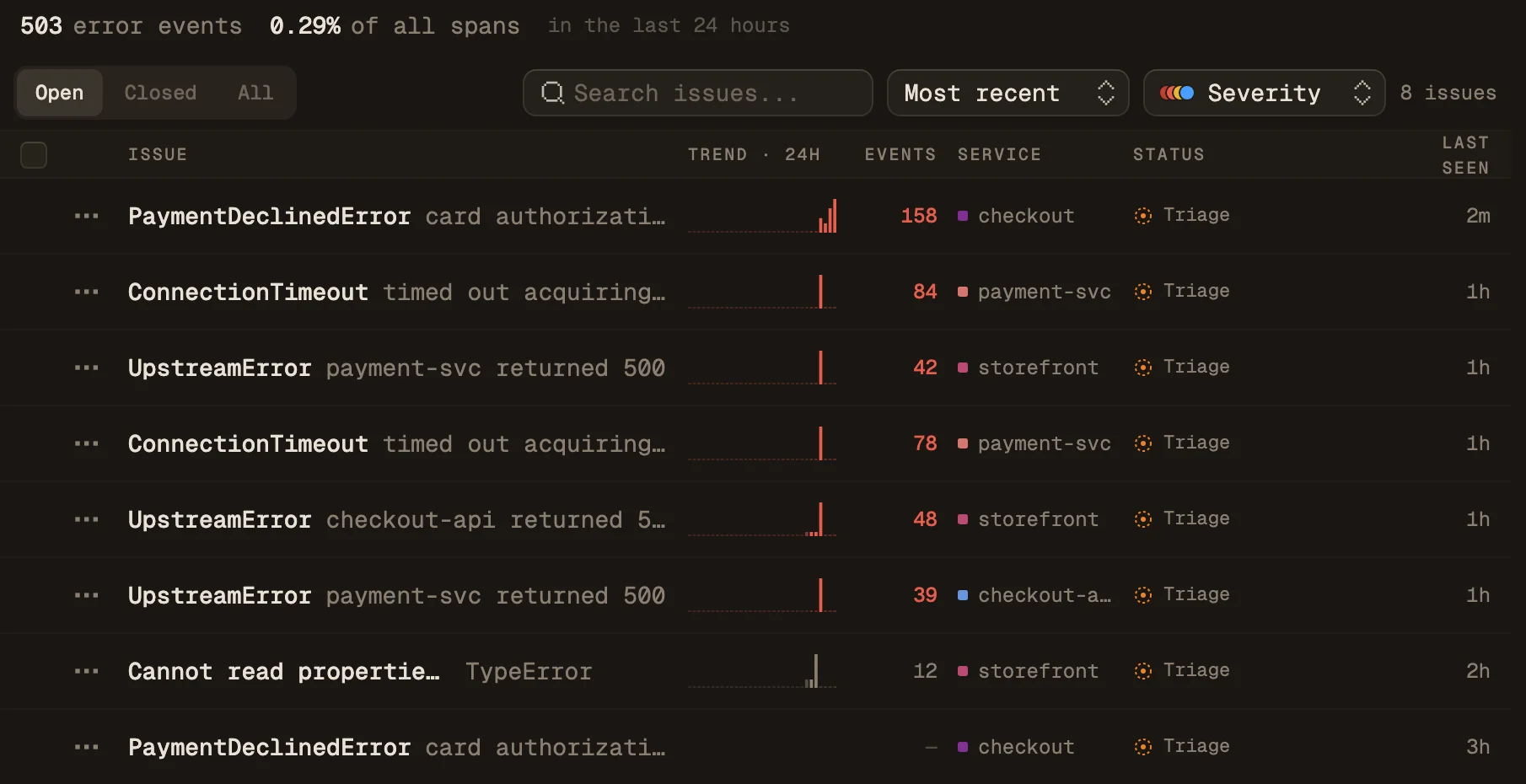
Errors come from your traces
Maple fingerprints every error span by service, exception type, top stack frames and message, and groups the occurrences into an issue with a triage workflow. A fixed issue that fires again from a newer build is marked Regressed.
- 02
Errors and replays link to traces
Each issue's Occurrences tab lists its latest error events with the trace each one came from. In the browser, the
@maple-dev/browserSDK tags every span and replay event with the samesession.id, so a replay's Traces tab lists the backend traces from that session, and a trace links back with View Session Replay.replay.sampleRatesets the share of sessions recorded.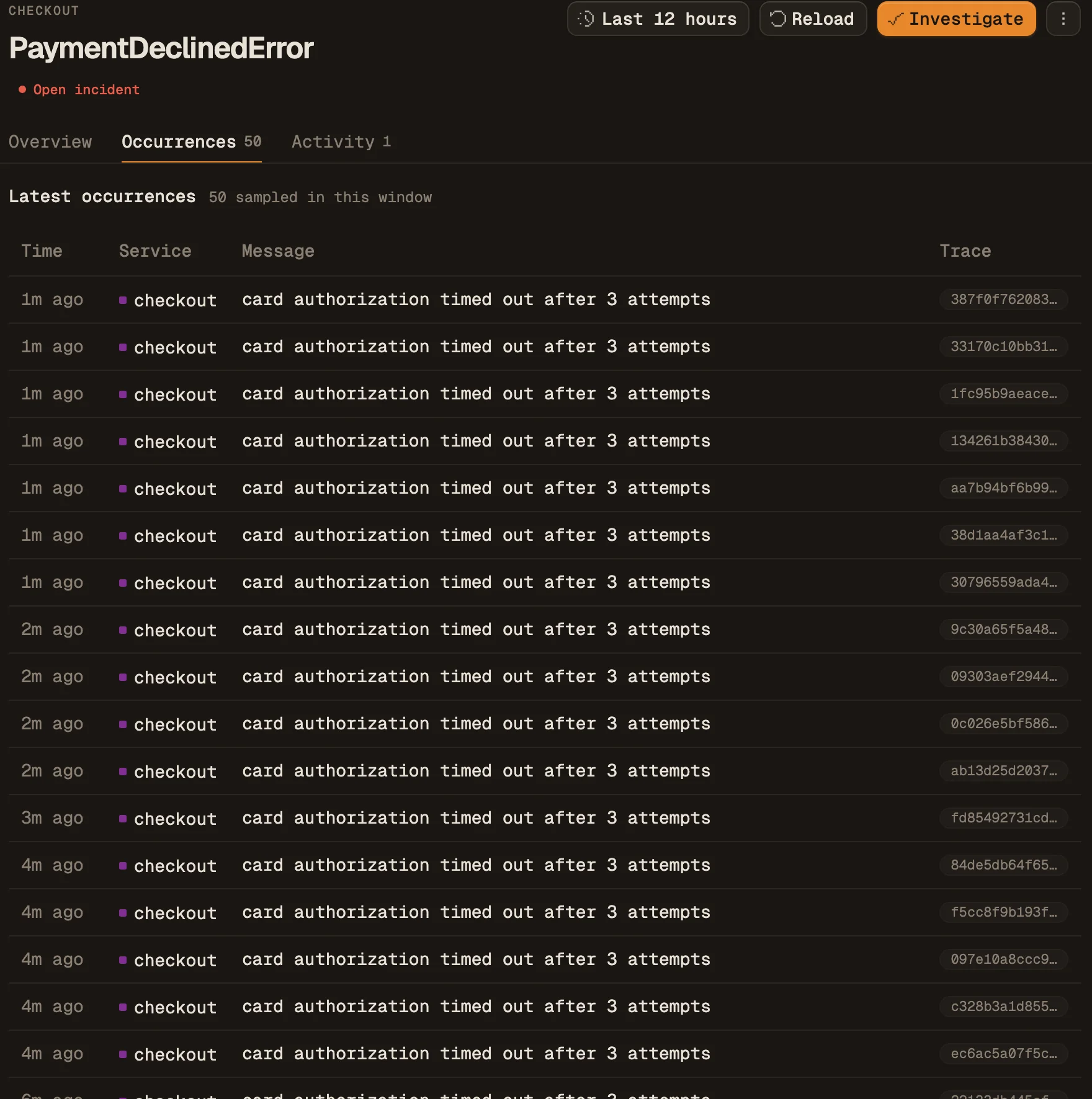
Maple
Errors, traces and replays on one bill
How errors are grouped, and how to set up the browser SDK with replay.
Sources and further reading
- Sentry: Pricing (verified 2026-10-20)
- Sentry docs: Pricing and billing
- Sentry help: Do I qualify for a sponsored account? (verified 2026-10-31)
- Sentry for Startups (verified 2026-10-31)
- Sentry docs: Quota management
- Sentry docs: Spike protection
- Sentry docs: Session replay for JavaScript
- Sentry developer docs: Self-hosted Sentry
- Maple docs: Errors and issues
- Maple docs: Replays